Build a WooCommerce store
Build a WooCommerce store with AI. Describe the catalogue once.
One brief names your products, their options, pricing logic and imagery. The agent then works through 65 typed WooCommerce abilities in dependency order: taxonomy first, attributes and terms next, parent products, then every valid variation, and reads the storefront back so you can see what a customer will actually get.
Free: Elementor and blocks; Pro: advanced and additional modules, Draft content; review shared changes separately, All build briefs
PROJECT TYPE: STORE CATALOGUE
STORE: [STORE NAME] selling [PRODUCT FAMILY] to [CUSTOMER TYPE].
SOURCE DATA: [SPREADSHEET / SUPPLIER SHEET / EXISTING SITE]: treat it as the only source of truth for names, SKUs, prices and stock.
TAXONOMY: Build the category tree first: [TOP-LEVEL CATEGORIES] with [SUBCATEGORIES]. Add tags only where they describe a real filter shoppers use.
ATTRIBUTES: Global attributes for [SIZE / COLOUR / MATERIAL / FORMAT] with the exact term lists supplied. Do not create per-product attributes where a global one belongs.
PRODUCTS: [N] simple products and [N] variable products. Each needs description, short description, price, SKU, stock behaviour, category, image and gallery.
VARIATIONS: Generate only combinations that genuinely exist. Missing price, SKU or stock for a variation is a stop, not a guess.
SHIPPING CLASSES: [CLASS NAMES] applied to [WHICH PRODUCTS].
STATUS: Create draftable products as draft or private. Shared taxonomy, attributes and shipping classes can affect existing products immediately; preview those changes and obtain separate approval before applying them.
VERIFY: After the run, read the saved products back, list anything that failed, and check the storefront for the three products I name.
CONFIRM: Prices, stock counts, weights, dimensions, certifications, delivery times and product claims are [CONFIRM] unless present in the source data.
Paste this into a connected client after filling the bracketed fields. Mark unverified facts [CONFIRM] and instruct the agent to stop and ask. Review its proposal and returned results; a prompt marker does not enforce model behavior or replace the site's permission gates.
 View full size ↗
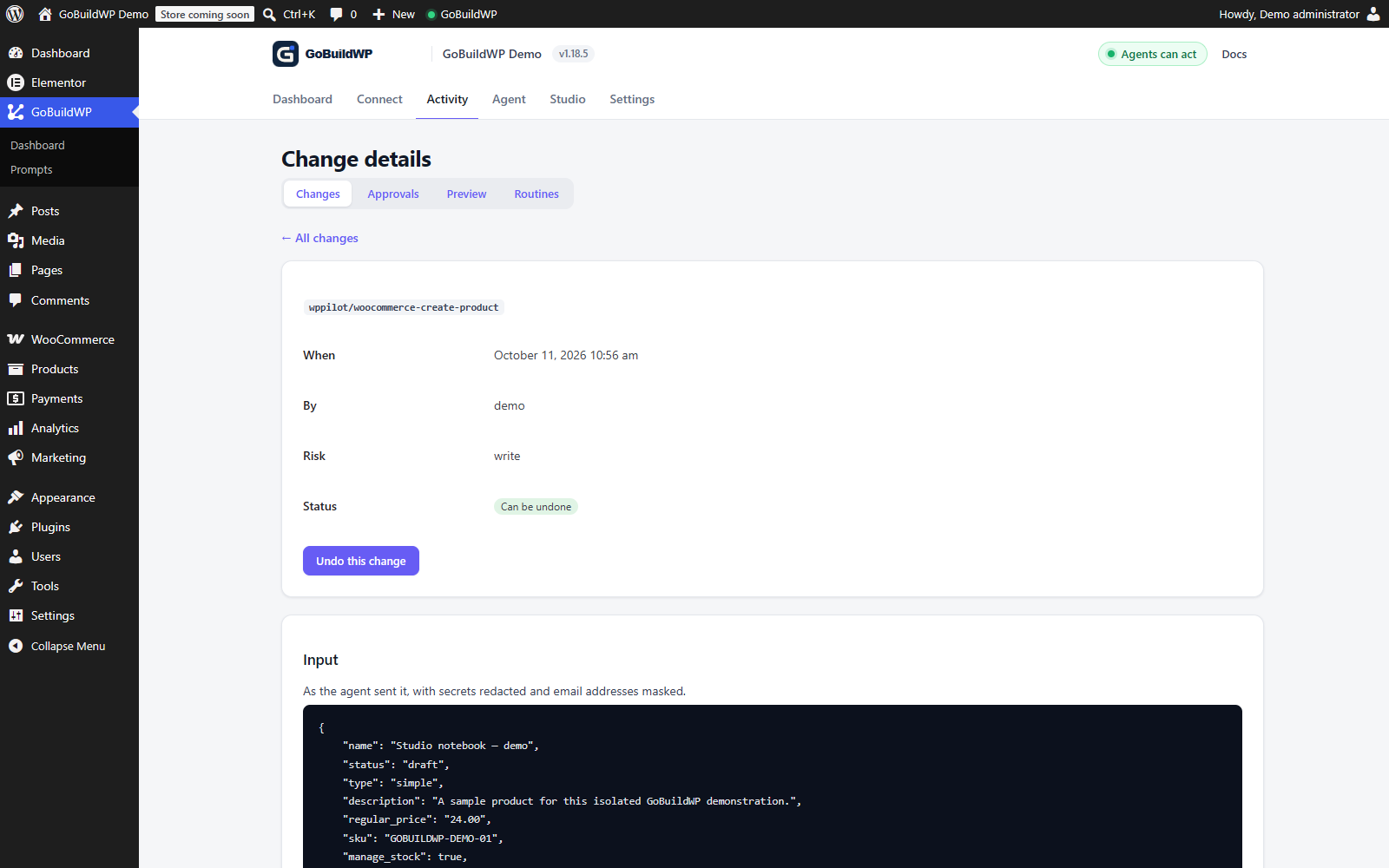
A real GoBuildWP ability created this WooCommerce draft product. The saved price of $24 and stock quantity of 12 were verified. WooCommerce 11.2.1; local test data and a test Pro entitlement. No checkout or payment was performed.
Actual product capture · local demoView the saved WooCommerce product ↗What happens next
One brief, many typed calls
Nothing here is a black box. Each step is a separate ability call, checked against the connected user's WordPress capabilities, the safety profile and the confirmation rules before it runs.
Start on staging. A draft page does not isolate shared menus, templates, styles, taxonomy, access or delivery settings: inspect affected routes and approve those changes separately. These briefs describe planned calls, not completed runtime tests; verify saved data, the native editor and rendered output before launch.
Abilities this run calls
woocommerce-check-setupwoocommerce-create-product-categorywoocommerce-create-product-attributewoocommerce-create-product-attribute-termwoocommerce-create-productwoocommerce-create-product-variationwoocommerce-create-product-tagwoocommerce-create-product-shipping-classwoocommerce-edit-productwoocommerce-list-productswoocommerce-get-store-settingswoocommerce-create-couponwoocommerce-sales-summaryimport-media-urlset-featured-image
Registered names from the shipped plugins. Schemas and descriptions are in the ability reference.
Reads the store before it writes
The run opens with woocommerce-check-setup, which reports the WooCommerce version, whether HPOS is enabled, the block checkout state, currency, default country and the detected extensions. That answer shapes everything after it.
Builds the taxonomy in dependency order
Inspect existing category, tag and shipping-class IDs first. Propose missing taxonomy before product creation and assign reviewed IDs; products can exist without categories, so this order is a workflow choice rather than an orphan-prevention guarantee.
Creates global attributes and their terms
Size, colour, material: created once as global pa_ attributes with their full term lists, so variations can reference them and shoppers get working filters instead of thirty per-product duplicates.
Creates parent products, then valid variations only
Each variable product is created first, then every variation is added with an explicit mapping for each variation-enabled attribute. The brief tells the agent to stop on a combination with no price or SKU in the source rather than guess one; the server does not enforce that, so check the returned variations against the sheet.
Imports and attaches media
Images come in through import-media-url, get attached, and are set as featured or gallery images. Ask for alt text written from the product data and check it, rather than assuming none was left blank.
Reads the result back
The agent re-reads the saved products, compares them against the source rows, and reports the diff: what was created, what was skipped, and which fields it refused to guess.
Scope
What it drives, and where it stops
GoBuildWP Pro ships 89 integrations. Pro modules require an active GoBuildWP Pro licence and the supported plugins installed on your site. Check feature-specific version and edition gates in the linked references; Free Elementor and block-editor basics have separate coverage.
Plugins this brief can drive
- Commerce
- WooCommerce (65 abilities, HPOS-aware)
- Storefront pages
- Elementor, Bricks, Divi 5, Oxygen 6, Breakdance, Beaver Builder, WPBakery, Etch, Mosaic, WoodMart
- Product data
- ACF, ACPT, Meta Box, Pods, JetEngine
- Search visibility
- Yoast SEO, Rank Math, AIOSEO, SEOPress
Where it stops and asks you
- This catalogue brief excludes payment, tax and shipping configuration. Pro also exposes gateway-settings, shipping-zone and tax-rate writers; use a separate reviewed task for those operations. Reading configuration does not prove that checkout, tax calculation or delivery works.
- Product types are simple and variable. Grouped and external products are not part of the current module.
- Writes are capped at 120 per minute per credential. A catalogue workflow is a sequence of calls, not an automatic resumable transaction: retain source rows and returned IDs, handle duplicate SKUs and partial failures, re-read state and review a fresh diff before retrying.
- Refunds and review deletion are marked destructive. Order-status writes use an operation-specific confirmation check for transitions other than pending. Inspect the installed policy for each call; an ordinary-write annotation is not proof that no confirmation is required. The AI client sets that flag; a person approves only when "A person approves" or the Pro approval queue is turned on.
- A successful ability call is not a completed transaction. Payment, tax, email and fulfilment behaviour still has to be tested against sandbox providers.
Catalogue work, done carefully
Get the source sheet right before you build a WooCommerce store with AI
Almost every catalogue problem an agent runs into was already in the spreadsheet. The brief tells it to stop rather than fill a missing SKU or price, so gaps should surface as a list of skipped products instead of a store. That is an instruction to a model, not a check the server runs, so compare saved values with the sheet anyway. Tidy the sheet first and the run becomes mostly typing.
- One row per sellable thing: a simple product, or one variation of a variable product with a column naming its parent.
- A unique SKU on every row. WooCommerce refuses a duplicate SKU, so two rows sharing one means the second fails rather than overwriting the first.
- Prices as plain numbers in one currency, with sale prices and their dates in their own columns.
- Attribute values spelt exactly as you want shoppers to filter on them, so Navy and navy do not become two terms.
- Image file URLs or a folder you will upload, with the photographer or supplier noted where reuse terms matter.
- Stock quantities only if you manage stock in WooCommerce; otherwise a stock status column is enough.
Run a pilot batch, then the rest
Do not send the whole catalogue first. Pick a handful of rows that cover the awkward cases: one simple product, one variable product with every attribute, one with a sale price and one with no image. The agent creates them as drafts, then reads them back with woocommerce-get-product and woocommerce-list-product-variations so you can compare the saved data with the sheet before it multiplies a mistake across hundreds of items.
Open those drafts in the WooCommerce product editor and on the storefront preview. Check that variation dropdowns offer only real combinations, that the category tree reads as a shopper would browse it, and that the gallery order is right. Fix the brief, not the products, then run the remainder. Because each product is its own set of calls, a batch that stops partway can be picked up again from the returned IDs, after a fresh read, rather than started from scratch.
Honest timings for a catalogue
A store is not built in one sitting because the work scales with rows, not with prompts. A variable product with many sizes and colours is a parent call plus one call per variation, each counting against the write limit, and images add their own imports. Small catalogues fit in an afternoon of runs and review; large ones are a series of batches across days, with you sampling each batch before the next.
Budget most of your own time for the parts the agent cannot judge: whether a product description is accurate, whether the photography matches the variant, and whether shipping classes match what your carrier actually charges. Checkout, tax and payment testing with sandbox providers is a separate stage again and belongs on the plan before launch day.
What Free can do in a store, and what needs Pro
GoBuildWP Free already reads a store and edits products that exist: woocommerce-check-setup, woocommerce-list-products, woocommerce-get-product, the order and customer readers and a basic copy of woocommerce-edit-product are all in the free edition. Free's editor changes a product's name, description, regular and sale price and stock; on a variable product only the name and description, because prices live on the variations. That is enough to correct copy or fix a price on a store someone set up by hand. Status, SKU, categories and images need Pro's fuller copy of the same ability.
Building the catalogue is Pro: creating products and variations, categories, global attributes and their terms, tags and shipping classes. So is ongoing maintenance at scale. woocommerce-bulk-update-prices and woocommerce-bulk-update-stock change up to a hundred items per call, preview every before and after with a dry run that writes nothing, and refuse the real write unless the call carries confirm: true.
Undoing a bad import
Inspect each product entry before relying on recovery. Current Pro product and variation edits that omit manage_stock, stock_quantity and stock_status can retain a before-image that preserves live stock during undo. An edit that supplies those stock fields on a stock-managed product, and the separate bulk writers on managed-stock items, have different limits; retain their original values for manual recovery. Bulk calls return per-item entries rather than one universally reversible batch. Global attribute definitions live in WooCommerce's own table and have no ledger restoration.
For a pilot that went wrong in a way you only noticed afterwards, list-sessions finds the session. Read undo-session's plan first: it reverses supported writes newest first, refuses the run where anyone has edited a product since, and lists irreversible items, which block the run unless you explicitly allow a partial undo.
Deletion is deliberately harder. woocommerce-delete-product and the other delete abilities are destructive: the call must carry a confirmation flag, and Read Only refuses them outright. By default the AI client sets that flag itself; to make a person approve each delete, turn on the "A person approves" setting or the Pro approval queue. Because drafts never reach the storefront, the safer clean-up after a failed pilot is usually to undo the session or leave the drafts for you to move to the Trash in wp-admin.
Questions
Build a WooCommerce store: questions
Can it really build a whole catalogue from one prompt?
Yes. One prompt from you becomes hundreds of typed ability calls from the agent. You write the brief once; the agent creates the categories, attributes, terms, products, variations and media one governed call at a time, and reports what it could not resolve.
Will it set up payments and shipping too?
This brief creates a catalogue in an already configured store. Pro has separate gateway-settings, shipping-zone and tax-rate writers, but configuring those is outside this brief. Review their contracts, authority and side effects separately and test checkout with sandbox providers before launch.
What happens to products it cannot complete?
The brief instructs the agent to stop and report missing prices, SKUs and unsupported claims. That instruction is not a model guarantee. Review proposed values against source rows, inspect failed/partial results and verify every saved product and variation before publication.
Does it work with HPOS?
Order reads go through wc_get_orders(), which is HPOS-agnostic, and the setup check reports whether HPOS is enabled on your install before anything runs. Test the exact combination of WooCommerce version and extensions on staging first.
Can it work on a live store?
Start on staging with a dedicated credential and review the saved and rendered result. Before production, take a fresh inventory of IDs, existing content, global tokens and settings, then approve a new diff. Do not replay staging calls unchanged. A draft does not isolate edits to shared taxonomy, global styles or store settings, and Production Safe does not guarantee a harmless write.
Send the brief. Review the woocommerce store.
Install GoBuildWP Free for the connection and supported Elementor/block basics. Add eligible Pro when the selected task needs advanced or additional builder, commerce or plugin operations; inspect each module's dependencies.