For agencies and freelancers
An AI WordPress workflow for agencies, with a paper trail for every client.
The part of a project you can compress is the middle: design system, templates, page structures, content model, forms. GoBuildWP Pro drives 89 integrations across the builders your clients already run, with a credential per client and an approval gate you control.
Approval queue and email notifications in Pro, Every site in one Cloud account, Build briefs
Representative session. Ability names and approval behaviour match GoBuildWP Pro 1.12.4; the client and its site are examples.
 View full size ↗
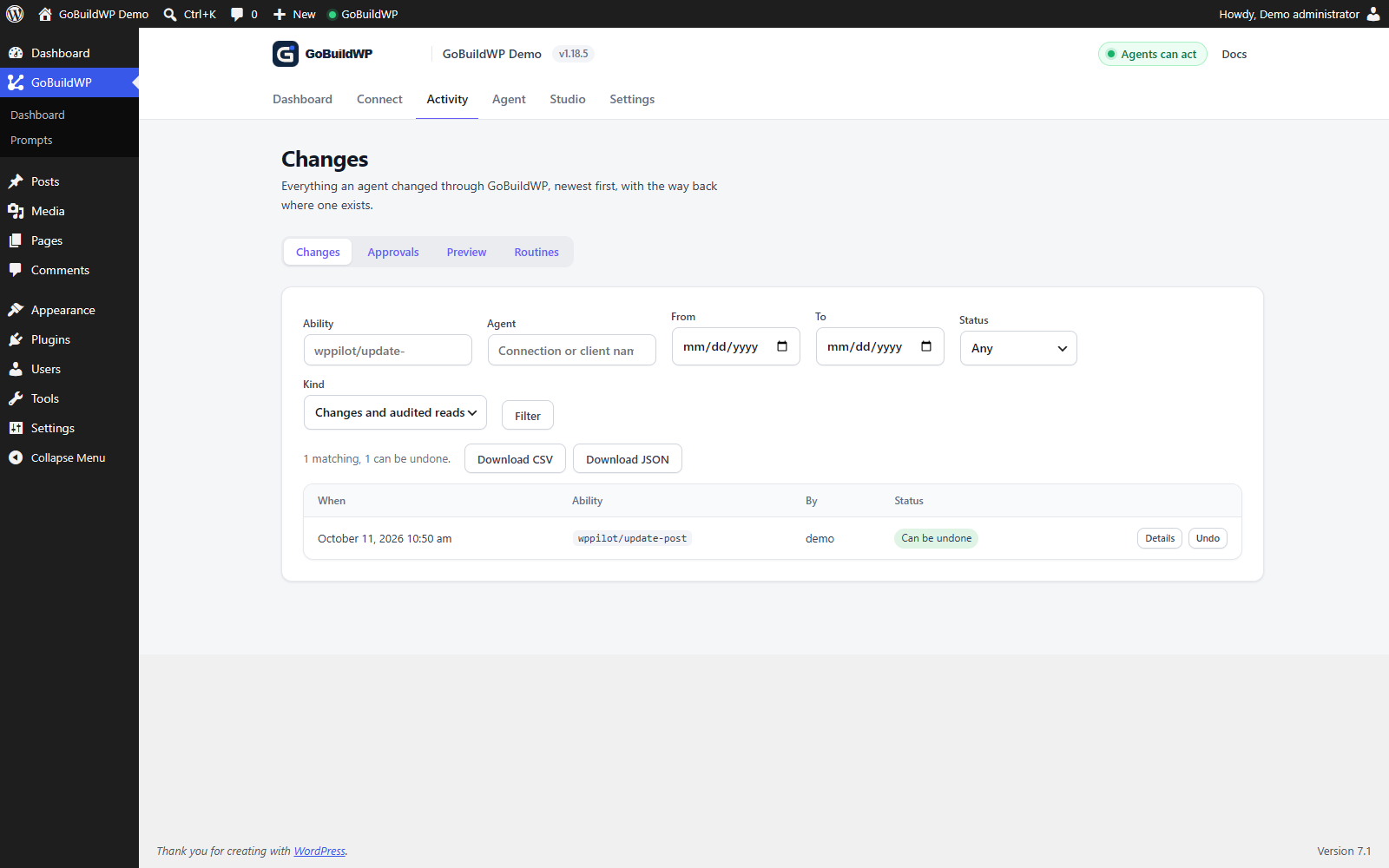
This local draft-page edit was made through a real GoBuildWP ability. The recording opens its details and uses Undo; the original saved content was then verified.
Actual product capture · local demoWatch: Review and undo a draft-page edit
Open the recorded WordPress draft update, inspect its input and result, return to Changes, and choose Undo. The original page content was separately verified after the recording. Silent, unedited browser recording; playback starts only when you choose Play.
Many client sites
Run the portfolio from one connection
GoBuildWP Cloud is an optional hosted account for exactly this: one MCP link for every client site, free for 3 sites and included with Pro.
- Cloud
Every client site behind one link
Connect each client site to your GoBuildWP Cloud account from its own wp-admin, then add one link to ChatGPT, Claude or Cursor. Choose which sites each AI app may reach, and make a connection read-only for juniors.
- Cloud with Pro
One job across many sites
Bulk actions run the same tool on many sites at once, with a dry run first. Cloud sites with Pro: 3 on Single Site, 10 on the 10 Sites plan, 100 on the 100 Sites plan and unlimited on Unlimited Sites. Pro also brings priority support.
- On each site
Each client's rules stay theirs
Every call still lands on the client's site, under its safety profile, confirmations and change ledger. Cloud cannot exceed the access that site granted, and either side can disconnect.
How GoBuildWP Cloud works, what it stores, and how to connect client sites to it.
Where the hours go
Compress the middle. Leave the ends alone.
Measure a scoped pilot with saved-state, responsive, delivery and recovery checks before changing project estimates.
- Unchanged
Discovery and art direction
Your judgement, your client relationship, your positioning work. An agent has no opinion worth billing for here.
- Workflow to test
The build phase
Design tokens, page structure and content can be scoped to native operations. Shared templates and form delivery need separate review. Measure a versioned pilot before estimating client-project savings.
- Unchanged
Review and launch
Responsive checks, content accuracy, performance, accessibility and the client walkthrough. Faster input does not mean skipping the output check.
Portfolio hygiene
Six rules for client work
Speed on one site is a demo. Speed across thirty sites without an incident is a business, and the difference is almost entirely in how you set it up.
One user per client site
An administrator account kept for the agent alone, narrowed by token scope and profile ceiling, never a shared admin login across the portfolio.
Staging first, then a fresh plan
Review the brief's output in the native editor. Before production, re-read the target: IDs and content can differ.
Approval queue where more than one person drives
Check which operations are held for review before relying on the queue.
Production Safe by default
Switch to Developer Full Access only for a task that genuinely needs WP-CLI or PHP, then switch back.
The change record is a deliverable
"What changed last Tuesday?" is a reasonable client question with an exact answer.
Version your briefs
The brief is the reusable asset, the way a starter theme used to be. Swap industry, pages and art direction; keep the structure.
Answering the client
Three questions you will get asked
Have the answers ready before the first invoice, not after the first incident.
- Where does our content go?
- The chosen AI client and provider receive prompts and returned site content. GoBuildWP runs on each client site, and calls reach it directly unless you route them through GoBuildWP Cloud, whose gateway passes calls on and logs them (bulk-run results are kept 30 days). Review provider retention, customer-data scope and any separately enabled reporting, and name the provider, and Cloud if you use it, in your client agreement.
- What changed on our site?
- The change ledger answers it per write, with the acting credential and the ability that ran. This is the question that makes shared admin accounts indefensible.
- Can it do something we did not approve?
- Under Production Safe, code execution, filesystem and database access and plugin installation are not available. Pro's approval policy gives each client credential its own mode, so one agent can have every write held while a trusted one waits only on destructive writes and code execution; reads still run.
Single jobs you can hand to a junior with a reviewed prompt: Elementor edits, SEO fixes and a read-only security audit.
Running client work on GoBuildWP
Which client sites need Pro, and which plan covers them
Not every site in a portfolio needs a licence. GoBuildWP Free on a client site already gives an agent core WordPress content, the free Elementor abilities, store reads, design checks, scheduled audit routines and the change ledger. Pro is worth placing on the sites where the work touches a page builder other than Elementor's free set, forms, SEO suites, the full WooCommerce module, approvals or safe updates.
Two numbers are easy to confuse. A Pro plan licenses the Pro plugin on a number of sites (one on Single Site, ten on 10 Sites, a hundred on 100 Sites, no limit on Unlimited Sites), and separately raises how many sites one Cloud account can hold. Single Site is the odd one: it licenses one site but keeps Cloud's three, and adds bulk actions. Count the sites that need Pro features, not every site you look after, and see pricing for the current plans. Decide before launch whose account holds each licence, because that is part of the handover conversation when a client moves on.
Care plans between projects
The build is one invoice; the retainer is the rest of the relationship. Scheduled routines are the part of GoBuildWP that works when nobody is connected. routines-save sets up to five read-only audits, such as accessibility on up to ten pages or a background content audit, to run daily or weekly; the site runs them by itself, emails a summary to chosen administrators and keeps the last twenty reports for routines-report to read back. That is a monthly care-plan report with no agent session at all.
Updates are the other half. On Pro, updates-available lists what is waiting, and safe-update updates one plugin or theme at a time, by default refusing to start without a backup newer than a set age from UpdraftPlus, Duplicator, BackWPup or All-in-One WP Migration, and putting the previous files back when its after-checks on the fetched pages, REST and admin-ajax fail. That rollback restores the plugin or theme files, not database changes the new version made, and it can itself fail, which safe-update reports as rollback_failed so you know to step in. safe-update-history keeps the last fifty runs, with rollback copies held for seven days. WordPress core updates are outside it.
Turning the change ledger into a client report
wppilot/export-changes returns the ledger as flat rows: when, which ability, which user and agent, the batch it belonged to, whether it can still be undone and why not, and the redacted input. It filters by date range, agent, user and status, and returns up to 500 rows per call, so a month of work on one site is usually a single request. Before-images are never included, which keeps a client report from carrying old content you did not mean to send.
A useful prompt: "Export last month's changes on this site, group them by page, mark anything that can no longer be undone, and write a one-page summary for the client in plain English." Check the summary against the rows before it goes out; the export is the record, the summary is the model's reading of it.
Onboarding and offboarding a client site
- Create a dedicated WordPress user for the agency's agent on that site. GoBuildWP only connects an account with manage_options (super admin on multisite), so the limits come from the connection, not the role: a token scoped to the abilities the work needs, capped at a safety profile.
- Connect the client through OAuth, or a scoped access token capped at a safety profile, rather than an Application Password shared across staff.
- Ask the agent to call agent-context first on every session; it returns the site's guidance, environment and skill summaries, so house rules such as drafts only travel with the site, not with one person's prompt.
- Run connection-doctor if the client's host or firewall blocks the connection; it tests the site's own MCP endpoints and names the CDN or WAF that answered instead of WordPress.
- At handover or when the contract ends: export the change ledger for the client's records, revoke the agency's tokens and OAuth clients, disconnect the site from your Cloud account, and remove or downgrade the agency's WordPress user.
Questions
Running this across a portfolio
How much time does this actually save?
There is no measured time-saving promise on this page. Time one repeatable staging task from brief to reviewed result, including corrections, and compare it with your normal process before using it in a client estimate.
Can a junior run this safely on a client site?
Use a scoped WordPress identity and configure the approval queue for the operations that need senior review. Test the policy with that identity on staging; enabling a profile alone is not proof that every write enters a queue.
How do we handle credentials across many clients?
One dedicated WordPress user per client site. It has to be an administrator (GoBuildWP connections need manage_options, or super admin on multisite), so narrow it with a scoped access token, a safety-profile ceiling and the approval queue rather than a lower role. Never a shared admin account across a portfolio: the change ledger is only useful if it can name who acted.
Do we have to tell clients we used AI?
Agree on the workflow and data handling with the client before connecting their site. Keep a handover record that explains the AI-assisted work, the changes made and the checks completed.
What about white-labelling?
GoBuildWP does not document a white-label option. The plugin runs on the client's own WordPress install, and on a direct connection there is no external GoBuildWP service in the middle. If you run the portfolio through GoBuildWP Cloud, calls pass through its gateway, which keeps a 90-day log of tool, site, outcome and time and stores no page content outside 30-day bulk-run results. Say which route you use in the procurement conversation; it is usually the harder question.
One brief per project. Not one afternoon per section.
Start on a single client site with the approval queue enabled, then roll the brief you refined across the rest of the portfolio.