GoBuildWP Design
An AI design system for WordPress. Saved on your site, available for supported checks.
AI-built pages look alike because nothing tells the model what your site is. GoBuildWP Design stores one direction in WordPress, and the agent checks its page against it before calling it done.
In GoBuildWP Free, 26 abilities, Design gate off by default; selected palette, font and rule checks require review.
Representative session. Ability names match GoBuildWP 1.18.6; the page, rules and results are examples.
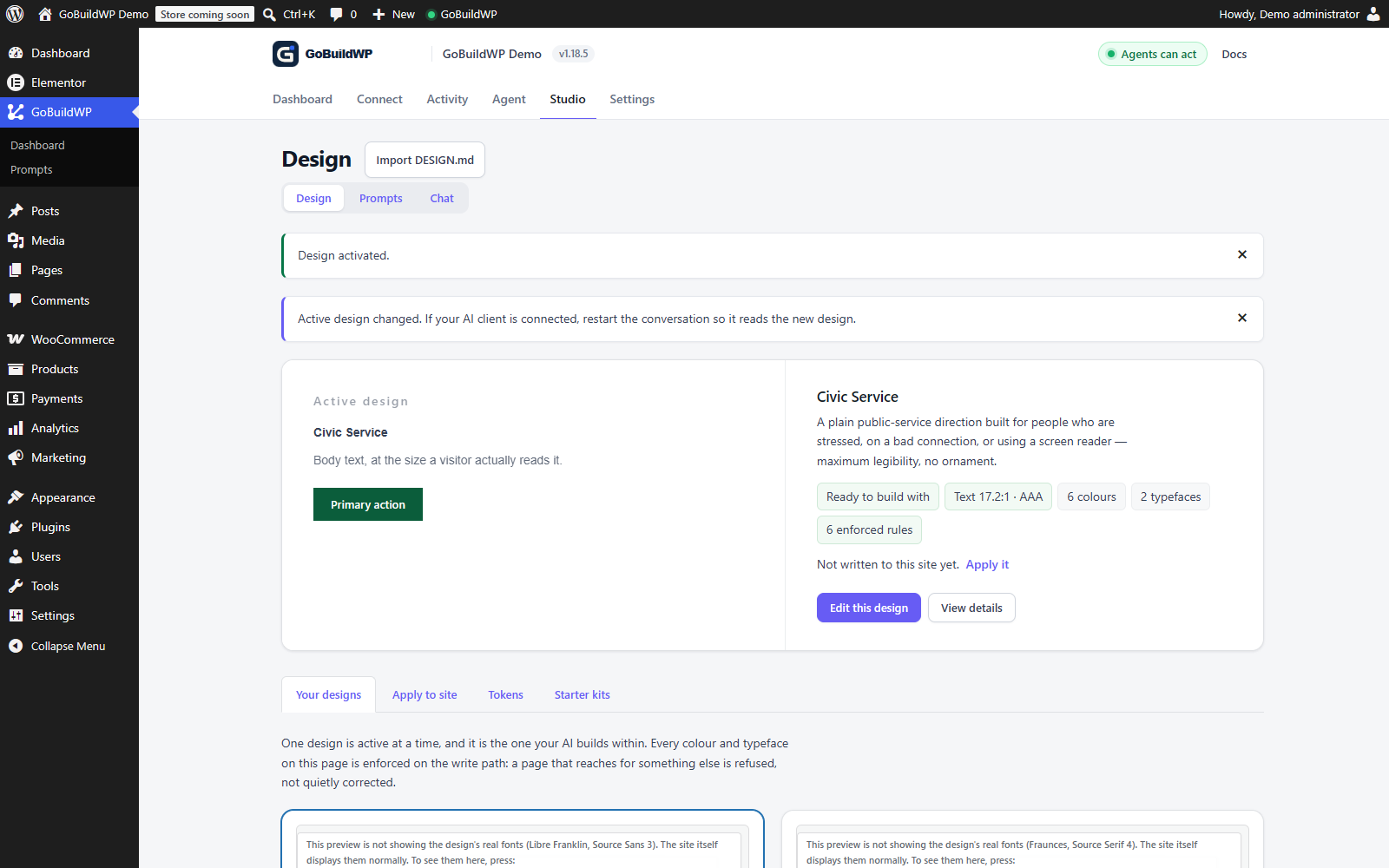 View full size ↗
A starter was copied into the site's design library and saved, then activated in this local demo. The recording shows the copy-and-save steps; it does not generate or publish a website.
Actual product capture · local demoWatch: Save a design starter
Open Starter kits, choose Start from this, inspect the editable DESIGN.md, save it, and return to the design library to verify the saved entry. Silent, unedited browser recording; playback starts only when you choose Play.
Optional checks and their scope
The server-side design gate is off by default. Warn and Refuse modes cover selected palette, font and declared rule checks. Deterministic token checks are separate from judgement about composition or voice; receiving a direction does not prove the agent followed it. The sequence above is illustrative, not a recorded before/after quality test.
What a direction contains
A design system the agent reads first
Without one, each session picks its own fonts, colours and layout, and the second page rarely matches the first. The direction is plain Markdown stored in WordPress, and the structured contract the abilities return is generated from it.
| Part | What it settles |
|---|---|
| Type | Display and text families, their weights, and the scale between heading levels. |
| Colour | The palette as named tokens, which one is the accent, and how much of it is too much. |
| Spacing | The rhythm sections sit on, so vertical space is a decision rather than a builder default. |
| Voice | How copy reads, stated once instead of renegotiated in every prompt. |
| Rules | The things the site never does. One accent colour. Real numbers only. No stock photography. |
The pre-flight check
Set it once. Check every page against it.
A rule in a system prompt is a request the model may drop later. A rule the site checks comes back as a failure to fix before shipping.
Set the direction
Describe the site in conversation. The agent adopts what the theme already has or drafts one, and you edit what it got wrong.
Build one real page
The agent reads the active design before it writes anything. Judge the direction on that page while changing it is still cheap.
Check before it ships
The pre-flight check returns pass or fail per rule. The agent fixes every fail, then looks at the rendered page.
Flagged when the agent runs the pre-flight check
- Em dashes sprayed through body copy
- The default AI purple nobody chose
- Inter, on a site whose brand font is not Inter
- Stock marketing filler phrases from a fixed word list
- Fonts and colours that are not in the palette
With an active design it also flags fonts and colours outside your palette, type off your scale, and those of your written “Don't” rules that map to something it can find in the output. Layout and composition rules are reported as not checked. The server-side gate that can refuse a write is off by default.
What ships
26 abilities in the free plugin
Design abilities obey the same controls as everything else: the safety profile decides which an agent can reach, deleting a design needs confirmation, and writes land in the change ledger.
- Free
Write and keep the direction
Adopt the design the site already has, generate one from a brief, or write it yourself. Saved by slug, one active at a time.
- Free
Check the work against it
Pre-flight a candidate page, check palette contrast at WCAG AA, and read what the site actually served.
- Free
See the page it built
A view link for the agent's own browser, or screenshots taken by the site, compared and attached to a ledger entry.
- Pro
Brand Kit: apply it to your builder
Write the palette and type stack into your theme's and builders' own global styles, and import or export DTCG design tokens.
The direction is builder-agnostic. It applies wherever the page is made: Elementor, Bricks, Breakdance, Divi, Oxygen, Beaver Builder, WPBakery, Flatsome, Etch, Mosaic, Gutenberg, GenerateBlocks, Kadence Blocks, Spectra, Spectra One. Depth by builder Read a builder layout before writing to it
Working with a design direction
Starting from the brand the site already has
Most sites are not blank. The theme defines colours, the customiser holds a few more, and a page builder keeps its own global palette. wppilot/adopt-design-from-site reads those sources (theme.json global styles, the customiser's standard colours and whatever an active builder module can report) and returns a draft design document built from them. Starting there avoids the common failure of an AI design system for WordPress: a fresh direction invented beside an existing brand, so new pages match neither.
Before accepting the draft, run check-contrast. It computes WCAG 2.x ratios for every pair in the palette and says which surfaces can carry body text at AA, which tends to expose the brand colour that only works for headings. If there is no brand yet, generate-design resolves a written brief into a full direction derived from the site rather than from the model's habits, and list-typefaces and list-layout-grammars give the agent alternatives to the familiar Inter-and-three-cards answer.
Design tokens from Figma or Tokens Studio
If a designer already keeps tokens, there is no reason to retype them. On GoBuildWP Pro, brand-kit-import-tokens reads a Design Tokens Community Group document, a DTCG token format supported by compatible export workflows; inspect the actual document from Figma, Tokens Studio or Style Dictionary. Group types are inherited, aliases such as a semantic colour pointing at a primitive are resolved to real values, and typography composites are split into family, weight and size. Types it does not map, such as shadows and gradients, come back in a skipped list rather than being approximated. Nothing is saved until the result is passed to save-design, so you can read it first.
The reverse also works: brand-kit-export-tokens writes the active design out as DTCG tokens, with the design's Do and Don't rules carried in an extensions block so a round trip keeps them.
Checking the design reached the served page
A saved and activated design proves nothing about the pages visitors see. verify-rendered-page, in Free, fetches a page as a visitor gets it and reports the heading outline, missing alt text, empty containers, PHP errors and the colours and fonts the HTML actually carries. On Pro, brand-kit-verify-applied answers the sharper question of which design colours and faces appear nowhere in the served page, which is how you catch an accent that is active in WordPress and absent from the site.
For layout, compare-to-spec grades a built page against the spec it was meant to match, but it needs measurements from a real browser, since the source cannot tell it how the cascade resolved. capture-page takes screenshots at chosen widths, and compare-captures scores the difference between two of them from 0 to 1 and names the regions that moved. Captures are taken by a logged-in wp-admin tab, the Visual Runtime page, so somebody has to have that tab open.
Prompts that use the direction
- "Adopt the design this site already has, show me the document, and flag any palette pair that fails AA for body text."
- "Build the Services page in the active design, run check-design on it before saving, and fix every fail."
- "Capture the home page at 390 and 1280 pixels, change the hero to the asymmetric split layout, capture again and tell me what moved."
- "Preview what brand-kit-apply would write into Elementor and the block theme. Do not apply it yet."
What the design layer will not do for you
It does not judge whether a page is good. check-design and the optional gate test palette, type stack and your written Don't rules; check-composition validates a section's structure; none of them knows whether the hierarchy is clear or the copy persuades. The gate, when switched on, checks writes only, so a page built before you enabled it is not re-checked until someone runs check-design or verify-rendered-page on it. A person still has to look at the page.
FAQ
Before you give it a direction
Is this a page builder or a theme?
Neither. GoBuildWP Design is a document stored in your WordPress that describes how the site should look and read, plus the abilities an AI client uses to read and check against it. Pages are still built in whichever builder or theme you already run, which is why the direction survives a builder change and a theme change.
How is this different from putting the brand in a prompt?
A prompt lasts one session. The design document gives every session, client and person the same place to find the direction, and the pre-flight check gives the agent something to be held to. The final page still needs a review against it.
Do I have to write the design document myself?
No. Describe what you want in conversation and let the agent write the document, or adopt the design the theme already has. Then read it back and edit the parts it got wrong. The document is plain Markdown, so a person who is not a designer can read it and argue with it.
What stops the agent from ignoring it?
The pre-flight check. Before finalising a page, the agent runs the candidate output against the active design's tokens and rules plus universal anti-slop checks, and gets a pass or fail per rule. A client must invoke it and act on the findings; the document alone does not guarantee that an external agent follows every rule. For a firmer line, switch on the server-side design gate: Off by default, Warn records a write that uses a colour or font outside the design, and Refuse blocks it and names the token to use. It checks only the palette, the type stack and the design's own Don't rules.
Can I keep more than one design?
Yes. Designs are saved in a library by slug, one is active at a time, and you can switch between them. Incomplete drafts are kept as drafts rather than activated, and an incomplete write never overwrites the design currently in use.
Is it in the free plugin?
Yes. The design module ships in GoBuildWP Free with 26 abilities and needs no licence. Pro adds Brand Kit, 8 abilities that write the design into your theme's and builders' global styles and import or export DTCG tokens, plus builder modules that express the direction in each builder's own classes and templates.
Will the result be as good as a designer?
No. Use the saved direction and supported checks to review consistency across pages, then inspect composition and voice yourself. The final page also depends on the model and client you connect.
Give your AI a direction.
Install GoBuildWP Free, describe the site you actually want once, and let every page after that be built and checked against the same contract.