GoBuildWP

GoBuildWP Free: $0, GPL, no account

Connect AI to WordPress. Start with a useful first task.

Use GoBuildWP Chat inside WordPress, or connect ChatGPT, Claude, Cursor and 24 more clients through MCP. Choose your setup below, then verify a useful read before authorising changes to your site.

Version 1.18.6, WordPress 6.9+, PHP 8.0+, Release notes on GitHub

What you need

  • A self-hosted WordPress 6.9+ site on PHP 8.0+
  • Permission to install a plugin, ideally on staging first
  • An external AI client, or a configured provider for Chat in wp-admin
  • Public HTTPS if that client is hosted in the cloud
  • A dedicated WordPress user when connecting an external client

Choose your Free edition

Free tool counts and downloads on this website refer to GitHub Free. It includes developer code, filesystem and WP-CLI tools, signed upload and admin-access links, and the sandbox. WordPress.org Free omits those twelve tools and their sandbox. WordPress.org availability is pending directory approval.

Install one Free edition. Pro is a separate plugin requiring compatible Free and a valid Pro licence. Pro supplies any of those tools missing from Free, while existing Free tools stay registered once. Site permissions, safety profiles and confirmation still apply. Without Pro eligibility, Pro-owned tools are unavailable; tools supplied by GitHub Free remain available under site policy.

Choose your starting point

Work in WordPress, or connect your own AI.

Both routes use the abilities available on your site. Free and Pro control the tools; your AI provider or client is supplied separately.

Inside wp-admin

Use GoBuildWP Chat

On WordPress 7 or newer, configure an AI provider through WordPress Connectors. GoBuildWP Chat also needs the WordPress AI Client’s native function calling support. The Chat menu appears when the required APIs are available and Chat is enabled.

Open GoBuildWP Chat, choose a configured provider and model, and accept the provider cost notice. Keep the dashboard open for Gutenberg browser finalization. Provider and API charges are separate.

Read the getting-started guide
Your existing AI client

Connect ChatGPT, Claude, Codex or Cursor

Use the Connect screen to generate the supported setup for your client. A hosted client needs a public HTTPS endpoint. Local desktop and terminal clients can use a reachable local endpoint; supported WP-CLI setups can use stdio.

Connect directly, or choose optional Cloud. Cloud requires an account and has a separate connected-site allowance. It does not replace a Pro licence.

Choose your AI client

After setup, ask: “Read one published page, report its WordPress ID and suggest three content improvements. Do not change anything.” Check the returned page in WordPress before moving on to an edit.

External client setup

Connect your AI client in three steps

Keep the first connection narrow. A read that works tells you the endpoint, the credential, discovery and the user's permissions are all right.

  1. Install GoBuildWP Free

    Download the zip, upload it under Plugins, Add New, Upload Plugin, and activate it. Select Read Only explicitly before connecting; the default is Production Safe.

  2. Connect one client

    Create a dedicated WordPress user, open GoBuildWP's Connect screen, pick your client and copy the entry it generates with your endpoint filled in. Sign in with OAuth where the client supports it.

  3. Prove one read

    Paste the first task. A good answer names the safety profile, the abilities it called and WordPress IDs you can check in wp-admin.

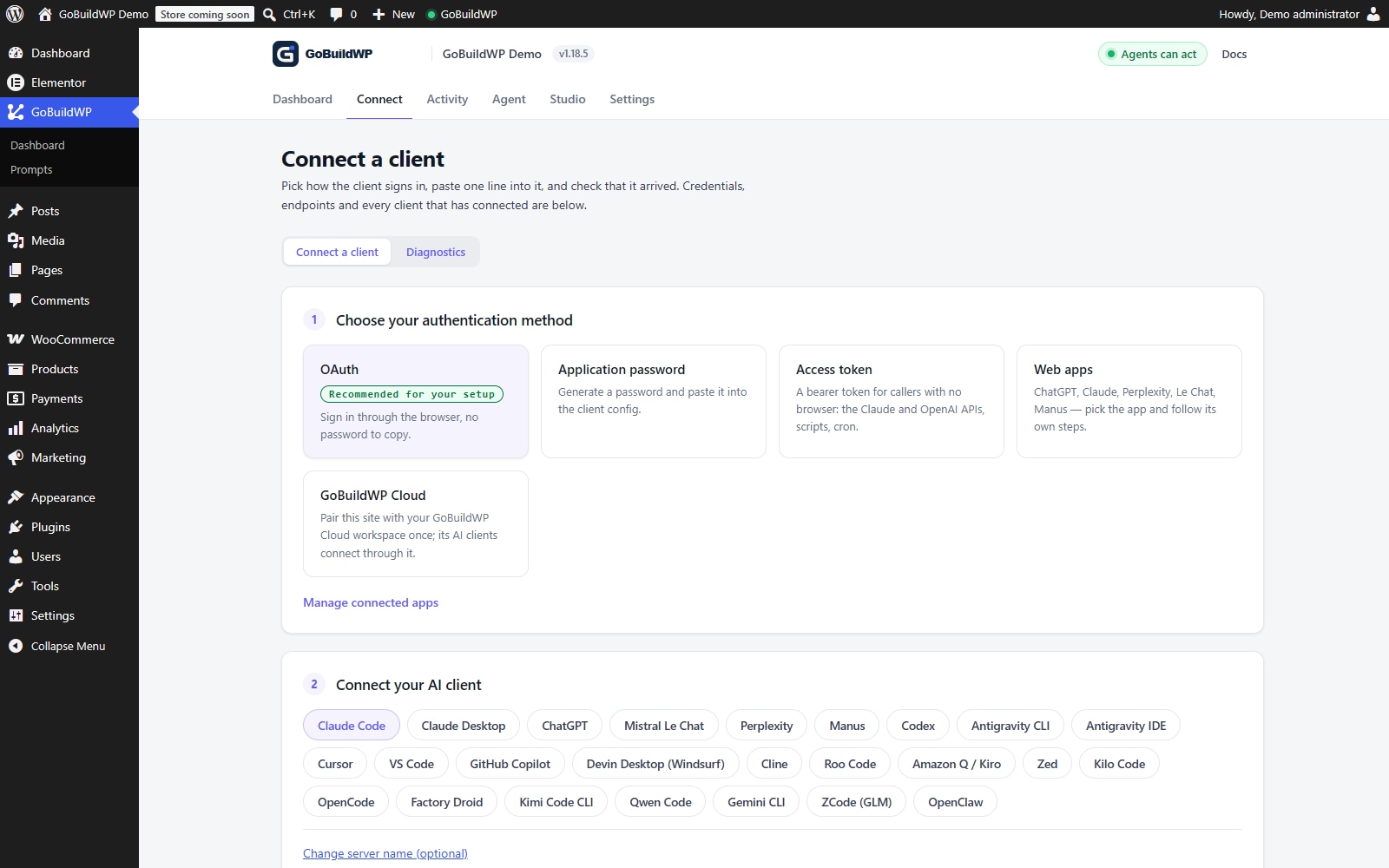
GoBuildWP connection-method screen with OAuth, application password, access token, web apps and GoBuildWP Cloud options
The GoBuildWP connection-method screen, from a test site. It shows setup options; verify your first task separately.
First task, any clientRead only
Use the gobuildwp-your-site-com MCP server in your AI client. Do not change anything.

1. Report the active GoBuildWP safety profile.
2. List the abilities this connection can see.
3. Call wppilot/get-site-settings and report the site URL and locale.
4. Call wppilot/list-content for the five newest pages,
   then wppilot/get-content on one of them.
5. Name every ability you called and each WordPress ID you read.

After the connection check

Choose the first result you want

Once the read succeeds, give your AI a focused job. Keep Read Only for reports; enable the appropriate write permissions when you are ready to review a draft or apply changes.

  • Improve a page

    Free: ask your AI to read one service page, identify unclear sections and propose a better draft using your real business details.

    Website brief
  • Find SEO work worth doing

    Start by reviewing page content and SEO fields. Pro adds bulk metadata changes and connected Site Kit search data.

    Site-wide SEO workflow
  • Build your next course

    Pro with Tutor LMS: supply your outline and source lessons, then ask for a draft course with topics, lessons and quizzes.

    Online-course brief

26 connection guides

Choose your AI client

The Connect screen generates setup for 27 clients; 26 have their own guide here, because a retired client's guide points to its successor. The displayed guide registry includes active and legacy client surfaces. These guides describe declared configurations and verification steps; they are not records of successful live connections.

Web and hosted apps

Hosted clients connect from their provider's servers and need publicly reachable HTTPS. Localhost and private networks are out of reach on this route. Use the authentication method listed for the specific client.

Clients that use the mcp-remote bridge

OAuth runs through the npx mcp-remote bridge, which needs Node.js on the machine. On a public site only a client whose own OAuth flow is unverified is sent this way; on a local or firewalled site the Connect screen gives every OAuth client the bridge, because it runs the sign-in from your machine.

What Free includes

Everything the first connection needs, free

Free is the whole MCP server, not a demo. Pro adds plugin-aware modules and human approvals when your stack needs them.

  • The MCP server

    An endpoint on your own domain, OAuth 2.1 with PKCE and Application Password sign-in, and generated setup for 27 clients. No GoBuildWP service in the path.

  • 232 abilities

    Posts, pages, custom post types, media, taxonomies, menus, comments and users, plus 18 Elementor abilities to read documents and edit elements, and the basics of WooCommerce, SEO, form, backup and security plugins when they are active. A fresh install on the default profile registers 167.

  • The controls

    Three safety profiles, per-ability switches, preview before write, confirmation for critical calls, and a redacted change ledger with rollback for reversible changes.

After the install

Reading the answer to the first task

The first task above is built so that each line of the answer tests a different part of the connection. A profile name proves the client reached GoBuildWP and not some other server. The ability list proves discovery works for this user. The site URL and locale prove the right site answered, which matters more than it sounds when staging and production share a database. The page IDs prove reads go through, and you can open one in wp-admin to check it.

Be suspicious of an answer that describes your site in general terms without ability names or IDs. That usually means the client never called the server and answered from the conversation instead. Ask it to repeat step 2 and quote the ability names exactly; a client with a working connection can, while one without may say it has no such tools or may answer from general knowledge again.

If the connection fails, run the doctor before changing settings

A failed connection is often caused by something between the client and the site rather than by GoBuildWP or the AI client. GoBuildWP's troubleshooting screen in wp-admin runs a set of checks from the site itself and gives a pass, fail or skip for each, with a suggested fix. They cover whether AI Abilities are on and the MCP endpoints registered, whether the endpoint answers with and without credentials, whether the Authorization header reaches PHP, whether OAuth discovery, metadata and client registration work, whether home and site URLs agree on HTTPS, the server clock, the permalink structure, and whether a CDN, firewall, hosting bot filter or security plugin answered instead of WordPress.

Two of the failures it can find, a stripped Authorization header and a host-level bot filter, are fixed in the host or CDN settings, not in the AI client, so changing client settings will not help with either. Once a client is connected, the connection-doctor ability runs similar checks on request, which helps when a working connection later starts failing.

Your second session: one write, then undo it

Once the read works, prove the recovery path before you rely on it. Switch the profile to Production Safe, then ask: "Create a draft page called Connection test with one paragraph. Then list your recent changes, show me the entry for that page, and roll it back." A good session ends with the draft gone and a ledger entry that says it was rolled back, using create-post, list-changes and rollback-change. If the rollback is refused, read the reason before doing real work; it tells you what this site can and cannot reverse.

Moving the connection from staging to production

A connection set up on staging does not carry over to the live site, and that is deliberate. GoBuildWP is locked to the domain set on its settings screen, so a staging database copied to production, or the reverse, does not start answering agents for the wrong site. On production, install and activate the plugin, set its domain, choose the safety profile again, and connect the client as a new server entry with its own sign-in. Give the two entries clearly different names in your AI client, such as site-staging and site-live, so a prompt is less likely to reach the wrong one by accident. Check which entry a session is using before you approve a write.

Keeping GoBuildWP Free updated

The free plugin checks the GoBuildWP website for new releases and offers them in the normal WordPress Plugins screen, so updating works like any other plugin even though the zip came from GitHub. Read the changelog before updating a production site, and update staging first if an agent runs routines on the site. If you later add GoBuildWP Pro, it installs beside Free rather than replacing it; both need to stay current together.
FAQ

Before you install

Is GoBuildWP Free a trial?

No. It is the GPL WordPress MCP server and it does not expire. Pro is a separate licensed plugin that adds plugin-aware modules, approvals and notifications on top of it.

Should I connect as an administrator?

Use a dedicated identity meeting GoBuildWP's connection requirement: manage_options on a single site, or superadmin on multisite. An ordinary Editor cannot manage the connection. Select Read Only explicitly before connecting, disable unnecessary abilities and verify discovery plus one authorized read. The default profile is Production Safe.

Can I connect AI to a WordPress site on localhost?

With a local client, yes: Claude Code, Cursor, VS Code, Codex CLI and the other desktop and CLI clients run on your machine and can reach a local site, and Claude Code or Cursor can also start wp wppilot mcp serve over stdio where WP-CLI runs, with no credential at all. Hosted clients such as ChatGPT, claude.ai, Le Chat, Perplexity and Manus call from their own cloud, so they need a public HTTPS site.

Do I need Node.js?

Only for entries that start npx mcp-remote: Roo Code's sign-in, OAuth on a site only your own network can reach, Claude Desktop's access-token entry, and most Application Password entries. Native clients such as Zed, Cline and OpenCode connect directly, hosted clients need nothing installed, and the WordPress server never needs Node.

Does installing the plugin prove my client works?

No. Installation proves WordPress loaded the plugin. Complete the connection in the actual client, list the available abilities, run a read, and check the returned record in wp-admin.

Where does the download come from?

The download link serves the latest public GoBuildWP Free release (1.18.6 at the time of writing) from GitHub. Upload the zip in WordPress under Plugins, Add New, Upload Plugin, then activate it.

Connect your AI. Give it a useful first job.

Install GoBuildWP Free, verify the connection and start with a page review. Add Pro when your workflow needs deeper plugin access.