Site-wide SEO · Seven supported SEO plugins
WordPress AI SEO automation from a site-wide audit to reviewed fixes.
WordPress AI SEO automation should help you find what needs attention across the site. Ask your AI to review pages and existing search data, prioritize useful fixes, then apply approved changes through your installed SEO plugin. Pro adds bulk metadata workflows and Site Kit reporting to Free’s single-page editing.
Per-post title, description and robots in Free, The rest in Pro, SEO-module global settings are read-only, Pricing
Review my pages and products for missing or duplicated SEO metadata and content that does not answer the visitor’s question.
Use Search Console data through Site Kit if it is connected. Explain which URLs deserve attention first.
Show proposed titles and descriptions beside the current values. Do not apply changes until I approve the batch.
Read back the saved fields, check the rendered tags and list anything that failed.
A brief for your connected AI client. This describes the workflow; it is not a completed customer audit or a ranking result.
 View full size ↗
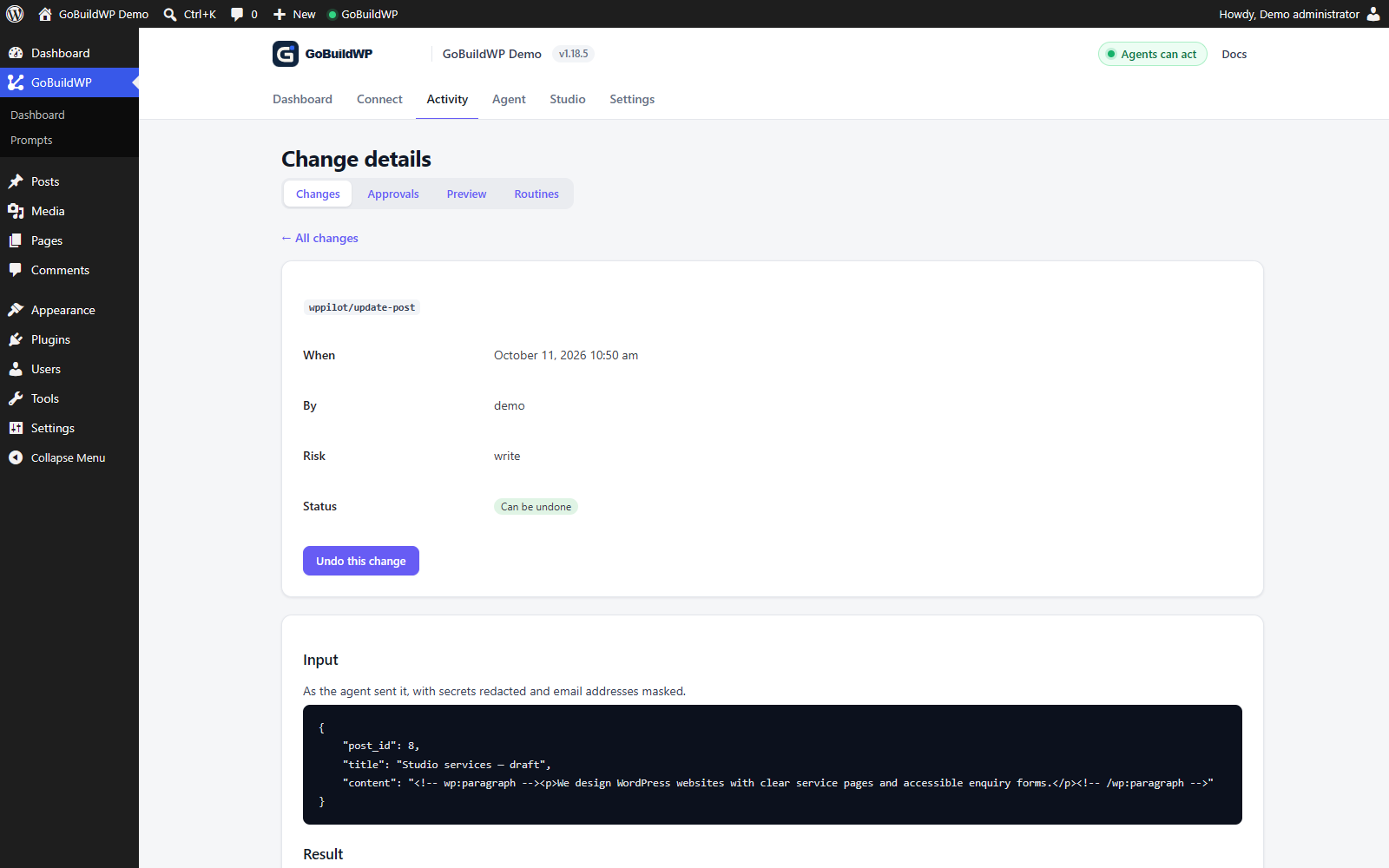
The actual record of a local WordPress draft update. Review what changed before checking the page's SEO fields and rendered tags; this capture does not demonstrate ranking results.
Actual product capture · local demoWatch: Review and undo a draft-page edit
Open the recorded WordPress draft update, inspect its input and result, return to Changes, and choose Undo. The original page content was separately verified after the recording. Silent, unedited browser recording; playback starts only when you choose Play.
Improve SEO across the site
Find the important problems. Fix them in reviewed batches.
Start with a useful audit, not a rewrite of every title. Free can inspect content and edit basic SEO for one post; Pro adds bulk metadata operations, provider-specific fields and Site Kit reads.
Audit pages and search opportunities
Read the content and stored SEO fields. With Site Kit connected, compare Search Console queries and pages. Distinguish a missing custom override from a missing rendered title.
Choose priorities
Group issues by URL and visitor intent: weak service pages, duplicate metadata, incomplete product information or outdated copy. Explain the evidence and likely value of each fix.
Propose and approve the changes
Keep the existing value, proposed value and reason together. Check claims against the page and obtain approval before writing. Review canonicals, robots and redirects as separate decisions; configure the supported approval policy when an enforced checkpoint is required.
Apply an approved batch
Pro supports up to 100 posts per bulk metadata call after a dry run. Fields depend on the active SEO provider. AIOSEO bulk changes do not support ledger rollback; prepare recovery before writing.
Check saved and rendered results
Read back each result, inspect served tags and links, and record failed or skipped URLs. A successful tool response alone does not prove the visitor sees the change.
Measure search performance
Compare impressions, clicks and relevant queries over time, using Site Kit or Search Console. Account for indexing delays and other changes; metadata edits do not guarantee higher rankings.
What each suite exposes
Seven SEO plugins, seven different operation sets
The first row is what GoBuildWP Free registers; the rest are taken from the registered abilities in each Pro module. Check the live schema on your site; some features also depend on the SEO plugin's own paid edition.
| Operation | Yoast SEO | Rank Math | AIOSEO | SEOPress | The SEO Framework | Slim SEO | SmartCrawl |
|---|---|---|---|---|---|---|---|
| In Free: one post's title, description and robots, undoable | Allowed | Allowed | Allowedundone through AIOSEO's own model | Allowedno per-post force-index | Allowed | Allowednoindex only | Allowed |
| Post title, description, canonical, robots | Allowed | Allowed | Allowed | Allowed | Allowed | Allowednoindex only | Allowed |
| Focus keyword | Allowed | Allowed | Allowed | Allowed | Blockednone in TSF | Blockednone in Slim | Allowedup to three |
| Category and tag SEO | Allowed | Allowed | Allowed | Allowed | Blocked | Blocked | Blocked |
| Structured data per post | Blocked | Allowed | Allowed | Allowedplus schema templates | Blocked | Blocked | Blocked |
| Redirects | AllowedYoast Premium | Allowedplus 404 log | Allowed | Allowed | Blocked | Blocked | Blocked |
| Bulk edits, up to 100 posts a call | Allowed | Allowed | Allowed | Allowed | Allowed | Allowed | Allowed |
| Pro/bulk writer: supported post SEO recovery | Allowed | Allowed | Blockedown table; unlike Free's basic model writer | Allowed | Allowed | Allowed | Allowed |
| Change global settings through SEO modules | Blockedread only | Blockedread only | Blockedread only | Blockedread only | Blockedread only | Blockedread only | Blockedread only |
Worked example, illustrative inputs
Correct one service page in Yoast
A heating company's service page shows up in search as “Home”. The business and post ID are placeholders; the ability names and merge behaviour are real.
Inspect the target
yoast-get-post-seo returns the current title, description, canonical and robots values. Record them before changing anything.
Check the wording against the page
Confirm the service, location and booking process on the visible page. Remove any promise the business has not supplied.
Write only the approved fields
yoast-edit-post-seo takes a partial merge: send the two fields being changed and nothing else.
Read it back as a visitor
Re-read the SEO object, then check the served page. Confirm the approved title and description are saved and rendered, and canonical and robots remain as intended. A successful write alone does not prove the served tags changed.
{
  "post_id": 123,
  "seo_title": "Book a Boiler Service in Leeds | Example Heating",
  "meta_description": "Book a boiler service in Leeds. See what the service includes, the areas covered and how to request an appointment."
}
The module declares a partial merge and returns post_id and seo. Fields left out are outside the change. A schema-based example, not a report of a client project.
Keep an editorial record
Save the URL, the reason, the previous values, the approved copy and the check result. Treat canonicals, robots directives and redirects as separate decisions: they change which URL people and crawlers reach.
Structured data should describe what the page visibly shows and its real author, product or organisation.
Image alt text, in GoBuildWP Free
Write alt text from the image, not the filename
Alt text is there for people who cannot see the image, and search engines read it as well. The workflow below is in the free plugin. The agent has to look at each image before it writes anything, and an empty alt is kept for images that are only decoration.
Find images that need work
audit-media-alt scans the media library, newest first, one page at a time. It marks each image's alt as missing, filename (only a file or camera name such as IMG_0042.jpg) or ok, and flags likely decorative images. That flag is a hint, not a verdict.
Look at each image
Use get-media-image to inspect the image, then describe its purpose in the page's context in natural, concise language. There is no universal character target. Keep decorative uses empty; give complex images an appropriate short alternative and the fuller explanation nearby. Name a product or variant only when the image and supplied catalogue facts support it.
Review, then write a batch
Read the proposed alt text next to each image and approve it. update-image-alt then writes up to 100 images per call. It skips anything that is not an image, that you cannot edit, or that already has the same alt, and reports each skip.
Check pages that already use the image
The new alt is stored on the attachment. New insertions and most themes use it, but an image already placed in a post keeps the alt written into its block until that block is edited. verify-rendered-page lists images that still have no alt on a page as visitors see it.
Undo one image or the batch
Each image gets its own change-log entry, and the entries in one call share a group. rollback-change can restore one image's previous alt or the whole batch.
Ability names and limits come from the free plugin's accessibility kit. Better alt text helps visitors using screen readers and image search. It does not guarantee a ranking change.
From audit to fix
Finding the pages worth fixing first
Bulk-rewriting every title on a site is the least useful thing WordPress AI SEO automation can do. The better start is a list of pages with a specific, checkable problem. GoBuildWP Free's audit-content runs over published posts and pages in the background and reports, worst first: broken internal links and missing uploads, orphan pages nothing links to, thin content under a word count you set, missing SEO titles or meta descriptions read through whichever SEO plugin is active, and JSON-LD problems such as invalid JSON or FAQ and HowTo markup that Google no longer shows as rich results. It changes nothing; audit-content-status pages through the findings.
If Site Kit by Google is connected, GoBuildWP Pro adds demand to that list. site-kit-search-pages returns two opportunity lists worth more than any generic audit: pages with many impressions but a click-through rate under half the site average, and queries at average positions five to twenty with their page. Treat these as review candidates, not a causal diagnosis: query mix, device, position, search appearance and page usefulness can also explain CTR. site-kit-status reports what is connected before you rely on it, and every Site Kit ability only reads.
Turning findings into a reviewed fix plan
On Pro, content-fix-plan turns a finished audit into one item per concrete change, each with a before and after preview, a confidence score and whether it can be applied on this site: retargeting a broken internal link to where WordPress now redirects, adding a missing description through the SEO plugin, or creating a redirect through Redirection or Rank Math. content-fix-apply then applies only the items a person picked from that plan, and nothing else.
That split is the useful discipline. The audit says what is wrong, the plan says exactly what would change, and a person chooses. A prompt that keeps it that way: "Run a content audit, build a fix plan, and show me only the link and description items with confidence above 0.8. Apply nothing until I name the item ids."
Rules for AI-written titles and descriptions
- Write from the page, not the keyword. The agent should read the visible content first and describe what is actually there, including the location and service names the page uses.
- Review duplicate custom titles in context. seo-bulk-get-meta can flag shared overrides, but a missing override is not necessarily a missing rendered title. Check the actual page intent and served tag before choosing a replacement.
- No claims the business has not made: prices, guarantees, awards and response times come from the page or the owner, never from the model.
- Leave canonicals, robots and redirects out of copy work. Those decide which URL search engines see, and they deserve their own reviewed change.
- Measure afterwards, separately. Note the date of the change and compare Search Console data for the page four weeks later; a successful write is not a ranking result.
Keeping it running without an agent
A one-off clean-up drifts back within months as new posts go out without descriptions. A scheduled routine can run audit-content weekly with no agent connected, email the summary to chosen administrators and keep the reports for comparison. The routine only reads; fixes still go through an agent session and a person's choice, which is the right place for them.
FAQ
SEO automation, with the limits attached
Which SEO plugins can GoBuildWP work with?
GoBuildWP Free reads and sets one post's SEO title, meta description and robots in all seven: Yoast SEO, Rank Math, AIOSEO, SEOPress, The SEO Framework, Slim SEO and SmartCrawl. Pro includes full modules for the first four and per-post modules for the other three. Their operation sets differ, as the table on this page shows, and some features depend on the paid edition of the SEO plugin, such as Yoast redirects on Yoast Premium.
Can the agent change my SEO plugin's settings?
The SEO modules read global settings and do not write them. The ordinary update-site-settings writer also accepts only its listed WordPress settings. A separately authorized execute-php call under Developer Full Access can use WordPress or plugin APIs to change other options; this metadata workflow excludes that path. Review global configuration separately on staging. Per-post fields are writable in all seven; per-term, schema and redirect support varies by suite and edition as shown above.
What do The SEO Framework, Slim SEO and SmartCrawl not support?
What the plugins themselves do not store. The SEO Framework and Slim SEO have no focus keyword; Slim SEO has no nofollow or Open Graph text and cannot force a post to be indexed; SmartCrawl prints titles only while its onpage module is on. Each module reports those limits in its setup check instead of pretending to write a field that goes nowhere.
Can it fix metadata on many pages at once?
Yes, through one plugin-neutral pair of abilities that works with whichever supported suite is active. seo-bulk-get-meta finds posts with no title override, no description or a title shared with another post; seo-bulk-update-meta then writes up to a hundred posts per call, after a dry run that shows each post's before and after. Every post gets its own ledger entry, and those entries can be rolled back one by one in every suite except AIOSEO. A field the active plugin does not store fails that post rather than reporting success. AIOSEO keeps SEO in its own table, so its entries say they cannot be undone.
Can the agent write image alt text?
Yes, in GoBuildWP Free. audit-media-alt lists images whose alt is missing or only a filename. The agent looks at each one with get-media-image, you approve the wording, and update-image-alt saves up to 100 images per call. Every image can be undone separately. Images already placed in a post keep the alt stored in their block until that block is edited.
Should I rewrite metadata for the whole site?
Start with pages that have a specific problem: an inaccurate title, a duplicated description or a canonical that points to the wrong page. Read the content before proposing a replacement and review the affected URLs after saving.
Does a successful metadata write prove better rankings?
No. It proves the operation returned successfully. Inspect the saved value and rendered tags, then measure search performance separately. Search demand, competition, indexing and the quality of the page matter more. If Site Kit by Google is connected, Pro can read its Search Console queries and pages, with the previous period for comparison, so the before and after sit next to the edit; it never writes to Google.
Start with the pages that need your attention.
Connect your AI client, request a site-wide review and choose a small first batch. Verify the results before expanding the work.