WordPress MCP features
WordPress MCP features. Everything GoBuildWP can do, sorted by the job.
These WordPress MCP features are what GoBuildWP adds once your site is its own MCP server, grouped by the job you would hand an agent. The free plugin ships 232 abilities; Pro adds 1,148 across 89 plugin integrations. Each capability below names its edition, the abilities behind it and the limit that applies.
Free plugin, GPL, What Free includes, What Pro adds, Free vs Pro
GoBuildWP in numbers
Free 1.18.6, Pro 1.12.4- Abilities in Free
- 232
- Abilities added by Pro
- 1,148
- Plugin integrations (Pro)
- 89 in 14 categories
- AI clients with generated setup
- 27
- Capability groups on this page
- 47
Choose your Free edition
Free tool counts and downloads on this website refer to GitHub Free. It includes developer code, filesystem and WP-CLI tools, signed upload and admin-access links, and the sandbox. WordPress.org Free omits those twelve tools and their sandbox. WordPress.org availability is pending directory approval.
Install one Free edition. Pro is a separate plugin requiring compatible Free and a valid Pro licence. Pro supplies any of those tools missing from Free, while existing Free tools stay registered once. Site permissions, safety profiles and confirmation still apply. Without Pro eligibility, Pro-owned tools are unavailable; tools supplied by GitHub Free remain available under site policy.
Inside the plugin
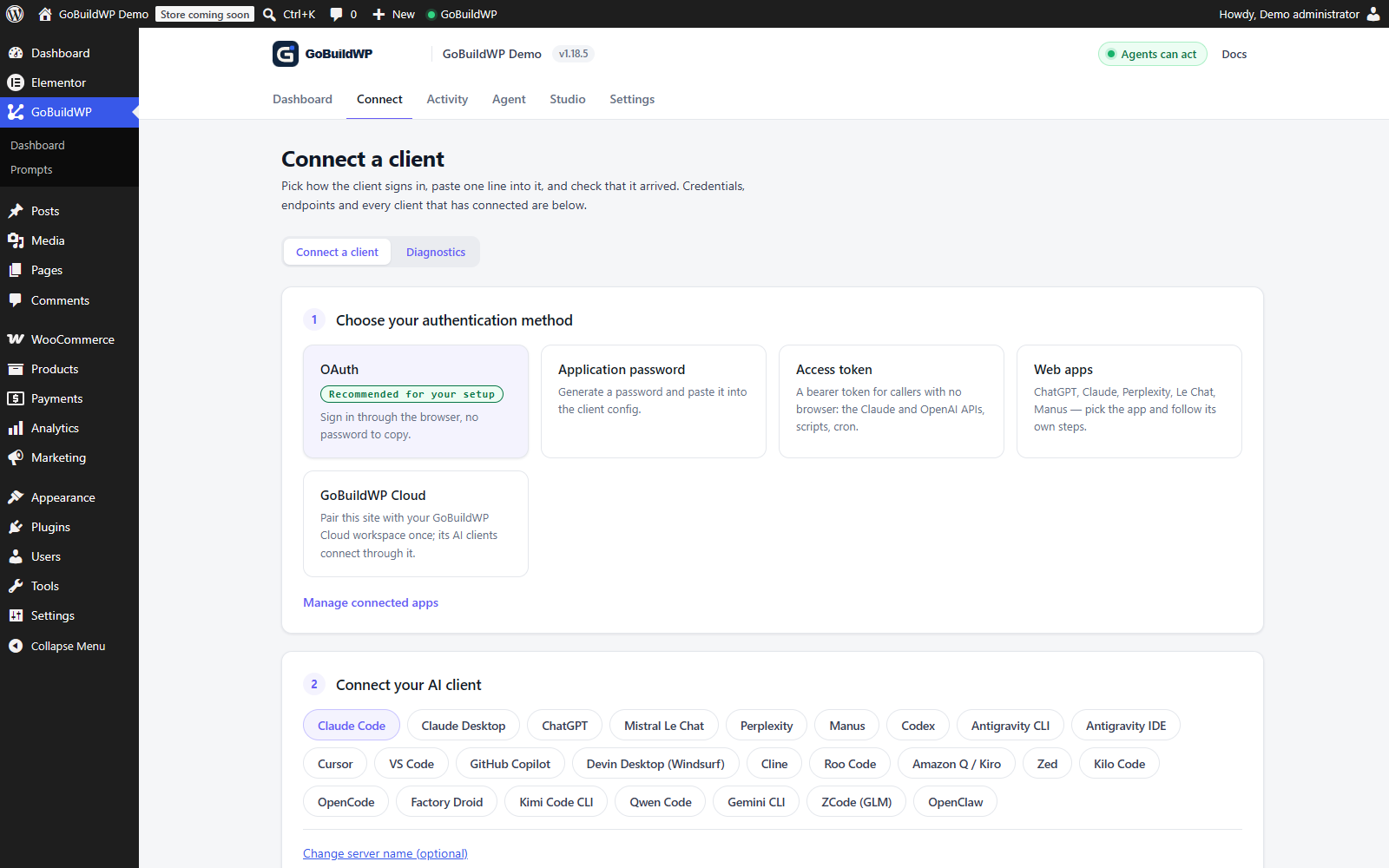
Start in WordPress. Choose how your AI connects.
The Connect screen brings the available sign-in methods together. Pick the method your client supports, then use its setup guide to verify the connection before making changes.
Start with the work
What would you like to get done?
Every workflow uses a configured AI client. Plugin-specific work also needs the supported plugin active on your WordPress site; third-party licences are separate.
| Your job | Example result | What you need |
|---|---|---|
| Build or redesign a website | Pages, navigation, forms and editable layouts | Free for blocks and basic Elementor editing; Pro for advanced composition and other supported builders |
| Improve SEO across the site | A prioritized review and approved metadata batches | One of seven supported SEO plugins; Free for basic per-post edits, Pro for bulk edits and Site Kit reads |
| Find and fix slow pages | A baseline, a supported change and a comparison | Pro and supported performance plugins; browser checks complete the workflow |
| Manage a WooCommerce store | Products, variations, inventory and store operations | WooCommerce; Free for basics, Pro for advanced catalogue and operations |
| Create an online course | A draft curriculum with topics, lessons and quizzes | Pro and Tutor LMS; your content and a tested enrolment path |
| Collect enquiries | A contact, lead or booking-request form | Pro and a supported forms plugin for form creation; a booking request is not a reservation engine |
| Publish and maintain content | Draft posts, media and organized content | Free for core content and media; Pro for supported custom-data plugins |
| Maintain WordPress | A reviewed update with before-and-after checks | Pro for the update workflow; supported backup integration and independent recovery checks |
| Work across websites | One AI connection for several WordPress sites | Optional Cloud; 3 sites free, Pro adds bulk actions and plan-specific allowances |
Capability map
What an agent can do on a GoBuildWP site
Three areas, 47 groups. Each ability name opens its entry in the documentation; to look up one operation by name, use the ability search.
Explained in full elsewhere: Approval queue (summary), Undo and verified restore (summary), Safety profiles (summary), Page builders (summary), Running a WordPress AI agent (summary).
Build and design inside the builder you already use
Pages are written into each builder's own data, so what the agent builds stays editable in the editor you open afterwards. Checks at the end read the page a visitor actually receives.
Elementor editing
FreeRead an Elementor page as its element tree, then add, move, duplicate or edit elements and page settings, and check whether the page is ready for v4 atomic elements.
Limit: Deleting an element or replacing the whole document needs confirmation.
Elementor MCP guideElementor composition
ProBuild whole pages from a structured spec, manage global classes, variables and v3 colours and fonts, apply dynamic tags and interactions, and edit Elementor Pro forms.
elementor-build-from-specelementor-create-global-classelementor-create-variableelementor-apply-dynamic-tag
Limit: Building over an existing page or applying a template needs confirmation.
Other page builders
ProA separate module for Bricks, Divi 5, Breakdance, Oxygen 6, Beaver Builder, WPBakery, Etch, Mosaic, Flatsome and Bricksforge, each written against that builder's element tree, classes and variables.
Limit: A module loads only while its builder is active. Removals and most whole-layout replacements need confirmation.
Page builder integrationsBlock editor
Free + ProRead block content and stage native block changes in a batch that the block editor itself finalizes, so saved markup is what Gutenberg would write, and leave, reply to and resolve Block Notes for a person; Pro adds block schemas for Spectra, Kadence Blocks and GenerateBlocks, and inserts free Kadence Design Library sections with their uniqueIDs renamed.
Limit: Static blocks are saved after a signed-in WordPress browser session finalizes the batch. Notes can be read from WordPress 6.9, but anchoring a new note to a block needs WordPress 7.1 and its required API.
Gutenberg MCP guideThemes and block templates
Free + ProOn a block theme, Free edits templates, template parts, global styles, patterns and navigation menus the way the site editor does. Pro changes layouts, hooks, palettes and typography through each theme's own options in Astra, GeneratePress, Kadence, OceanWP, Avada and Spectra One, with a shared bridge for customizer settings elsewhere.
Limit: Reverting a customised block template and site-wide Astra and GeneratePress changes need confirmation.
Design system and brand kit
Free + ProDerive a design from a brief or from the live site, keep it as the active design, check contrast and composition against it; Pro writes its palette and type into the builders' global colours and fonts.
Limit: Applying a brand kit writes to every chosen design system and needs confirmation.
Design featuresTemplates, popups and theme parts
ProSave and apply templates and set display conditions for headers, footers and archive templates in Elementor Pro, Divi, Bricks, Breakdance and Oxygen; create popups in Elementor Pro, Bricksforge and Spectra.
elementor-set-template-conditionselementor-preview-template-conditionsdivi-create-theme-builder-templateelementor-create-popup
Limit: Applying a template replaces the page's content and needs confirmation.
Custom code and atomic widgets
ProGenerate Elementor v4 atomic widgets as a PHP mu-plugin, place header or body code with Elementor Pro Custom Code, and manage Code Snippets and Dynamic Shortcodes.
elementor-create-atomic-widgetelementor-save-custom-codecode-snippets-validate-snippetcode-snippets-create-snippet
Limit: Writes count as code execution: Developer Full Access only, with confirmation on every call.
Stock images
Free + ProSearch Openverse for openly licensed images with no API key, each result carrying its licence and a ready attribution line for the caption; Pro places one straight onto an Elementor element.
Page builder converter
ProConvert a page from one builder into a new draft in another, with a loss report that names anything dropped or reduced to raw markup.
Limit: The source page is never modified, and a lossy conversion refuses until the loss is accepted.
How conversion worksVisual check
FreeOpen the built page in the agent's own browser, capture screenshots through a signed-in wp-admin tab, score what moved between two captures, and read back what a visitor is served.
Limit: Screenshots are taken only while someone keeps the Visual Runtime tab open in wp-admin.
Working copies
ProEdit a draft copy of a live page with its builder data, preview it, then publish it back onto the original so the URL, ID, comments and SEO history stay put.
Limit: Publishing and discarding need confirmation. Supported publishes with retained before-images can be rolled back; an accepted irreversible publish cannot.
Manage content, plugins and the running site
Day-to-day site work, from a post's tags to a WooCommerce refund. Plugin modules appear only when their plugin is active, and each speaks that plugin's own data model.
Content, menus and comments
FreeList, search, create and update posts, pages and public custom post types, with their terms, navigation menus and theme locations, comment moderation and revision restore.
Limit: Deletes need confirmation.
Search and replace
FreePlan a site-wide replacement across post titles, content, excerpts and chosen meta keys, serialized values and builder JSON included, review every match with its before and after, then apply only the posts that have not changed since, with one undoable change per post.
Limit: Applying needs confirmation. Serialized objects, guids and options are never touched, and regular expressions are off unless asked for.
Media library
FreeImport media from a URL, edit titles, captions and alt text, attach files to content, set or clear featured images, and resize, crop, rotate or flip an image as a new attachment or in place.
Limit: Deleting an attachment needs confirmation. Image edits can be undone, and the original file is never deleted.
Users and site settings
FreeRead users with personal fields kept to a minimum, change an allowlisted set of ordinary site settings, and create or update accounts where the profile allows it.
Limit: Creating or changing users is Developer Full Access only and needs confirmation. Secrets and authentication settings are never writable.
Plugins and themes
FreeSearch the WordPress.org directory, then install, activate, update, switch or remove plugins and themes.
Limit: Installing and deleting are Developer Full Access only; activating, updating and switching need confirmation. Installs cannot be rolled back from the ledger.
Guarded updates with file recovery
ProUpdate one supported plugin or theme with a backup requirement by default, a retained file copy, and selected page, REST and admin-ajax checks. Failed checks trigger a file-recovery attempt. Retained copies support undo for up to 7 days, subject to recovery checks.
Limit: The backup requirement can be explicitly skipped. Recovery can fail and does not restore database migrations or external effects. WordPress core, GoBuildWP itself and single-file plugins are refused. No screenshots are taken; each update needs confirmation.
Safe updatesBackups
Free + ProRead the last backup and whether it worked, what it held, its size and where it went, in UpdraftPlus, Duplicator, BackWPup and All-in-One WP Migration, in Free. Pro starts one with UpdraftPlus's or BackWPup's own scheduler or All-in-One WP Migration's own export steps, which Pro runs itself in short slices on WP-Cron and on each backup-status read, and its optional setting holds destructive calls until a fresh backup exists.
Limit: Nothing restores, downloads or deletes a backup. Duplicator is read, never started, and archive paths, links and credentials never leave the site.
Backup pluginsSecurity plugins
Free + ProRead Wordfence and Solid Security status, scan findings and lockouts in Free, with addresses shown only as networks. Pro applies a hardening plan a person confirmed, blocks or unblocks an IP, and starts the plugin's scan.
Limit: Applying settings and blocking or unblocking an IP need confirmation and can be undone with rollback-change; starting a scan changes no setting and cannot be undone. Application Passwords are never switched off. Wordfence extended protection and Solid two-factor are only reported, and scans need a Wordfence key or a publicly reachable site for Solid.
Security pluginsFiles, WP-CLI and PHP
FreeRead and edit files, upload large archives through a one-time link, run WP-CLI in the foreground or as a background job, execute PHP, hand a browser agent a temporary admin sign-in, and explore options or run one read-only SELECT against the database.
Limit: Everything here runs only under Developer Full Access, file reads and directory listings included, since a file read can reach wp-config.php. Writes, WP-CLI, PHP and admin sign-in links also need confirmation on each call. File, options and database reads are recorded in the change log. Options and database read results are not stored there; database reads redact sensitive columns and refuse the users, options and key tables.
Diagnostics
FreeReport WordPress, PHP, database, cron and cache status, run bounded server-side performance checks and Site Health tests, list hardening gaps and outstanding updates, manage WP-Cron events and transients, and find what stops an MCP client connecting.
Limit: The security audit checks configuration. It is not a malware scan. A deleted cron event can be put back at the same time and schedule.
Accessibility and content audits
FreeCheck a page as visitors receive it against WCAG 2.2, find images with missing or filename alt text and write real alt text from the image itself, and audit the site for broken internal links, orphan pages, thin content and missing descriptions.
Limit: The WCAG check reports what it could not test, such as contrast, focus, target size and script-rendered content. It is not a full accessibility audit.
Scheduled audit routines
FreeRun the accessibility, content and alt-text audits daily or weekly on WP-Cron with no agent connected, keep each run's report with what is new, fixed or changed since the last one, and email a short summary to administrators chosen by user id.
Limit: Routines can run only those three read-only audits, so they never change the site. Their audit calls are not written to the change log; saving, deleting and running a routine are.
Scheduled site auditsContent fixes
ProTurn a finished content audit into a plan of proposed link, redirect and metadata fixes with before/after evidence and confidence. Apply selected items and inspect each result. Recovery needs a supported writer and retained before-image; redirects and AIOSEO own-table writes have separate limits.
Limit: Structured-data findings are report-only, and page-builder layouts never get related links. More than 20 items in one call need confirmation.
Fix broken links with AIMultisite networks
FreeList the sites on a network and run an ability on one of them through that site's own safety profile, confirmation and gates, with the change recorded in that site's own log.
Limit: Only on a multisite network.
Cache and page speed
ProDetect 26 cache and optimisation layers, inspect available settings, measure a page, change a supported key, and request supported purge or warm operations. An experiment can restore captured settings where its driver supports recovery.
Limit: The aggressive preset and native setting changes need confirmation. Recovery excludes uncaptured settings and external effects; W3 Total Cache writes have no per-change undo. Verify settings and visitor output after recovery.
Supported cache layersSEO
Free + ProRead and set one post's SEO title, meta description and robots in Yoast SEO, Rank Math, AIOSEO, SEOPress, The SEO Framework, Slim SEO and SmartCrawl in Free, each undoable. Pro adds focus keywords, social fields, term SEO and schema, audits or updates meta on up to 100 posts per call across any of them, and reads Search Console and Analytics figures through Site Kit.
Limit: Bulk writes need confirmation and support a dry run. Site Kit access is read-only. A field the active plugin does not store fails for that post instead of reporting success.
AI SEO automationRedirects
ProManage redirects and 404 logs in Redirection and in the SEO plugins that store them, and add a 301 automatically when a permalink changes.
Limit: Automatic redirects go to the first available redirect store; with none installed, only WordPress's own old-slug fallback applies.
WooCommerce
Free + ProFree reads products, variations, categories, tags, store settings, orders and customers, and edits one product's name, description, prices and stock with undo. Pro manages variations, attributes, orders, customers, coupons, refunds and reviews, changes prices or stock on up to 100 items at once, reads shipping zones, tax rates and gateways, and reports sales and best sellers for calendar dates in the store's timezone.
woocommerce-bulk-update-priceswoocommerce-update-order-statuswoocommerce-sales-reportwoocommerce-create-refund
Limit: Refunds need confirmation and reach the payment gateway only when you opt in. Bulk changes support a dry run.
WooCommerce MCP guideSales funnels
ProRead FunnelKit funnels with their steps in order, count optins, orders and revenue per step for a date range, and rename, re-slug, publish or draft a step without its URL moving unasked.
Limit: Funnel Builder lite records no page views, so there are no conversion rates. Only counts and sums are returned, never customer data.
FunnelKit integrationForms and entries
Free + ProList forms and read entries in Contact Form 7, WPForms, Gravity Forms and Forminator in Free, with contact details withheld. Pro builds and edits forms, fields and notifications in those and in Fluent Forms, Formidable and Ninja Forms, exports entries, edits Elementor Pro forms, and reads WS Form with small label and button edits.
Limit: Entry exports redact sensitive fields unless a person confirms otherwise; Forminator and WS Form entries always withhold emails, phones and IPs. Contact Form 7 entries need Flamingo, and WS Form edits cannot be undone from the log.
Build forms with AICustom fields and content models
ProCreate post types, taxonomies, field groups and options pages in ACF, Meta Box, Pods, JetEngine, ACPT and Admin Site Enhancements, read and write values, and update fields on up to 100 posts per call.
Limit: Editing a field group's fields or writing complex values needs confirmation.
Multilingual
ProLink translations, set content language and translate strings in WPML and Polylang, and manage Weglot languages, excluded URLs and translated slugs.
wpml-link-content-translationspolylang-bulk-set-string-translationsweglot-add-destination-languagewpml-list-content
Limit: Re-linking translations and pushing Weglot settings to its cloud need confirmation.
WPML MCP guideCourses, memberships, events and groups
ProBuild Tutor LMS courses, lessons and quizzes and manage enrolments, run Paid Memberships Pro levels and discount codes, create The Events Calendar events, and manage BuddyPress groups.
tutor-lms-create-coursepaid-memberships-pro-create-levelevents-calendar-create-eventbuddypress-create-group
Limit: Enrolments, membership changes and deletions need confirmation.
Connect clients and decide what they may do
How an AI client reaches the site, what it is allowed to see, and what is left behind afterwards: the controls, the record and the context that carry from one session to the next.
AI clients and sign-in
FreeGenerated configurations for 27 AI clients, signing in with OAuth 2.1 and PKCE (Client ID Metadata Documents, with dynamic registration as a fallback), an Application Password or an access token. A client on the machine that runs the site, such as Claude Code, Cursor or a CI job, can also connect over stdio through wp wppilot mcp serve, with no credential to create.
Limit: Clients that connect from their own servers, such as ChatGPT and Claude on the web, need the site on public HTTPS.
Client setup guidesCompact discovery and site briefing
FreeDiscovery follows the negotiated protocol. Modern MCP connections list permitted abilities as individual tools with schemas; legacy adapter connections use discover-abilities, get-ability-info and execute-ability. The available list follows this site's plugins, permissions and safety profile.
Safety profiles and switches
FreeRead Only, Production Safe or Developer Full Access decides which abilities exist for a connection, alongside per-ability switches, WordPress capability checks, confirmation on destructive calls and a per-minute write budget per credential. Confirmation can be required from a person rather than the model, and access tokens can be scoped and capped below the site's profile.
Limit: Profiles are enforced by WordPress on every call path, not requested in a prompt.
Safety profilesWrite previews
FreeGet a field-by-field diff and a wp-admin review link for a post, media, settings or delete write before it runs; applying refuses if the target changed in between.
Limit: Covers supported write projectors. Required preview is opt-in; Chat and unsupported operations are exempt. A preview is not a rendered-site test.
MCP Apps preview cardChange ledger and rollback
Free + ProSupported writes are recorded with ability, actor and object, secrets and email addresses masked when a record is read, and reversible ones roll back with the result checked against the stored before-state. The Changes screen in wp-admin filters the record, undoes one change, one bulk batch or everything a filter shows, and downloads it as CSV or JSON. A whole agent session can be undone or redone, newest first, after a check that nothing else changed its targets since. Pro extends rollback to builder documents, WPForms, Contact Form 7 and Forminator forms, SEO fields beyond one post's title, description and robots, custom-field values, full product edits, FunnelKit steps, content fixes and safe plugin updates.
Limit: Not every write is reversible; an entry that cannot be undone says why. The record keeps 10,000 changes or 90 days, and changes older than 30 days lose their larger before-images. The screen undoes at most 200 at a time, and exports never include before-images.
How undo and rollback workApproval queue
ProHold every write, only destructive and critical ones, or nothing by default, set a different mode per client or per ability, and email the site admin when a write is waiting. A held call can be listed, and approved or rejected from an MCP Apps card, when a person confirmed the decision.
Limit: A client cannot use the policy ability to release its own holds, and an agent's own confirm=true never approves a held call: the decision has to be confirmed by a person.
How the approval queue worksSkills and memory
Free + ProSkills are written procedures an agent can fetch and you can edit; Pro adds persistent memory for durable facts about the site and ongoing work, plus plugin-aware skill packs.
Approvals, memory and skills docsMCP Apps cards
Free + ProIn a host that renders MCP Apps, Free shows a preview card with an Apply button beside a pending write. Pro adds four cards: a side-by-side or inline diff, a before and after screenshot slider, a filterable search-and-replace grid and an approval card for held calls.
Limit: Hosts without MCP Apps get the same results as plain text. The cards load nothing from the network except the slider's screenshots, from this site's uploads.
MCP Apps cardsChat in wp-admin
FreeWork with the site from the WordPress dashboard through the provider and model configured in the WordPress AI Client, with attachments, saved sessions and an approval choice on each tool call. Calls go through the same safety profile, rate limit and Pro approval queue as an MCP client.
Limit: Prompts, attachments and tool results go to that configured provider.
Chat docsPHP sandbox
FreePHP files an agent writes can only go into one sandbox directory, loaded as small plugins you can disable one by one; a fatal error puts the sandbox in safe mode until the file is fixed.
Limit: Developer Full Access only. It handles loading and crash recovery; it is not a security boundary.
Prompt library
Free + ProIndustry briefs for landing pages, 10 in Free and 300 in Pro, each with a palette, a type pairing, required sections and a design signature so two businesses do not get the same page.
Integration health
ProExplains why a Pro module is not answering: whether its plugin is active, whether its loader is eligible to run, and any recorded load failure.
Compatibility
Builders, plugins and AI clients it works with
Modules have dependency, version and licensing gates and guarded registration; these do not guarantee immunity from an active plugin's runtime failure. Open a name for its source-declared scope, or filter the integration directory.
Page builders 10
Elementor editing is in Free; composition and every other builder are Pro.
 Bricks
 Breakdance
 Divi
Divi Oxygen
 Beaver Builder
 WPBakery
 Etch
Etch Mosaic
Blocks and themes 13
Free covers core blocks and block themes. Pro adds the listed block-plugin and theme-specific modules; check each module's edition and dependencies.
 GenerateBlocks
 Kadence Blocks
 Spectra
 Avada
Avada WoodMart
Forms 8
Free lists forms and reads redacted entries in four of them; editing and exports are Pro. Elementor Pro forms are handled by the Elementor module.
 WPForms
 Gravity Forms
 Fluent Forms
 Formidable Forms
 Contact Form 7
 Ninja Forms
SEO suites 7
One post's title, description and robots in Free for all seven; the rest is Pro, with bulk meta and Site Kit reads alongside.
 AIOSEO
 Rank Math
 SEOPress
 Yoast SEO
Custom data 7
Pro, plus a bulk field writer that works through whichever of these is active.
 Advanced Custom Fields
 ACPT
ACPT Admin and Site Enhancements
 Meta Box
 Pods
PodsCommerce, languages and communities 9
WooCommerce reads and a basic product editor are in Free; everything else here is Pro.
 WooCommerce
 Weglot
 Polylang
 WPML
WPML The Events Calendar
 Paid Memberships Pro
 Tutor LMS
 BuddyPress
Developer tools 2
Pro. Code Snippets writes need Developer Full Access.
 Code Snippets
 Bricksforge
Caching and page speed 25
Pro. One shared module detects 26 layers; mapped keys, native settings, purges and recovery vary by driver.
 LiteSpeed Cache
 WP Rocket
 WP Fastest Cache
 Speed Optimizer (SiteGround)
 WP-Optimize
 W3 Total Cache
 Autoptimize
 SpeedyCache
 Breeze
 Cache Enabler
 Perfmatters
 FlyingPress
 WP Super Cache
 Redis Object Cache
 Jetpack Boost
 Aruba HiSpeed Cache
 NitroPack
 Hummingbird
 10Web Booster
 Docket Cache
 SQLite Object Cache
 Powered Cache
- Swift Performance and Lite
 Super Page Cache for Cloudflare
 Converter for Media
Backups and security plugins 6
Free supplies supported backup/security reads. Pro can request supported backups and review security changes. Undo covers supported settings and blocks; scans and other irreversible effects need separate review. Duplicator is read, not started.
AI client guides 26
Free. Each guide covers that client's sign-in and where its configuration goes. The plugin generates setup for 27 clients; one has no separate guide here because the old guide now points to its successor.
Product names and marks identify their owners and do not imply endorsement. Plugin versions below a module's floor do not load it; integration health reports why.
How is this page different from the tool list?
The tool list at /tools is a searchable index of every ability name, one row each. This page is the map above it: it groups those abilities by the job they do, says which edition each job needs, and names the limit that applies before you rely on it.
Which of these features are in the free plugin?
The documented WordPress operations in the Free reference: content, media, menus, comments, users, settings and plugin lifecycle, plus the block editor, Elementor editing, the design system, visual checks, diagnostics, audits and their schedules, developer tools, chat, skills, previews, the change ledger and session undo. Free also covers the basics of WooCommerce, seven SEO plugins, four form plugins, and backup and security status. Pro adds the full plugin and builder modules, approvals, memory, working copies, the converter, cache control, content fixes and the larger prompt library.
Will every feature show up on my site?
No, and that is deliberate. A Pro module registers only when its plugin or theme is active, the safety profile removes whole classes of abilities, per-ability switches remove single ones, and the connected user's WordPress capabilities still apply. Two connections to one site can see different lists.
Which features can change a live site without asking first?
Under Production Safe, ordinary writes such as editing a draft can run directly unless another policy holds them. Confirmation-gated calls require the model's confirm=true by default; selecting A person approves requires human confirmation for those calls. Ordinary writes need a per-ability confirmation rule or Pro approval policy if they should wait too. Code execution is refused outside Developer Full Access. Optional previews cover supported write types.
Does GoBuildWP take backups or run as a hosted service?
GoBuildWP is the MCP server inside your WordPress, not a backup engine. It can request supported backup plugins to run their own jobs. A reported successful job does not establish archive completeness or recoverability. Keep independent backups and verify restoration; the change ledger covers supported before-images only.
Install Free, then add Pro for the plugins you run.
Connect one AI client on a staging site under Read Only, try a few of the abilities above, and widen the profile when the ledger shows what you expected.