WordPress MCP
WordPress MCP, explained. Then run your own server.
WordPress MCP is the Model Context Protocol applied to a WordPress site: an MCP server publishes the site's abilities as typed tools that AI clients such as ChatGPT, Claude and Cursor can discover and call. GoBuildWP is a free plugin that makes your site its own MCP server, with the rules enforced on your site.
WordPress 6.9+, PHP 8.0+, 27 AI clients, No GoBuildWP account
Which of the newest pages have no featured image?
wppilot/list-contentRead allowed3 newest pages: Home, Services, Contactwppilot/get-contentRead allowedServices (#482): no featured image setwppilot/execute-phpBlockedRaw PHP is not available under Production Safe
 View full size ↗
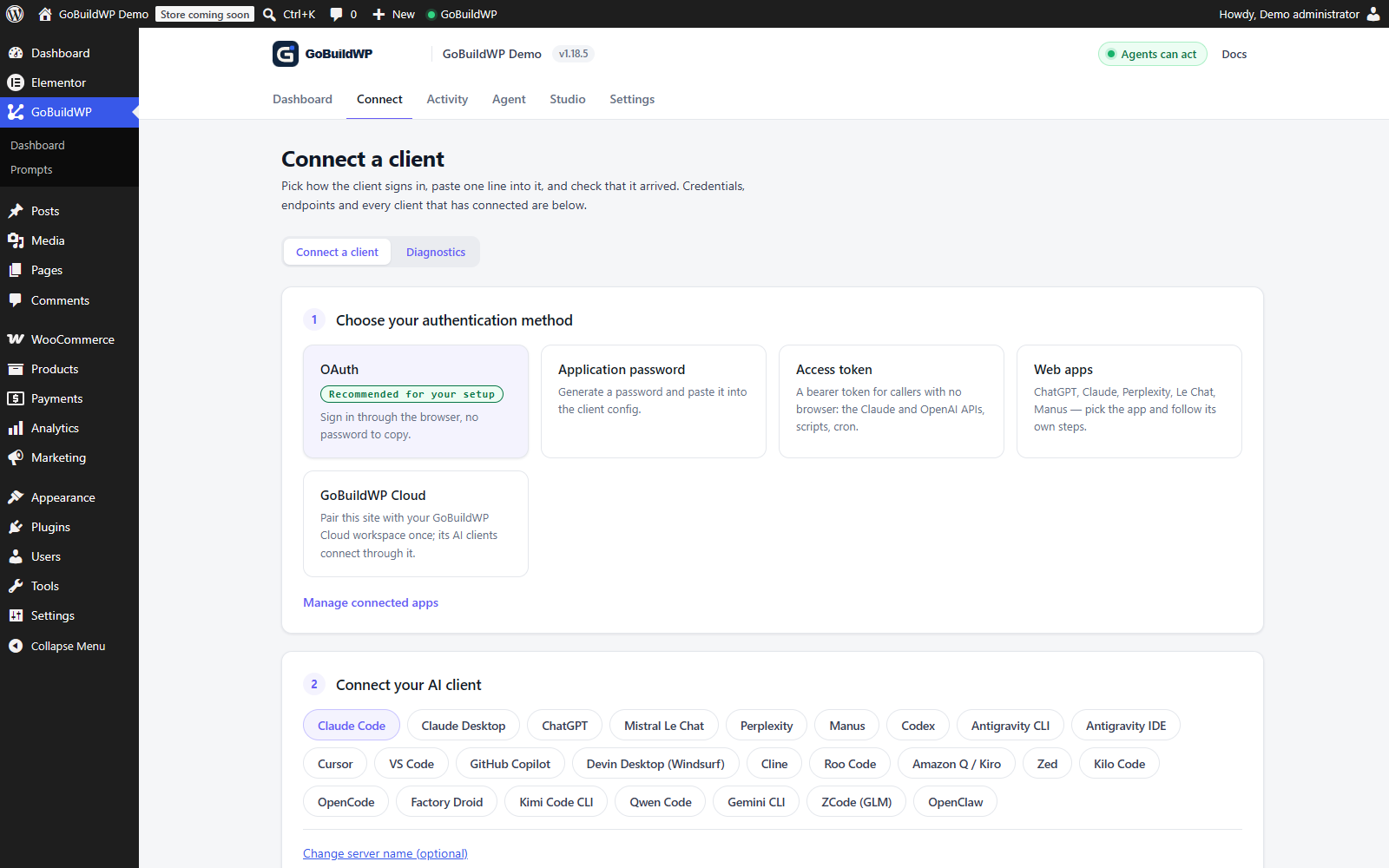
OAuth, application passwords and access-token options in the actual plugin. This capture shows the setup screen, not a completed external AI connection.
Actual product capture · local demoWhat is WordPress MCP?
The Model Context Protocol (MCP) is an open standard for letting an AI client discover and call tools that live somewhere else. The server lists typed operations with input schemas; the client shows them to the model; the model calls one and gets a structured result back.
WordPress MCP applies that to a WordPress site. Since WordPress 6.9, plugins can register what they do through the core Abilities API, and an MCP server exposes those abilities as tools. Nothing is pasted between a chat window and wp-admin, and no integration is written per client.
GoBuildWP is that server as a plugin. Requests arrive on your own domain over HTTPS, authenticate as a WordPress user and run in your PHP process. On a direct connection no GoBuildWP service sits in the path; GoBuildWP Cloud is an optional hosted gateway for reaching many sites through one link.
- Endpoint
/wp-json/mcp/wppilot- Requires
- WordPress 6.9+ and PHP 8.0+
- Sign-in
- OAuth 2.1 + PKCE or Application Password
- MCP revision
2026-07-28
From the GoBuildWP Free 1.18.6 source. Legacy clients negotiate 2025-11-25, 2025-06-18, 2024-11-05.
MCP Tasks shipped in Free 1.15.0 on the modern transport. When enabled and tools are served, discovery advertises Tasks. Task-capable, job-backed abilities can run in the background; other abilities return an already completed or failed task. Authenticated clients can poll, retrieve results, list their tasks and request cancellation. Cancellation does not undo completed writes. The connected user's permissions, safety profile and confirmation checks still apply. Tasks connection guide →
The landscape
Five different things are called WordPress MCP
They are not rival standards. One is for plugin authors, one is a bridge you build on, two are hosted services and the last kind is a server inside your own WordPress. The columns that matter are whether it reaches your site, whether the AI can write, and what happens after it does.
| Route | Who runs it | Reaches which sites | Sign-in | Can the AI write? | Per-ability control | Change log | Undo | Cost |
|---|---|---|---|---|---|---|---|---|
| WordPress.org plugin-directory MCP | WordPress.org, started locally with npx -y @wporg/mcp (Node 18+) | The Plugin Directory only. It never touches your own site | A WordPress.org account and one MCP application password per account | Only directory actions: validate a readme, check status, submit a plugin | Not applicable | Not documented | Not applicable | Free |
| WordPress MCP Adapter | A separately installed official plugin, version 0.7.0 now in WordPress.org. Not in WordPress core; library bundling is deprecated. | The site it is installed on | No built-in OAuth; WordPress authentication, with OAuth only as custom code. | Whatever write abilities other plugins register and mark public | Abilities stay private until marked public. | Observability hooks, and WordPress 7.1's ability-invoked action; no log screen. | None built in | Free and open source. |
| WordPress.com MCP | Hosted by WordPress.com; self-hosted sites connect through Jetpack. | Sites on the WordPress.com account, and Jetpack-connected sites | OAuth 2.1 with PKCE, DCR and token rotation. | Yes, content writes since 20 March 2026; the agent must confirm each one | An account switch, per-site settings, and read and write tool groups. | Changes appear in the WordPress.com Activity Log. | Deleted items go to trash for 30 days; terms and media have no trash. | Paid WordPress.com plans, $4–$45 a month billed yearly; new free sites get 30 days; Jetpack AI or Complete for self-hosted. |
| Host-built MCP (InstaWP InstaMCP) | Built into InstaWP hosting; only for sites hosted there. | Only sites hosted on that platform | Not on the site MCP, which uses the URL token; the separate account-level MCP has OAuth 2.1. | Yes, within the token's scopes; power tools are off by default | Read-only mode, token scopes and power tools off by default. | Not documented by InstaWP. | A one-step rollback for theme switches only. | Needs InstaWP hosting. Product and pricing pages now describe in-site MCP on Sandbox and above; verify the current checkout price. Rechecked 2 October 2026. |
| Self-hosted MCP plugins, such as GoBuildWP | Inside your WordPress install, on any host. Clients connect directly; GoBuildWP Cloud is an optional hosted gateway for many sites. | The site it is installed on, on any host | OAuth 2.1 with PKCE, CIMD first and DCR as fallback, revocable per app. | Yes, through 232 typed abilities in Free, more in Pro, under the active safety profile | Read Only, Production Safe and Developer Full Access, plus a switch per ability. | Redacted ledger credited to each agent credential, 90 days, CSV and JSON export. | Each undo is checked against the before-image and names any field that still differs. | Free core with no per-call charges; write rate limits apply. Pro $39–$99.99 a year, or $59.99–$199.99 once. |
Checked 29 September 2026 against each vendor's own pages; the comparison pages list every source. A cell that says "not documented" means the vendor's pages do not say.
Automattic's original wordpress-mcp plugin is archived: its README now says not to use it for new installations, after a final commit on 17 September 2026 pointed users to the MCP Adapter and WordPress.com. A tutorial that installs it, or calls its /wp/v2/wpmcp endpoint, is out of date. All WordPress MCP alternatives
How it works
How a WordPress MCP server handles one call
On the discovery route the client need not load every schema up front: it discovers, inspects the one ability it needs, and calls it. On the modern route a client may load the tool list in full or in part. Either way, WordPress checks the call again before it runs.
Connect
The client reaches the generated HTTPS endpoint on your domain:
/wp-json/mcp/wppilot-oauthfor OAuth or/wp-json/mcp/wppilotfor a password or access token.Discover
It asks which abilities exist. Only those that pass the safety profile and the user's capabilities are listed.
Inspect
It fetches the input schema for the one ability it needs, instead of holding hundreds in context.
Execute
WordPress re-checks capability, profile, confirmation and rate limits, then runs the ability in your PHP process.
Record
Supported writes are logged with redacted inputs, a result summary and, where one can be taken, a before-image, so reversible ones can be rolled back.
What your site needs
| WordPress 6.9+ | The Abilities API ships in core from 6.9. |
|---|---|
| PHP 8.0+ | The plugin's declared minimum. |
| HTTPS | Required by hosted clients and by Application Passwords, which WordPress refuses over plain HTTP. |
| Pretty permalinks | So /wp-json/ routes resolve. |
| An open path | The Authorization header reaches WordPress, and the firewall allows /wp-json/mcp/wppilot and /.well-known/oauth-*. |
| Node.js | Only on the machine running an mcp-remote client. Never on the server. |
Full walkthrough: getting started, OAuth setup and troubleshooting.
Verify the connection
A useful first result: read one page
In Read Only, ask your client to find a page by its exact URL and return its WordPress ID, title, publication status and main headings. Ask it to report access errors instead of guessing.
Compare the returned ID, title and status with WordPress, then check the headings against the editor. This is your success check, not a recorded test result. If tools are missing, check the connected user, profile and client tool refresh before attempting writes.
Connect ChatGPT and run your first taskTwo choices you make once
Local STDIO or remote HTTP, OAuth or an Application Password
Both choices decide which clients can reach the site and what a leaked credential would expose.
Local STDIO
The client starts a process and talks to it over standard input and output, so it has to run where WordPress and WP-CLI are: your laptop for a local site, the server or container for a live one. The MCP Adapter does this with
wp mcp-adapter serve. GoBuildWP has its own command,wp wppilot mcp serve --user=<login>, which serves the same server as its HTTP endpoint with the same abilities, safety profile and confirmations, acting as that WordPress user with no password or token to create. The Connect screen prints it for Claude Code, Cursor and CI with the site's--pathfilled in. A client on another machine still needs HTTP.Remote HTTP
The client calls a URL on your domain with Streamable HTTP. It works from any machine and is the only route hosted clients such as ChatGPT and claude.ai can use, which is why they need the site on public HTTPS. GoBuildWP serves
/wp-json/mcp/wppilotfor passwords and tokens and/wp-json/mcp/wppilot-oauthfor OAuth.OAuth 2.1 or an Application Password
On a self-hosted site, OAuth 2.1 with PKCE means the client never holds a WordPress password, access tokens expire after an hour, and one client can be revoked alone. An Application Password never expires and carries the whole user's authority, so keep it for clients that cannot run a browser flow, on a dedicated user.
Common mistakes
Why a WordPress MCP connection fails, and the fix
Most failures are not in the model or the plugin. They sit between the client and WordPress, or in which user the client signed in as.
| Symptom | Usual cause | Fix |
|---|---|---|
| A hosted client such as ChatGPT or claude.ai cannot reach the site | The site is on localhost, a private network or behind staging basic auth; hosted clients call from the vendor's servers | Use a public HTTPS staging URL, or connect a local client such as Claude Code or Cursor instead |
| The client connects but lists no tools | The connected user lacks the capability, the profile removes the abilities, or the client cached an old tool list | Check the user's role and the safety profile, then reconnect so the client fetches the list again |
| 401 on every call, even with the right password | Possible credential, capability, Application Password filter or Authorization-forwarding failure | Inspect the actual response and Connection Doctor, then verify header forwarding and the generated endpoint from the client's network. OAuth does not repair a proxy that strips its bearer header |
| Application Password sign-in suddenly fails | A security plugin such as Wordfence has disabled Application Passwords | Re-enable them in the security plugin, or use OAuth 2.1 |
| The AI can do everything an administrator can | The connection signs in as a shared administrator account | Create a dedicated administrator account for the agent (GoBuildWP requires manage_options), start in Read Only, and narrow it further with a scoped, expiring access token |
| A tutorial's plugin endpoint returns 404 | It targets Automattic's archived wordpress-mcp plugin and its /wp/v2/wpmcp route | Use the MCP Adapter or a maintained plugin; GoBuildWP serves /wp-json/mcp/wppilot |
Still stuck: MCP tools not showing and troubleshooting.
Safety
What stops an agent doing the wrong thing
The client proposes. WordPress decides. Every control below runs on your server, so a prompt, a pasted page or a confused model cannot switch it off.
Three filters on every call
An agent sees only abilities that are registered, allowed by the active safety profile, and within the connected user's WordPress capabilities. Execution checks all three again.
Three safety profiles
Explicitly select Read Only for initial inspection; Production Safe is the default. Review the ability's policy before changing profiles. The dedicated user still needs manage_options on a single site or superadmin on multisite; an ordinary Editor is insufficient.
A preview, a record and a way back
Preview is optional, off by default and limited to supported projectors; built-in Chat has a separate path. By default the agent sets the API confirmation flag itself; a person approves only when you switch Free's confirmation setting to A person approves or turn on Pro's approval queue. Inspect both settings, review the actual ledger entry and test supported recovery for the exact workflow. Redaction is best effort.
26 connection guides
Connect your AI client to WordPress
How each client reaches your site, which sign-in it supports and where its configuration lives, from GoBuildWP's own Connect registry. Each guide has the config, a read-only first task and the errors people hit.
| Client | How it reaches the site | Sign-in | Where the config goes |
|---|---|---|---|
| Claude Code | Native OAuth | OAuth 2.1, Access token, App Password | One terminal command |
| Claude Desktop | Native OAuth | OAuth 2.1, .mcpb bundle, Access token, App Password | mcpServers JSON |
| Claude on the web | Hosted, public HTTPS | OAuth 2.1, Access token | Settings screen |
| ChatGPT | Hosted, public HTTPS | OAuth 2.1 | Settings screen |
| Mistral Le Chat | Hosted, public HTTPS | OAuth 2.1, Access token | Settings screen |
| Manus | Hosted, public HTTPS | OAuth 2.1, Access token | Settings screen |
| Perplexity | Hosted, public HTTPS | OAuth 2.1, Access token | Settings screen |
| Codex desktop app | Native OAuth | OAuth 2.1 | Settings screen |
| Codex CLI | Native OAuth | OAuth 2.1, Access token, App Password | ~/.codex/config.toml |
| Cursor | Native OAuth | OAuth 2.1, Access token, App Password | ~/.cursor/mcp.json |
| VS Code | Native OAuth | OAuth 2.1, Access token, App Password | .vscode/mcp.json |
| Factory Droid | Native OAuth | OAuth 2.1, Access token, App Password | ~/.factory/mcp.json |
| Kimi Code CLI | Native OAuth | OAuth 2.1, Access token, App Password | ~/.kimi-code/mcp.json |
| Qwen Code | Native OAuth | OAuth 2.1, Access token, App Password | ~/.qwen/settings.json |
| ZCode (GLM) | Native OAuth | OAuth 2.1, Access token, App Password | Settings screen |
| GitHub Copilot | Native OAuth | OAuth 2.1, Access token, App Password | ~/.copilot/mcp-config.json |
| Antigravity CLI | Native OAuth | OAuth 2.1, Access token, App Password | ~/.gemini/config/mcp_config.json |
| Antigravity IDE | Native OAuth | OAuth 2.1, Access token, App Password | ~/.gemini/config/mcp_config.json |
| Devin Desktop | Native OAuth | OAuth 2.1, Access token, App Password | ~/.config/devin/mcp_config.json |
| Zed | Native OAuth | OAuth 2.1, Access token, App Password | ~/.config/zed/settings.json |
| Cline | Native OAuth | OAuth 2.1, Access token, App Password | Settings screen |
| OpenClaw | Native OAuth | OAuth 2.1, Access token, App Password | ~/.openclaw/openclaw.json |
| Kilo Code | Native OAuth | OAuth 2.1, Access token, App Password | ~/.config/kilo/kilo.jsonc |
| Amazon Q | Native OAuth | OAuth 2.1, Access token, App Password | ~/.kiro/settings/mcp.json |
| OpenCode | Native OAuth | OAuth 2.1, Access token, App Password | opencode.json |
| Roo Code | OAuth via mcp-remote | OAuth 2.1, Access token, App Password | .roo/mcp.json |
Is WordPress MCP safe on a live site?
It is as safe as the server's rules, which is why the rules have to live on the server. With GoBuildWP every call authenticates as a real WordPress user, and the tool list is the intersection of registered abilities, the active safety profile and that user's capabilities. Start in Read Only with a dedicated least-privilege user, move to Production Safe for live work, and keep Developer Full Access for staging. Prompt text cannot switch any of those on.
Do I need Node.js?
Only on the machine running an entry that starts npx: OAuth for Roo Code on a public site, OAuth for every client on a site only your network can reach, Claude Desktop's access-token entry, and the Application Password entries other than Claude Code's. Claude Code, Cursor, VS Code, Codex, Zed and the other native clients connect to the endpoint directly with OAuth or a token, hosted clients such as ChatGPT and claude.ai need nothing installed, and the WP-CLI route needs PHP and wp rather than Node. The WordPress side never needs Node.
Does it work on shared hosting?
Usually. The MCP server is part of the plugin and runs inside WordPress's own PHP process, so there is no separate service, port or daemon to host. What breaks on some hosts is the path to it: a proxy that strips the Authorization header, a WAF that blocks /wp-json/mcp/wppilot or /.well-known/oauth-*, a site on plain HTTP, or basic authentication in front of staging.
Should I use OAuth or an Application Password?
OAuth 2.1 with PKCE wherever the client supports it: the client never stores a WordPress password, access tokens last one hour, refresh tokens fourteen days, and you can revoke one client without touching the others. Use an Application Password when the client cannot run a browser flow or the site is not publicly reachable. It never expires, so put it on a dedicated user and revoke it when the work ends.
Is GoBuildWP the official WordPress MCP?
No. The official pieces are the Abilities API in WordPress core and the WordPress MCP Adapter. GoBuildWP is an independent plugin built on that foundation: it adds authored abilities, the Connect screen for each client, safety profiles and the change ledger. It is not affiliated with or endorsed by the WordPress Foundation.
How is MCP different from the REST API or WP-CLI?
The REST API suits code that already knows the resource and request shape. WP-CLI suits deliberate scripts run by someone with shell access. MCP lets an AI client discover typed operations and their schemas at runtime and call them under the connected user's permissions, which is what an agent needs and what the other two were not designed for.
Which WordPress version does WordPress MCP need?
The Abilities API that MCP servers build on shipped in WordPress 6.9, and GoBuildWP requires WordPress 6.9+ and PHP 8.0+. The MCP Adapter has required WordPress 6.9 since its 0.6.0 release, when it stopped supporting the standalone Abilities API plugin.
Is Automattic's WordPress MCP plugin still supported?
No. The Automattic/wordpress-mcp repository is archived and its README says not to use it for new installations. Its last release was 0.2.5 in July 2025, and a final commit on 17 September 2026 replaced the README with a pointer to the MCP Adapter and WordPress.com's MCP docs (GitHub API, checked 29 September 2026).
Is the WordPress.org MCP server the same thing?
No. The WordPress.org MCP server helps plugin authors validate a readme and submit a plugin to the directory. It connects to WordPress.org with your account and cannot read or change your own site.
Does WordPress.com have MCP?
Yes. WordPress.com runs a hosted MCP server for sites on a paid WordPress.com plan and for self-hosted sites connected through Jetpack AI or Jetpack Complete, with OAuth 2.1 sign-in and read and write tool groups (checked 29 September 2026). A self-hosted site without Jetpack needs a server of its own, such as the Adapter or GoBuildWP.
Can the AI actually write to my site?
It depends on the route. With GoBuildWP, Read Only lets it discover and read only; Production Safe lets it edit content and supported plugin data while raw PHP, the filesystem, the database and plugin installs stay blocked; destructive calls still need confirmation. Supported writes go to the change ledger so they can be reviewed and, where reversible, rolled back.
Do I need one connection per site?
A direct connection uses each site's own endpoint and WordPress identity. Optional GoBuildWP Cloud provides one gateway link to connected sites; its connection allowance is separate from Pro activation on each site. On a multisite network, GoBuildWP can run an ability on another site under that site's own profile.
Do I need to code to use WordPress MCP?
No. The Connect screen generates the client entry, and hosted clients need only the site address and a browser sign-in. Writing your own abilities is the part that takes PHP, which the WordPress Abilities API guide walks through.
Is GoBuildWP free?
GoBuildWP Free is a GPL plugin with no expiry and no account. It includes the MCP server, OAuth and Application Password sign-in, the three safety profiles, 232 abilities for core WordPress work and the basics of common store, SEO, form, backup and security plugins, and the change ledger with session undo. GoBuildWP Pro adds full modules for 89 plugins and human approvals, from $39 a year.
Turn your site into a WordPress MCP server.
Install the free plugin, connect one client as a dedicated user, and prove a read in Read Only before anything can change.