GoBuildWP Free and Pro · 70 Elementor abilities
Elementor MCP that edits classic and atomic pages. Free editing for Claude and Cursor, with supported recovery.
GoBuildWP's Elementor MCP lets Claude, ChatGPT, Codex and Cursor work with native classic and atomic documents. 18 Free abilities include inspecting schemas, editing elements and writing a complete replacement tree. Pro adds 52 for compact-description composition, templates, popups, forms and shared design controls. A write to an existing published page can affect visitors immediately; use a draft for a separate review.
18 abilities free, Elementor 3.6+, Setup guide
Proposed sequence using source-declared abilities in GoBuildWP Pro 1.12.4. Site, IDs, changes and outcomes are illustrative; no live client, native-editor or restore test is recorded here. Confirm the installed schema and policy separately. A confirmed call carries confirm: true, which the agent sets itself by default; a person approves only when Confirmation mode is “A person approves” or a Pro approval policy holds the call.
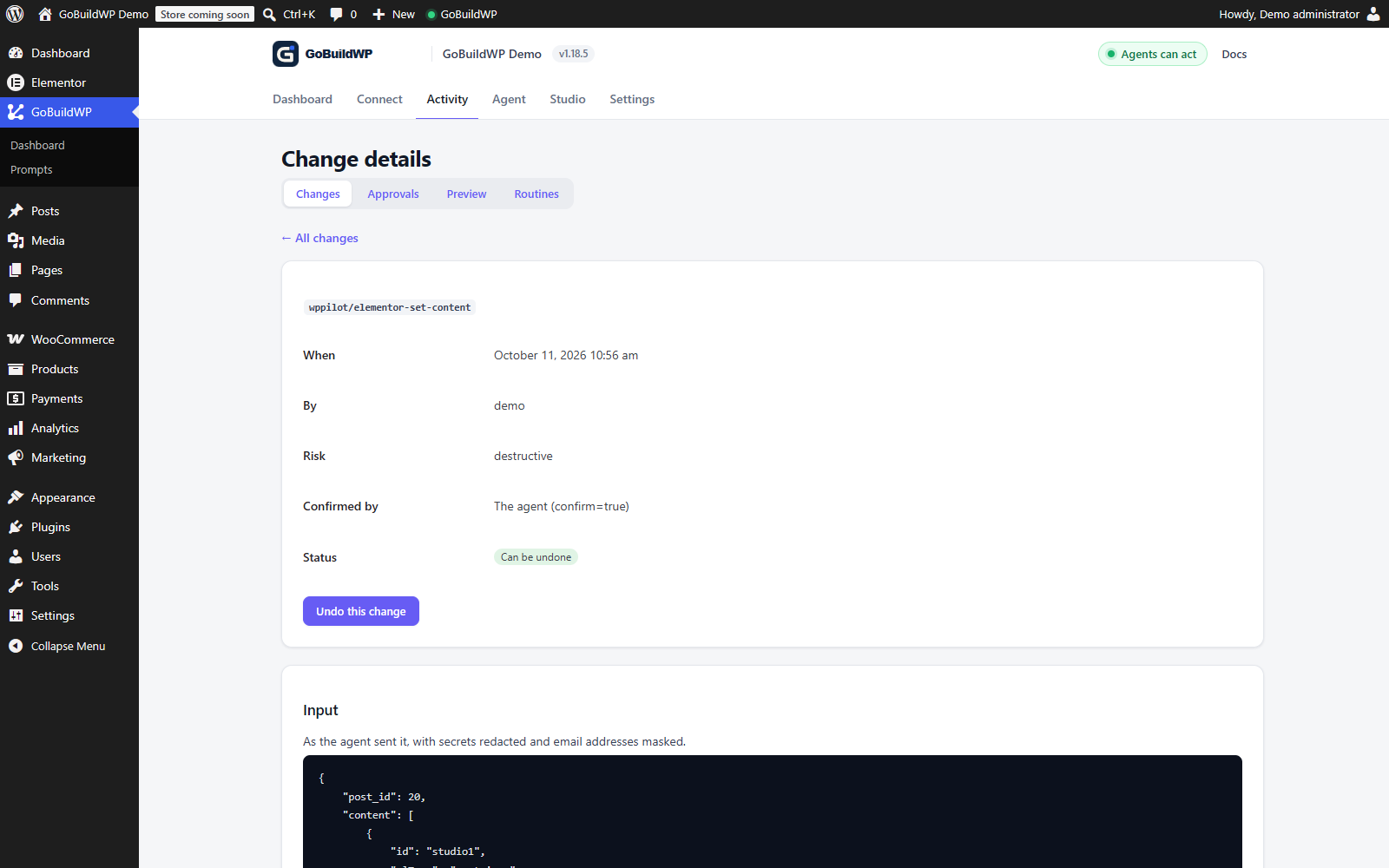 View full size ↗
GoBuildWP wrote a native Elementor document on this local demo. Its saved heading, text and button structure and the rendered draft were checked. Elementor 4.3.4; Free 1.18.5 with Pro 1.12.3 enabled for testing.
Actual product capture · local demoView the resulting Elementor draft ↗From MCP to an editable page
See an actual Elementor result.
A car showroom draft built through GoBuildWP MCP using native Elementor elements, real photography and a composition chosen by the AI.
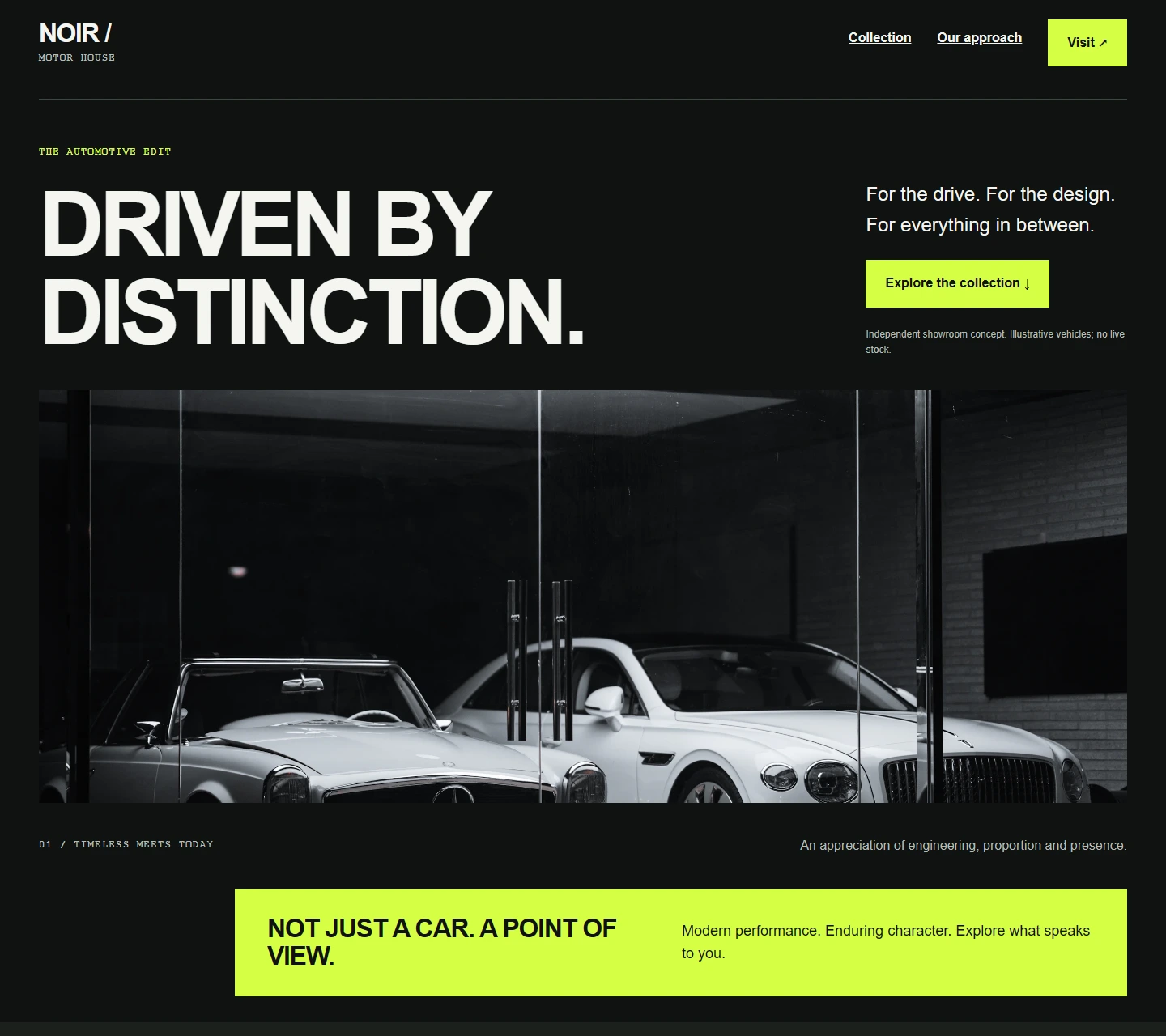
Reviewed at desktop, tablet and mobile widths, then refined through MCP. These screenshots show the resulting page; they are not a template or a guarantee of identical results.
Classic and atomic
Classic pages Elementor's own MCP cannot edit yet
Elementor's own MCP works on atomic V4 elements, and on 29 September 2026 Elementor still listed V3 layouts as coming. Most sites built before Elementor 4 are classic widgets, and an atomic-only tool can connect, report success and leave the page you asked about unchanged. Find out which kind of site you have before choosing a route.
Audit the whole site once
wppilot/elementor-audit-atomic-readiness reads every Elementor document, counts atomic and classic widgets, and names the widget types that would block an atomic-only tool, with the number of documents each one appears in.
Edit classic widgets where they are
The free abilities read and write v3 widgets and containers through the same calls they use for atomic elements, so a page nobody has converted is still editable today.
Test both endpoints before relying on coexistence
Separate endpoint registration is intended to permit coexistence. Test discovery and one authorized read on both installed endpoints before relying on it; a combined installation has not been verified here.
Undo from wp-admin, not from the chat
Each free Elementor edit is stored with a before-image. The Changes screen undoes one edit or a whole batch and checks the restored document against that image.
Elementor's own MCP
Official Elementor MCP and GoBuildWP, row by row
Elementor's MCP shipped inside Elementor 4.3.0 on 22 September 2026, a week after a public beta opened on 15 September; WordPress.org listed 4.3.2 as current on 29 September. It stays off until a site admin enables it, and it works on the Atomic Editor's V4 elements.
Since Free 1.13.0, GoBuildWP has a separate endpoint registration path when another plugin supplies the MCP Adapter. This source architecture is intended to support coexistence; discovery and an authorized read against each endpoint still need testing on the installed versions.
| Elementor MCP (official) | GoBuildWP | |
|---|---|---|
| Elementor version required | Elementor 4.3.0 or newer and WordPress 6.8 or newer, per Elementor's help article. | Elementor 3.6 or newer; the atomic abilities need Elementor 4.0. |
| Atomic v4 elements | Yes: pages, global classes, variables, states, breakpoints, theme parts and components. | Yes: atomic elements in Free; global classes, variables and interactions in Pro. |
| Classic v3 widgets | Not yet. Elementor lists Widget (V3) layouts as coming soon. | Yes, in Free, through the same calls used for atomic elements. |
| Auth | Site admins only. Generate Prompt creates an Application Password inside a setup prompt; Turn off MCP access disconnects it. | OAuth 2.1 with PKCE, an Application Password, or an access token with an expiry, an ability scope and a safety-profile ceiling. |
| Drafts and conflict detection | Nothing it creates publishes on its own, and it flags when the editor and the AI change one page at once. | Free writes to the document you name. Pro working copies edit a draft of a live page and publish it back with a rollback point. |
| Change log | Not documented for Elementor MCP. | Change ledger credited to each agent credential, with a redacted before and after, kept 90 days and exportable as CSV or JSON. |
| Undo | Not documented for Elementor MCP; Elementor's own revisions still exist. | Each free edit stores a before-image. The Changes screen undoes one edit or a batch and checks the result against that image. |
| Works with other plugins' abilities | Only with Elementor's separate Angie plugin, which names WooCommerce, Yoast and WPForms. | Yes: WordPress core abilities and 89 Pro integrations on one endpoint, each loaded only when its plugin is active. |
| Price | Free to connect; you pay your AI tool. Pro elements need an Elementor Pro plan. | 18 Elementor abilities free. Pro, from $39 a year, adds 52. |
Where the other route is stronger. Elementor's route is first-party. It keeps every result as a draft until a person publishes it, warns when the editor and the AI touch the same page, and its design-system coverage of classes, variables, states and breakpoints comes from the team that defines the atomic format. On a site that is atomic throughout, try it first.
Competitor cells come from the vendors' own pages, seen 29 September 2026; “not documented” means the source is silent, not that the feature is missing: Elementor MCP product page, launch post, beta post, help: connect an AI tool, Elementor on WordPress.org.
Worked example
Change a button colour on a classic v3 page
The calls an agent makes for "make the Book a demo button our accent green" on a page built from v3 widgets. All six are free abilities; the last two are how you back out if the green is wrong.
Representative sequence written from the ability reference, not a recorded run. Post ids, element ids and colour values come from your own site.
wppilot/elementor-check-setupReports the Elementor version and whether the atomic runtime exists, so the agent knows it is planning against v3 widgets.
wppilot/elementor-find-elementsSearches the page for button widgets whose text is Book a demo and returns each match's element id and path, without reading the whole document.
wppilot/elementor-get-widget-paramsReturns the settings that button actually sets rather than its full control list, so the colour control and its current value are in view.
wppilot/elementor-edit-elementMerges the new background colour into that one widget. An unknown control name or value aborts the write and returns the widget's schema.
wppilot/list-changesShows the edit in the change ledger with the credential that made it and whether it can be rolled back.
wppilot/rollback-changeIf the colour is wrong, restores the stored before-image once the call is confirmed, and reports success only when the page matches that image again.
Two MCPs on one site
Running Elementor's MCP and GoBuildWP side by side
The source registers separate endpoints, intended to let each route retain its own tools. Coexistence on your installed versions still needs discovery and an authorized read against both endpoints. The readiness audit identifies classic and atomic documents; keep overlapping edits out of the same session.
Permissions differ. Elementor's help article says the AI acts with the permissions of the user it connected as. GoBuildWP checks those capabilities too, then applies the site's safety profile on the server, so a Read Only connection stays read-only whatever the prompt asks for.
Guard rails on Elementor writes
- Schema-checked edits. Every setting is validated against the widget's own controls; an unknown key or enum value stops the write.
- No trash for elements. Elementor deletes elements permanently, so every elementor-delete-element call needs explicit confirmation.
- Design system held. Deleting a global class, variable or v3 colour is destructive, and Pro approvals can hold such writes for a person.
- Before-images. Free Elementor edits keep the document as it was, so one change can be restored from wp-admin.
Complete module
Every Elementor ability, Free and Pro
18 ship in the elementor-core module of the free plugin and 52 more load with a Pro licence, grouped here by what each one does to the site.
Reads · 28
| Ability | What it does | Read / Write / Destructive | Edition |
|---|---|---|---|
elementor-audit-atomic-readiness | Audit Elementor Atomic Readiness | Read | Free |
elementor-audit-output | Audit Elementor Output | Read | Free |
elementor-check-setup | Check Elementor Setup | Read | Free |
elementor-find-elements | Find Elementor Elements | Read | Free |
elementor-get-content | Get Elementor Content | Read | Free |
elementor-get-dynamic-tag | Get Elementor Dynamic Tag | Read | Pro |
elementor-get-form | Get Elementor Form | Read | Pro |
elementor-get-form-submission | Get Elementor Form Submission | Read | Pro |
elementor-get-page-settings | Get Elementor Page Settings | Read | Free |
elementor-get-popup-schema | Get Elementor Popup Schema | Read | Pro |
elementor-get-popup-settings | Get Elementor Popup Settings | Read | Pro |
elementor-get-schema | Get Elementor Widget Schema | Read | Free |
elementor-get-style-schema | Get Elementor v4 Style Schema | Read | Free |
elementor-get-variable | Get Elementor Global Variable | Read | Pro |
elementor-get-widget-params | Get Elementor Widget Params | Read | Free |
elementor-list-condition-schema | List Elementor Condition Schema | Read | Pro |
elementor-list-custom-code | List Elementor Custom Code | Read | Pro |
elementor-list-dynamic-tags | List Elementor Dynamic Tags | Read | Pro |
elementor-list-form-submissions | List Elementor Form Submissions | Read | Pro |
elementor-list-forms | List Elementor Forms | Read | Pro |
elementor-list-global-classes | List Elementor Global Classes | Read | Pro |
elementor-list-interactions | List Elementor Interactions | Read | Pro |
elementor-list-popups | List Elementor Popups | Read | Pro |
elementor-list-template-conditions | List Elementor Template Conditions | Read | Pro |
elementor-list-templates | List Elementor Templates | Read | Pro |
elementor-list-v3-styles | List Elementor v3 Global Styles | Read | Pro |
elementor-list-variables | List Elementor Global Variables | Read | Pro |
elementor-preview-template-conditions | Preview Elementor Template Conditions | Read | Pro |
Writes · 28
| Ability | What it does | Read / Write / Destructive | Edition |
|---|---|---|---|
elementor-add-element | Add Elementor Element | Write | Free |
elementor-add-interaction | Add Elementor Interaction | Write | Pro |
elementor-apply-dynamic-tag | Apply Elementor Dynamic Tag | Write | Pro |
elementor-apply-global-class | Apply Elementor Global Class | Write | Pro |
elementor-clear-document-cache | Clear Elementor Document Cache | Write | Free |
elementor-compile-spec | Compile Design Spec | Write | Pro |
elementor-create-global-class | Create Elementor Global Class | Write | Pro |
elementor-create-popup | Create Elementor Popup | Write | Pro |
elementor-create-v3-color | Create Elementor v3 Global Color | Write | Pro |
elementor-create-v3-typography | Create Elementor v3 Global Typography | Write | Pro |
elementor-create-variable | Create Elementor Global Variable | Write | Pro |
elementor-duplicate-element | Duplicate Elementor Element | Write | Free |
elementor-edit-element | Edit Elementor Element | Write | Free |
elementor-edit-form | Edit Elementor Form | Write | Pro |
elementor-edit-global-class | Edit Elementor Global Class | Write | Pro |
elementor-edit-v3-color | Edit Elementor v3 Global Color | Write | Pro |
elementor-edit-v3-typography | Edit Elementor v3 Global Typography | Write | Pro |
elementor-edit-variable | Edit Elementor Global Variable | Write | Pro |
elementor-fix-output | Fix Elementor Output | Write | Pro |
elementor-move-element | Move Elementor Element | Write | Free |
elementor-place-stock-image | Place Stock Image in Elementor | Write | Pro |
elementor-reorder-children | Reorder Elementor Children | Write | Free |
elementor-save-custom-code | Save Elementor Custom Code | Write | Pro |
elementor-save-template | Save Elementor Template | Write | Pro |
elementor-set-page-settings | Set Elementor Page Settings | Write | Free |
elementor-set-popup-settings | Set Elementor Popup Settings | Write | Pro |
elementor-set-template-conditions | Set Elementor Template Conditions | Write | Pro |
elementor-upload-svg | Upload SVG for Elementor | Write | Pro |
Destructive effects; inspect confirmation policy · 14
| Ability | What it does | Read / Write / Destructive | Edition |
|---|---|---|---|
elementor-apply-template | Apply Elementor Template | Destructive | Pro |
elementor-build-from-spec | Build Page From Spec | Destructive | Pro |
elementor-build-page | Build Elementor Page | Destructive | Pro |
elementor-create-atomic-widget | Create Elementor Atomic Widget | Destructive | Pro |
elementor-delete-custom-code | Delete Elementor Custom Code | Destructive | Pro |
elementor-delete-element | Delete Elementor Element | Destructive | Free |
elementor-delete-element-style | Delete Elementor Element Style | Destructive | Pro |
elementor-delete-global-class | Delete Elementor Global Class | Destructive | Pro |
elementor-delete-interaction | Delete Elementor Interaction | Destructive | Pro |
elementor-delete-page-content | Delete Elementor Page Content | Destructive | Pro |
elementor-delete-v3-color | Delete Elementor v3 Global Color | Destructive | Pro |
elementor-delete-v3-typography | Delete Elementor v3 Global Typography | Destructive | Pro |
elementor-delete-variable | Delete Elementor Global Variable | Destructive | Pro |
elementor-set-content | Set Elementor Content | Destructive | Free |
Names drop the wppilot/ prefix. The 18 marked Free ship in the free plugin; the other 52 need a GoBuildWP Pro licence. Supported writes are recorded in the change ledger with a redacted before and after, and reversible ones can be rolled back.
Where the work happens
Six Elementor abilities that carry most sessions
Reading a compact skeleton first, then one element by id, is what keeps an Elementor session small enough to review.
- Reads
- 28
- Writes
- 28
- Destructive effects
- 14
elementor-get-contentFreeReturns a compact skeleton first, then one element's full settings by id, instead of thousands of tokens of page dump.
elementor-edit-elementFreeMerges settings server-side. An unknown control or enum value aborts the write and returns that widget's schema inline.
elementor-audit-atomic-readinessFreeCounts atomic and classic widgets across every document and names the widgets an atomic-only tool cannot edit.
elementor-build-pageProComposes a whole page from one nested description; the document is validated before anything is written.
elementor-create-global-classProAdds a v4 global class checked against the style schema, so new sections reuse your design system.
elementor-set-template-conditionsProAssigns templates and theme parts, with a preview of where a condition will apply before it is saved.
Jobs to hand over
Elementor jobs worth giving an agent first
Edit an Elementor page without a licence
The Free abilities read the document, check which widgets and style properties this install offers, and add, edit, move, duplicate, reorder and delete elements.
Example prompt: Read this page's element tree, then rewrite the hero heading and swap the button below it for a wider one.
Build a section from your design system
With Pro, the agent lists global classes and variables first, then composes atomic widgets that reuse them instead of one-off inline styles.
Example prompt: List the global classes on this page, then rebuild the hero using only existing classes and variables.
Find out what an atomic-only tool can edit
Run the readiness audit before planning work, or when another tool reports success but the page did not change.
Example prompt: Audit this site for atomic readiness and tell me which widget types block the rest.
Roll a colour change across a page
Update a v3 colour or typography definition and let every bound element follow, rather than hand-editing each widget.
Example prompt: Show the v3 global colours, then change the accent definition instead of editing each widget.
Requirements and limits
What an Elementor site needs before the first prompt
Requirements
- WordPress
- 6.9 or newer, PHP 8.0 or newer.
- Elementor
- 3.6 or newer. Atomic (v4) abilities need Elementor 4.0.
- Elementor Pro
- Not required. Pro-only features such as forms report as unavailable without it.
- GoBuildWP
- Free for 18 editing abilities. A Pro licence adds 52.
- Current versions
- GoBuildWP Free 1.18.6 and Pro 1.12.4.
Limits
- A valid response is not a finished page. Responsive behaviour, fonts and interactions still need review in the Elementor editor.
- Free can inspect and edit elements or write a complete replacement tree with elementor-set-content. Pro adds compact-description composition through elementor-build-page, reusable templates, popups, forms, dynamic tags and shared design controls. Free's separate build-site-header uses Elementor Pro when building its Theme Builder header.
- Layout formats Elementor does not expose through a supported schema fail closed rather than being guessed at.
- Document cache clearing is scoped to the documents you name, not a site-wide purge.
First run
Install GoBuildWP Free
WordPress 6.9+ and PHP 8.0+; the site becomes its own MCP endpoint.
Connect a client
OAuth 2.1 in the browser, or an Application Password where the client cannot sign in.
Audit before editing
On a Read Only connection, run the atomic readiness audit to see how much of the site is v3.
Edit and undo once
Switch to Production Safe, change one element on a draft, then undo it from the Changes screen.
Setup guide · OAuth 2.1 · Application Passwords · Client guides
Checking and repairing what an agent built
Grade how editable an Elementor page is
From GoBuildWP Free 1.18.0, an audit reads a page's saved Elementor tree, classic or atomic, and scores it from 0 to 100 with a fix for each finding. It looks for what makes a page look finished and edit badly: layout written into HTML widgets, scripts in the content, shortcode widgets, widgets whose plugin is no longer active, inline styles and custom CSS, fixed colours where the global palette belongs, containers nested more than six deep, and empty containers.
Each kind of finding is capped, so one problem cannot sink a score on its own. The exception is deliberate: a page that is a single HTML widget holding the whole layout can no longer grade as good. It scores fair at best, with that fix listed first, because it is the page that looks done in the browser and cannot be edited in the panel.
Turn HTML widgets back into Elementor widgets (Pro)
GoBuildWP Pro 1.12.0 repairs the most common finding. It reads simple markup inside an HTML widget and rebuilds it from the widgets a person would have used: headings become Heading widgets, paragraphs and lists one Text Editor, button-styled links Buttons, and images Image widgets, linked to the media library when the file is the site's own. Plain wrapper divs are opened up.
It leaves scripts, styles, iframes, forms, SVG, video and tables where they are and says why for each. Inline styles, classes and IDs are dropped on purpose, so plan to restyle the result from the kit. It runs as a dry run unless told to apply, and an applied repair stores the page's previous Elementor data in the change log, so the Changes screen can put it back.
Older pages built with sections and columns
Pages from before Elementor's containers are built from sections and columns. From Free 1.18.0, a page read with elementor-get-content can be written back with elementor-set-content: sections and columns validate against their own Elementor controls instead of failing as an unknown widget type, and column widths are kept.
Three smaller fixes from the same client reports: the form widget's Reply-To setting accepts a real field ID, rich-text fields such as the Text Editor accept paragraphs and lists, and rewriting a Theme Builder template keeps its template type, so a header stays a header and its display conditions keep placing it.
When the change comes through Elementor's own MCP server
Elementor 4.3 ships an MCP server of its own, and an agent connected to it does not pass through GoBuildWP. From Free 1.18.0, mapped element, composition, settings, publication, class and variable writes can be recorded with supported partial snapshots. Target resolution, retained capture and a matching handler are required; inspect the actual entry and verify the restored document separately. This source mapping is not an executed coexistence or restoration test. A page it creates, a component or a default style is recorded with the reason it cannot be put back; trash a created page to undo it.
On WordPress 7.1 you can go further under Settings, Other MCP servers. With Approvals for their writes switched on, those writes follow the site's safety profile, a destructive one waits for a person to approve it on a one-time wp-admin link, and Pro's approval queue and backup gate apply. It is off by default, because it changes how agents on that server behave; reads are never held.
A site header the AI designs and GoBuildWP builds
From GoBuildWP Free 1.18.0, wppilot/build-site-header handles the part of a header that is plumbing rather than design. There is no built-in layout: the AI reads the site first (title, tagline, logo, the colours and fonts the home page is actually painted with, each language's menu, whether there is a shop) and designs a header for this brand, as it designs the rest of the site.
On Elementor Pro, GoBuildWP saves that design as a Theme Builder header on every page, one per language when Polylang is active, swapped in by language. It fills in each language's menu, a styled language dropdown instead of Polylang's bare list, and the WooCommerce cart icon when there is a shop. Existing conditioned headers are kept with their conditions removed. Inspect the returned change entry and before-image before requesting recovery, because a saved record alone does not establish that the previous header is restorable.
Every design is checked twice. Before saving: a missing menu button for phones, a raw language list, a cart without WooCommerce, an image with no picture, links to nowhere, rows that would wrap on phones, and WCAG AA contrast for the colours the design sets. After saving, selected language home pages are fetched for supported server-side checks. Detected failures can trigger attempted restoration unless keep_on_fail is true; inspect that result. HTTP and stored-state checks do not exercise every responsive menu or interaction. Problems come back against the element that caused them, with what to change, so the AI fixes its own design; GoBuildWP never rewrites it. It also returns short-lived probe links the AI can open in a browser at 1440, 768 and 390 px to see wrapping, overlaps and the menu button opening. Building needs confirmation. wppilot/rollback-change requests supported recovery; verify its result and inspect each affected language page in a browser.
FAQ
Elementor MCP questions, answered
Other builders: Bricks, Breakdance, Divi, Oxygen, Beaver Builder, WPBakery, Flatsome, Etch, Mosaic.
What is Elementor MCP?
Elementor MCP lets an AI client work with native editable content. GoBuildWP Free can inspect and edit elements or write a complete tree; Pro adds higher-level composition and shared design operations. Verify the saved structure in Elementor and the rendered page in a browser. The MCP server itself is GoBuildWP Free running inside your WordPress install, which includes 18 Elementor abilities; Pro adds 52 more.
What are the requirements for Elementor MCP?
WordPress 6.9 or newer, PHP 8.0 or newer, Elementor 3.6 or newer and the free GoBuildWP plugin. The atomic abilities need Elementor 4.0, and Elementor Pro is optional: where a feature exists only in Elementor Pro, such as its forms, the ability reports it as unavailable instead of writing a partial result. Elementor's own MCP needs Elementor 4.3.0 or newer.
Which AI clients can use it?
Any MCP client that can reach the site. GoBuildWP's Connect screen generates a configuration for each of 27 clients, including Claude Code, Claude Desktop, ChatGPT, Codex, Cursor and VS Code. Web clients such as ChatGPT sign in with OAuth and need the site on public HTTPS.
How do I disconnect a client or revoke its access?
For an OAuth connection, revoke the client on WordPress's Connected Apps screen and its tokens stop working at once. For an Application Password, revoke that password on the user's profile. Revoking ends new calls only: it does not undo work already in the change ledger. Elementor's own MCP has a Turn off MCP access button for the same job.
Is Elementor MCP free?
Editing and full-tree writing are included. 18 Elementor abilities ship in GoBuildWP Free without a GoBuildWP account. Configured request and write limits still apply. Pro, from $39 a year, adds 52 for whole-page composition, templates, popups, forms, dynamic tags, global classes and variables. Elementor's own MCP is also free to connect, and with either one you pay your AI provider separately.
Does it work on classic v3 pages?
Yes. The free abilities read and write v3 widgets and containers with the same calls they use for atomic elements, so a page nobody has converted is editable today. That is the main gap in Elementor's own MCP, which on 29 September 2026 edited Atomic (V4) elements and listed V3 layouts as coming.
Can Elementor's MCP and GoBuildWP run on the same site?
Separate endpoint registration is intended to support that setup, but it is not a verified coexistence result for every version combination. On staging, test discovery and an authorized read on each endpoint. Choose which route edits each document, keep credentials separate and inspect the actual ledger entries.
Can the agent break my global design system?
Global classes, variables and v3 colours are site-wide, so deleting one is marked destructive and needs explicit confirmation. They are Pro abilities, and Pro's approval policy can make them wait for a person: hold every write from the agent's credential, or add a hold rule for just the design-system abilities.
Try it on one classic Elementor page.
Connect in Read Only, run the readiness audit, then make one reversible edit to a v3 widget and undo it from the Changes screen.