Free vs Pro
GoBuildWP Free vs Pro. Choose by the work, not the tier.
GoBuildWP Free vs Pro comes down to how deep the work goes: Free covers WordPress itself, the whole safety layer and the basics of the store, SEO, form, backup and security plugins most sites run, and Pro goes deep into the plugins that store their own data. Free can write a complete Elementor tree. Pro adds 89 plugin integrations, higher-level Elementor composition, templates, shared design controls, human approvals and memory on the same connection.
Free: $0, no account, Pro: from $39/year, Same Pro features on every plan
At a glance
Pro adds to Free| Item | Free | Pro |
|---|---|---|
| Price | $0, GPL | From $39/year |
| Typed abilities | 232 | + 1,148 |
| Elementor abilities | 18 | + 52 |
| Plugin integrations | Basics for 19 plugins | 89 |
| Approval queue | No | Yes |
| Guarded updates with attempted file recovery | No | Yes |
| Audits | On demand and scheduled | Plus content fixes |
| Undo | One change or a whole session | The same |
| Needs | WordPress 6.9+ | Free + a licence |
Choose your Free edition
Free tool counts and downloads on this website refer to GitHub Free. It includes developer code, filesystem and WP-CLI tools, signed upload and admin-access links, and the sandbox. WordPress.org Free omits those twelve tools and their sandbox. WordPress.org availability is pending directory approval.
Install one Free edition. Pro is a separate plugin requiring compatible Free and a valid Pro licence. Pro supplies any of those tools missing from Free, while existing Free tools stay registered once. Site permissions, safety profiles and confirmation still apply. Without Pro eligibility, Pro-owned tools are unavailable; tools supplied by GitHub Free remain available under site policy.
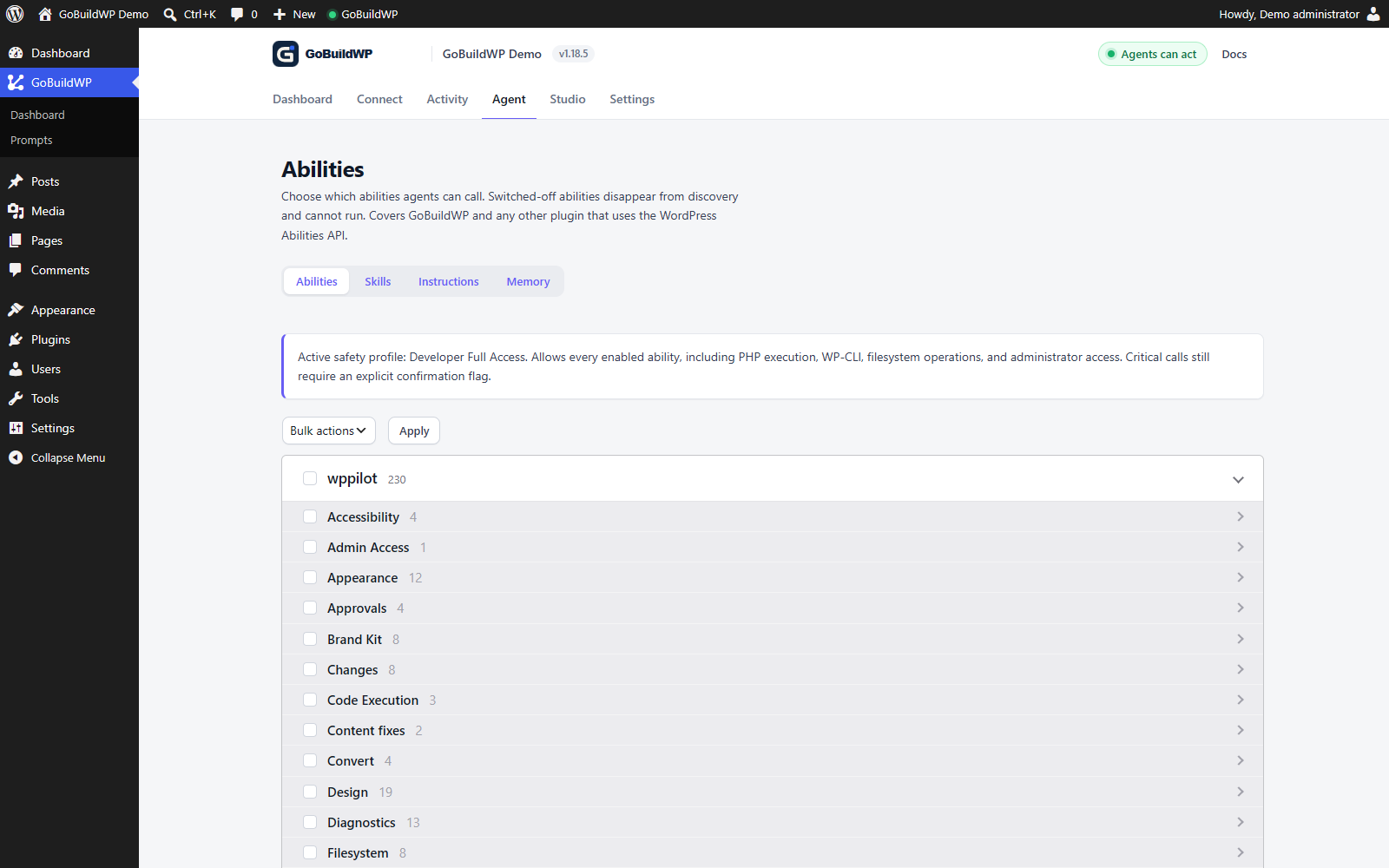 View full size ↗
The catalogue on a local Free 1.18.5 / Pro 1.12.3 test installation. Available tools depend on the active plugins, permissions and edition; this is not a complete edition-comparison screenshot.
Actual product capture · local demoSide by side
Everything in Free is also in Pro
An included capability still needs the right WordPress permissions, enabled abilities and dependencies. Pro also needs Freemius premium-code eligibility and the free plugin.
| Capability | GoBuildWP Free | GoBuildWP Pro |
|---|---|---|
| Added by Pro | ||
| 89 integration entries with Pro capabilities | Not included | Included |
| Additional builder modules and advanced authoring | Not included | Included |
| Page builder to page builder conversion | Not included | Included |
| Full store operations: variations, bulk prices, orders, refunds, coupons, shipping, tax | Not included | Included |
| SEO in depth: focus keywords, schema, redirects, term SEO, bulk meta | Not included | Included |
| Form editing, full entry values and exports | Not included | Included |
| Custom-data and theme modules | Not included | Included |
| Persistent memory | Not included | Included |
| Human approval queue | Not included | Included |
| Approval email notifications | Not included | Included |
| Plugin and theme file updates with a bounded rollback attempt | Not included | Included |
| Backup Now: UpdraftPlus, BackWPup, All-in-One WP Migration | Not included | Included |
| Require a fresh backup before destructive calls | Not included | Included |
| Security plugins: Wordfence, Solid Security hardening, IP blocks and scans | Not included | Included |
| Content fixes from the content audit; supported recovery per item | Not included | Included |
| MCP Apps diff, screenshot slider, search-replace and approval cards | Not included | Included |
| Integration health and isolated loading | Not included | Included |
| HTML widgets turned into native Elementor widgets, with undo | Not included | Included |
| TranslatePress string translations, 100 at a time, with undo | Not included | Included |
| Daily and monthly Chat token limits per person | Not included | Included |
| GoBuildWP Cloud reviewed bulk updates, backup options and eligible file recovery | Not included | Included |
| GoBuildWP Cloud safety policies and a Search Console report across sites | Not included | Included |
| In both editions | ||
| WordPress-native MCP server | Included | Included |
| OAuth 2.1 with PKCE | Included | Included |
| Application Password connection | Included | Included |
| 27 current client-specific connection paths | Included | Included |
| In-dashboard AI chat through a configured provider | Included | Included |
| Three server-side safety profiles | Included | Included |
| Per-ability controls | Included | Included |
| Critical-action confirmation | Included | Included |
| Rate limiting per credential | Included | Included |
| Redacted change ledger | Included | Included |
| Preview a write before it happens | Included | Included |
| Rollback for supported changes | Included | Included |
| Gutenberg staged workflow | Included | Included |
| Diagnostics and audits | Included | Included |
| Elementor atomic readiness audit | Included | Included |
| Accessibility, alt-text and content audits | Included | Included |
| MCP Apps preview card with Apply | Included | Included |
| Screenshot capture and visual comparison | Included | Included |
| Developer file, WP-CLI, and sandbox surfaces | Included | Included |
| Local stdio connection through WP-CLI | Included | Included |
| Undo or redo supported session changes; unsupported/conflicting items can refuse | Included | Included |
| WooCommerce reads and one product's name, prices and stock | Included | Included |
| One post's SEO title, description and robots in 7 SEO plugins | Included | Included |
| Forms and entries read, contact details withheld | Included | Included |
| Backup and security plugin status | Included | Included |
| Scheduled audit routines with emailed reports | Included | Included |
| Posts, pages and custom post types | Included | Included |
| Categories, tags and public taxonomies | Included | Included |
| Media library, featured images and alt text | Included | Included |
| Comments and moderation | Included | Included |
| Navigation menus and theme locations | Included | Included |
| Revisions and revision restore | Included | Included |
| Privacy-minimized user reads and allowlisted settings | Included | Included |
| MCP 2026-07-28 and 2025-11-25 | Included | Included |
| Client ID Metadata Documents for OAuth | Included | Included |
| AI-designed site header, checked before saving and on the served page | Included | Included |
| Block theme Global Styles, templates, patterns and navigation menus, with undo | Included | Included |
| Elementor editability audit, scored 0 to 100 with a fix per finding | Included | Included |
| Change log and undo for writes made through Elementor's and WooCommerce's own MCP servers | Included | Included |
| Chat token meter per person | Included | Included |
| GoBuildWP Cloud: each site's pending updates and newest backup on one screen | Included | Included |
| Industry briefs in the prompt library: 10 in Free, 300 in Pro | Included | Included |
Not sure an operation is covered? Search the ability reference
Where the abilities are, by edition
| Module or area | Edition | Abilities |
|---|---|---|
| GoBuildWP Free, by module: 232 abilities | ||
| WordPress core | Free | 69 |
| Platform and diagnostics | Free | 37 |
| Design documents | Free | 26 |
| Elementor (free) | Free | 18 |
| Block editor | Free | 15 |
| WooCommerce basics | Free | 13 |
| Block themes | Free | 11 |
| Scheduled routines | Free | 5 |
| Skills | Free | 4 |
| Accessibility | Free | 4 |
| Security plugins basics | Free | 3 |
| AIOSEO basics | Free | 2 |
| Contact Form 7 basics | Free | 2 |
| Gravity Forms basics | Free | 2 |
| Rank Math basics | Free | 2 |
| SEOPress basics | Free | 2 |
| WPForms basics | Free | 2 |
| Yoast SEO basics | Free | 2 |
| PageSpeed | Free | 2 |
| Backups basics | Free | 2 |
| Forminator basics | Free | 2 |
| Slim SEO basics | Free | 2 |
| SmartCrawl basics | Free | 2 |
| The SEO Framework basics | Free | 2 |
| Site header | Free | 1 |
| Added by GoBuildWP Pro, by area: 1,148 abilities | ||
| Page builders | Pro | 407 |
| Forms | Pro | 168 |
| Content modelling | Pro | 158 |
| Themes and blocks | Pro | 155 |
| SEO | Pro | 64 |
| Commerce | Pro | 56 |
| Events and membership | Pro | 52 |
| Multilingual | Pro | 43 |
| Platform | Pro | 25 |
| Developer tools | Pro | 11 |
| Site maintenance | Pro | 9 |
Counted from the same ability reference the documentation is built from. A Pro area's abilities load only for the plugins that are active on your site.
When Pro is worth it
Stay on Free until the work needs a plugin
Most teams should prove one read and one reversible draft on Free first. These are the signs it is time to add Pro.
- Free is enough
You edit WordPress content
Posts, pages, media, menus, comments, revisions and the block editor are all in Free, with previews, the ledger and rollback.
- Free is enough
You edit Elementor pages
Reading, editing and replacing a complete Elementor tree is in Free, with 18 abilities. Pro adds composition from compact descriptions, Elementor templates and shared design controls.
- Free is enough
You check on a store, an SEO plugin or a form
Reading WooCommerce orders, fixing one product's price or stock, rewriting a post's Yoast or Rank Math title, reading form entries with contact details withheld, and checking the last backup are all in Free.
- Pro is worth it
The work goes deep into a plugin
A variable product, a refund, a bulk price change, schema or redirects, a form definition or an ACF field group needs Pro's full module for that plugin.
- Pro is worth it
Nobody watches every session
The approval policy can hold writes for a person. Safe updates attempt file rollback after failed checks; database migrations and external effects need separate recovery, and rollback can fail. A fresh-backup rule and confirmed hardening plans add checks where supported.
Choose by the operation
What can you build with Free?
Page size does not define the edition. Free can create content and write a complete Elementor tree; Pro adds composition tools and deeper plugin workflows.
| Task | Edition | What the operation does |
|---|---|---|
| Create a WordPress page | Free | create-post can create a draft; inspect the saved status before proceeding. |
| Supply a complete Elementor tree | Free | elementor-set-content writes a prepared native tree, including nested sections. It can replace a whole page; it is not limited to single-element edits. |
| Compose Elementor from a compact description | Pro | elementor-build-page translates nested type/settings/children descriptions into the document. This is a higher-level authoring operation, not the only way to write a full page. |
| Reuse Elementor templates and shared styles | Pro | Dedicated template, condition, global-class and variable operations. Installed Elementor features and licences still apply; shared changes can affect multiple pages. |
| Operate additional page builders | Pro | Use the specific Bricks, Divi, Breakdance or other supported module. Core WordPress block workflows remain in Free. |
| Create a form and configure its workflow | Pro | For example, wpforms-create-form needs the supported form plugin. Free includes selected form reads; notification recipients, delivery and integrations need separate review. |
A connected AI client, hosting, assets and required plugins are supplied separately. Review saved content in its native editor and test the rendered result. Undo covers supported writers, not every operation or external effect.
Deciding with evidence
Run the job on Free first and watch where it stops
The cheapest way to settle GoBuildWP Free vs Pro is to give your AI client the real task on a staging copy with only the free plugin installed. Free is not a trial, so nothing expires while you test, and the point where the agent stops is usually the answer. Three kinds of stop are worth telling apart:
- The agent finds no ability for the plugin's own data. It can edit a post but not the Elementor widget tree beyond the free Elementor set, the form's fields, or the SEO plugin's schema and redirects. That depth is what Pro's integrations add, and the ability reference lists exactly which abilities belong to which edition.
- The agent can do the work but you want a person to review it. Free's person-approves mode covers confirmation-gated calls, and optional previews cover supported write types. Ordinary writes need a per-ability confirmation rule or Pro's approval policy if they should wait too. Pro adds a queue and email notifications for held calls.
- The task needs to remember the site between conversations, such as brand rules or which pages are off limits. Persistent memory is Pro-only; on Free the context has to be given again each time.
What changes on the site when Pro is added
Pro installs next to Free rather than replacing it, and it needs Free active to load at all. The connection, credentials, safety profile and change ledger stay exactly as they were, so the AI client keeps its configuration and simply sees more tools after you reconnect it. Nothing is migrated, and Pro only loads integrations for plugins that are actually active on that site, so a site with Elementor and WooCommerce does not gain abilities for builders it does not run.
Deactivate Pro and the site returns to the free set. Plan for approval policy first: Free's "A person approves" mode holds confirmation-gated calls, while ordinary writes need per-ability confirmation rules if they should wait too. Pro that remains active without paid-code eligibility can still refuse writes covered by its persisted approval hold. Re-check policy and test one permitted call before resuming an unattended workflow.
If the deciding factor is the number of sites rather than the features, look at the pricing page instead of this comparison: every tier carries the same Pro plugin features, and the tiers differ in Pro site activations and in their Cloud site and seat allowances.
FAQ
Deciding between the editions
Do I need GoBuildWP Pro?
Choose Pro for operations beyond the Free reference or for its queue, memory and other paid controls. Free already supports human confirmation for confirmation-gated calls, plus the connection, safety profiles, supported previews and recovery, Elementor editing, audits and selected plugin basics. Ordinary writes need a per-ability confirmation rule or Pro approval policy to wait too. Look up the exact operation before buying.
Are the audits in Free or Pro?
Running and scheduling the accessibility, alt-text and content audits are Free. Pro adds selected content fixes. Recovery depends on the writer; inspect each result rather than assuming every fix is undoable.
What happens to the Free basics when Pro is installed?
Pro 1.12.4 still carries its own, fuller copies of the 45 abilities that moved into Free, under the same names. Pro registers first, so its copy answers and the free one stands aside; nothing changes on a site that already runs Pro.
Can I edit Elementor with Free?
Yes. Free includes 18 Elementor abilities for inspecting schemas, editing elements, writing a complete element tree and managing page settings. Pro adds 52 authoring abilities, including higher-level composition, templates and shared design controls. Both can affect an existing live page; request a new draft for a separate review.
What changes between paid tiers?
The number of sites you can activate, and the GoBuildWP Cloud allowances that come with the tier. Single Site, 10 Sites, 100 Sites and Unlimited Sites include the same Pro plugin capabilities.
Does a workflow built on Free keep working after upgrading?
Usually, but test it. Pro registers additional abilities on the same connection, and where it has a fuller copy of a Free basic, such as the WooCommerce product editor, it registers under the same name, so the name a workflow calls still exists. Pro's copy can accept more inputs and return a fuller result, with its own recovery rules, so re-read the schema and run a saved workflow on staging once before relying on it.
What happens if Pro becomes inactive?
Paid modules stop loading while the Free connection remains. Existing WordPress content and plugin records stay in place. Review automations that depend on paid abilities before disabling Pro.
Start with a task you can check.
Read the target, make one permitted change, then inspect the saved result. Add Pro when the task needs a paid capability.