Build with AI
Build a WordPress website with AI, in the builder you already own.
Choose a brief, add your content and connect your AI to the builder already on your site. GoBuildWP can create supported native pages and content for you to review in WordPress. Start with drafts; approve shared navigation, templates and settings separately.
Free pages and Elementor trees · Pro composition and additional modules, 89 integrations, Pricing
Representative session. Ability names and profile behaviour match GoBuildWP Pro 1.12.4; the business and its content are examples.
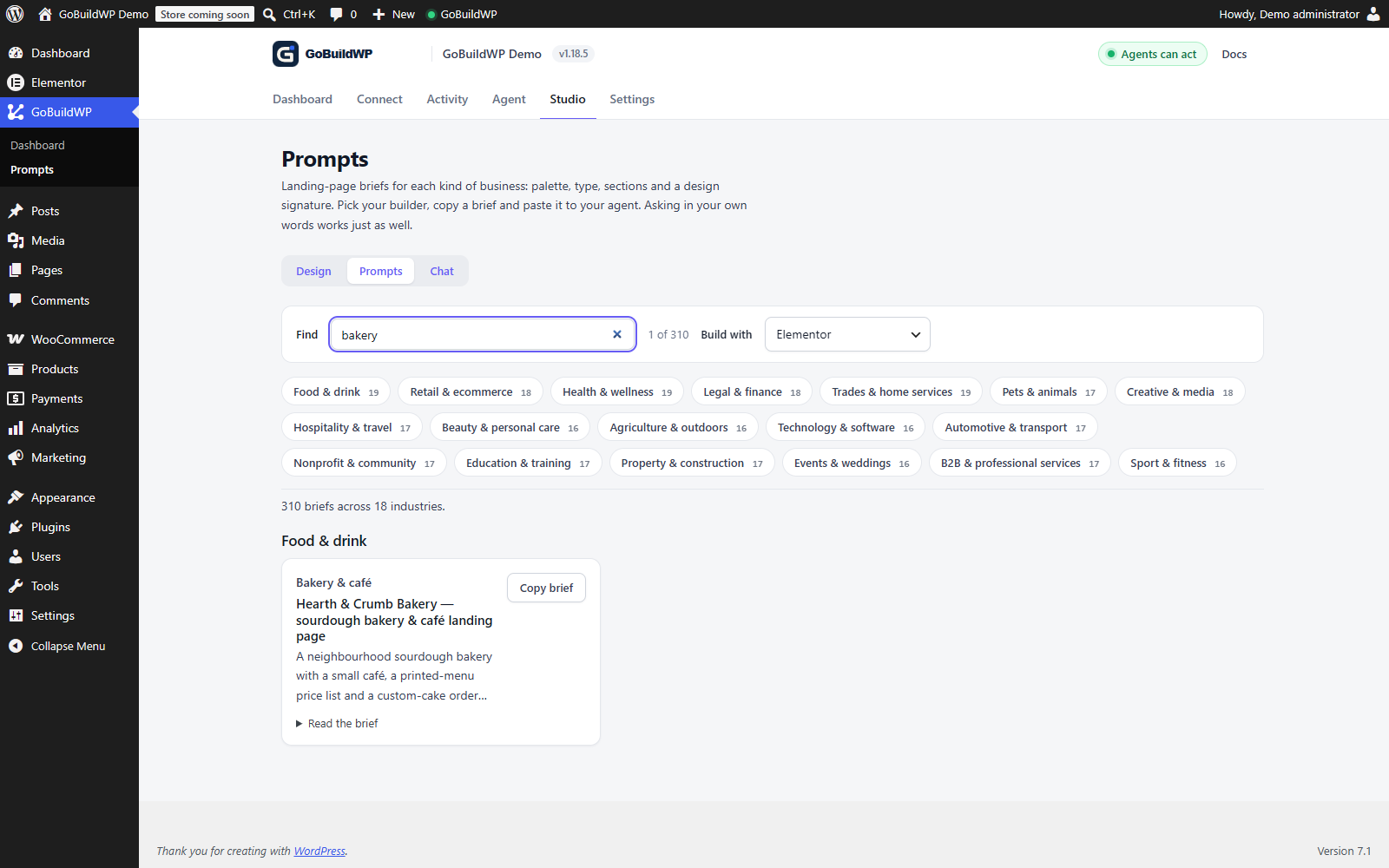 View full size ↗
The plugin's searchable briefs provide a starting point for your own requirements. This is the working brief library, not a claim that the example website has been generated.
Actual product capture · local demo8 starting points
Pick what you are building
Each brief supplies editable starting text, proposed steps, plugin dependencies and decisions to review. Check the client's actual calls and configure server approval where a human checkpoint is required.
- Online course websiteTurn your teaching outline into a Tutor LMS draft with topics, lessons and quizzes, then build the pages that introduce it.
- WooCommerce storeCategories, global attributes, variable products, variations, images and shipping classes, created from one catalogue brief.
- Business websiteDraft pages plus separately reviewed templates, navigation, front-page settings and a contact form whose delivery you test.
- Landing pagesCampaign pages composed from your existing classes and variables, so variant six still looks like variant one.
- Blog and content systemThe content model, taxonomy, archive template and per-post SEO. The system a blog runs on, not a single post.
- Portfolio siteProject post type, field group, archive and single templates, galleries with credits. The shell around your work.
- Membership and events siteThe site around your membership, course or events plugin: pricing pages, gated templates, event entries, enrolment admin.
- Forms and lead captureSix form plugins, built from their real field schemas: fields, notifications, confirmations, conditional logic.
AI site builders vs your own builder
Is this an AI website builder?
Yes. GoBuildWP connects a supported AI client to your own WordPress site so it can build and edit pages using supported WordPress tools and builders. You provide the brief, hosting, assets and required plugins, then review the result before launch. A complete build involves multiple tool calls, checks and human decisions; one prompt does not guarantee a production-ready site.
| Tool | How a site starts | Where the result lands | Hosting | Free tier and price |
|---|---|---|---|---|
| Elementor AI (Angie) | Describe a page and it builds the sections, content and styling; a screenshot can seed a design system of colours, fonts, classes and variables | Native Elementor content, reviewed and refined in the Elementor editor | Not stated on the page | Free plan with daily-renewing AI credits |
| ZipWP | A complete, live WordPress site from a plain-English description, which the vendor says takes under 90 seconds | Designs auto-selected from 900+ templates; the page does not name the builder | Managed hosting and a free domain included | Free for 3 AI site generations; Starter $29 a month; Lifetime $399 once |
| WordPress.com AI website builder | Describe the site and answer a few follow-up questions; the vendor says most sites are ready in under 5 minutes | The WordPress block editor, or keep chatting with the AI to refine | A site on WordPress.com | Not on the builder page; plugins need a paid plan from Personal up |
| SeedProd AI | Describe the business; the vendor says a complete site with pages, copy and images in 60 seconds | SeedProd's drag-and-drop builder and the SeedProd theme | Not stated on the page | 3 sites free with no card; the page does not give the Pro price |
| GoBuildWP with your AI client | A written brief in Claude, ChatGPT, Cursor or another MCP client, run as many separate ability calls | Native documents in your installed builder. Request drafts for new pages; existing and shared changes may affect live content. | Your own WordPress host; GoBuildWP hosts nothing | Free core pages, Elementor tree writing, block theme templates and the site header; Elementor Theme Builder footers and conditions, other builders, commerce and form building need Pro |
Each vendor row is what its own page said on 29 September 2026; the timings are the vendors' claims, not measurements of ours. Where they are stronger is starting from nothing: ZipWP and WordPress.com include the hosting, and the three whole-site builders put a first draft in front of you in minutes, before GoBuildWP would even be connected. Angie works inside the Elementor editor and can draft a design system from a screenshot. GoBuildWP is for the site and builder you already run, where the brief has to fit the classes, templates and plugins already there.
Why it holds together
Use the builder's native structure, then verify the result
Schemas help preserve the builder's document model. They do not establish layout quality or compatibility on every installed version: inspect the native editor and rendered pages before launch.
It writes the document, not the markup
A builder stores a structured tree: elements, shared classes, template rules, dynamic bindings. GoBuildWP writes into that tree through the builder's own schemas, so the page still opens in its own editor.
It reuses your design system
Ask the client to read supported global classes, variables and theme styles before composing a page. Reuse the reviewed tokens and compare the saved document and rendered result; a brief does not guarantee consistency.
It leaves evidence
Every write is a typed call with a ledger entry. When something looks wrong you can see which ability did it, and roll back the reversible ones, rather than guess at a diff.
Who is driving
Same abilities, three very different people
The policy lives on your site rather than in the client, so the abilities behave the same whoever is asking.
You have never used MCP
Stay in plain language. Install one plugin, connect the app you already talk to, and review drafts.
For beginnersYou live in Claude Code or Cursor
Typed abilities, real schemas, OAuth 2.1 with PKCE, and WP-CLI behind an explicit profile.
For developersYou ship client sites
Per-client credentials, an approval queue, change evidence and briefs you reuse across projects.
For agencies
Planning a whole build
Which edition each brief needs
Most people who set out to build a WordPress website with AI want to know early whether the free plugin is enough. It depends on the brief more than the size of the site.
- Business website: page content in Elementor or the block editor, menus, front page settings and the site header (build-site-header) work on Free, as do a block theme's footer and other template parts. Elementor Theme Builder footers and their display conditions, global classes and variables, other builders and form building need Pro.
- Landing pages: a single Elementor page is Free; shared classes, variables and reusable templates are Pro.
- WooCommerce store: reading products and editing an existing product's name, description, prices and stock is Free; creating a catalogue, variations and bulk changes are Pro.
- Blog and content system and portfolio site: post types, taxonomies and field groups come from Pro fields modules; posts, terms and per-post SEO fields are Free.
- Forms and lead capture: listing forms and entries is Free on several plugins; building them is Pro.
- Membership and events: every membership, course and events module is Pro.
Combining briefs into one project plan
A real site is often two or three of these at once: a business site with a blog, or a shop with lead capture. Run them in dependency order rather than all together. Design system and site structure first, because every later page references them. Then content models, because templates bind to their fields. Then pages and products. Forms and anything that touches people or money go last, when the pages they sit on have been reviewed.
Keep one handover document across the briefs: the IDs of everything created, every [CONFIRM] still open, every new global token, and every live setting you approved. That list is also what you re-check when the staging work is repeated on production.
Running a brief from ChatGPT
To build a WordPress website with ChatGPT, add GoBuildWP to ChatGPT as a custom MCP server with OAuth sign-in, then select it with @ in a new chat and paste one brief at a time. The ChatGPT connection guide walks through it. Use your site's OAuth endpoint, which ends in /wp-json/mcp/wppilot-oauth, or GoBuildWP Cloud at https://app.gobuildwp.com/mcp.
Two limits come from ChatGPT rather than the plugin. Whether you can add a custom MCP server at all depends on your ChatGPT plan and workspace policy, so check that before planning around it. On a direct connection, ChatGPT calls your site from OpenAI's servers, so a site on localhost or behind a staging password cannot be reached; use a public HTTPS staging copy. The editions, approvals and undo limits on this page are the same whichever client sends the brief.
Before the first brief: a pre-flight list
None of this is specific to GoBuildWP, but skipping it is how AI-assisted builds go wrong in ways that look like product failures.
- A staging copy of the site, with the same builder, theme and plugin versions as production.
- A dedicated connection for the agent. GoBuildWP only accepts a user with manage_options (a super admin on multisite), so a lower role cannot connect; narrow the agent with its own access token's scope and profile ceiling instead.
- A deliberate safety profile: Production Safe for anything resembling a live site, Developer Full Access only on staging and only if the brief needs plugin installation or code. Production Safe still allows deletes that carry a confirmation flag, which the AI client sets itself by default; turn on "A person approves" or the Pro approval queue if a person must approve them.
- A recent backup you have checked, separate from the change ledger.
- The facts the brief depends on, collected from the business rather than left for the model to fill.
- Time booked for review in the native editor and a browser at phone and desktop widths.
What a realistic schedule looks like
Every brief on this page is a sequence of governed calls, paced by a per-credential write limit, so the run takes as long as the work it describes. A short site arrives over a sitting you can watch in the change log; a large catalogue or a long archive of posts is a series of runs across several days. The model writing faster does not change that, because each call is checked and recorded before the next one starts.
In practice the agent's run is rarely the longest stage. Gathering facts, review and launch approvals take more of the calendar. Plan a whole-site project in weeks with review time in every one, not in minutes, and you will spend that time on the parts that need a person.
When to undo a run rather than fix it
If a run produced the wrong structure, fixing it page by page by chatting is slower and riskier than starting again. list-sessions shows each agent session with how many of its changes can still be undone. undo-session reverses the supported changes in a session newest first, and refuses the whole run if anything has touched those targets since. It stops at the first change that fails verification, and changes recorded as irreversible, such as a Divi Theme Builder template or a global attribute, block the run unless you explicitly allow a partial undo. Read its plan, fix the brief, then run it again. Reserve rollback-change for single writes, and keep undo for direction changes, not tidying.
Straight answers
Building with AI, honestly
Does one prompt really build a whole site?
One brief starts the workflow. Your AI may ask follow-up questions and make many tool calls to create pages, navigation, forms and supported templates. Missing content, plugin requirements and approvals can require your input. Review the saved content, native editor and working website before publishing.
What do I need before I start?
WordPress 6.9 or newer, PHP 8.0 or newer, GoBuildWP Free installed and enabled, one of the supported AI clients connected, Free Elementor and Gutenberg for their supported operations, or eligible Pro for additional builder modules and advanced commerce. Inspect the task-specific dependencies and installed schemas. Start on staging.
Can it install the plugins it needs?
Not under Production Safe, the profile for live sites: plugin and theme installation is blocked there. Those abilities only exist under Developer Full Access, which belongs on staging. The briefs are written to build with the builder, forms plugin and fields plugin you already have, and to report a missing module rather than work around it.
How much of the result needs reviewing?
Review the structure and saved data as well as the writing, images and mobile layout. Test navigation, forms and checkout where relevant. Supply real business facts and ask the AI to flag missing information; that instruction does not guarantee it will avoid mistakes.
Stop describing the work. Describe the result.
Install GoBuildWP Free, connect the AI client you already use, and run your first brief against a staging site.