GoBuildWP Free and Pro · 65 WooCommerce abilities
WooCommerce MCP server that keeps refunds behind a confirmation. Catalog, orders and store data, typed.
GoBuildWP's WooCommerce MCP server, an MCP for WooCommerce that runs on your own site, gives Claude, ChatGPT or Cursor typed store abilities. 13 are free: read products, variations, categories, store settings, orders and customers, and edit one product's name, description, prices and stock with an undo. GoBuildWP Pro adds 52 to build the catalog, change prices and stock in reviewed batches, create and edit orders and customers, report sales by day, week or month, and adjust shipping zones and tax rates. Refunds, deletions and order statuses that email customers need explicit confirmation, and the setup check reports HPOS before anything else runs.
13 abilities free, WooCommerce 9.0+, Setup guide
Proposed sequence using source-declared abilities in GoBuildWP Pro 1.12.4. Site, IDs, changes and outcomes are illustrative; no live client, native-editor or restore test is recorded here. Confirm the installed schema and policy separately. A confirmed call carries confirm: true, which the agent sets itself by default; a person approves only when Confirmation mode is “A person approves” or a Pro approval policy holds the call.
 View full size ↗
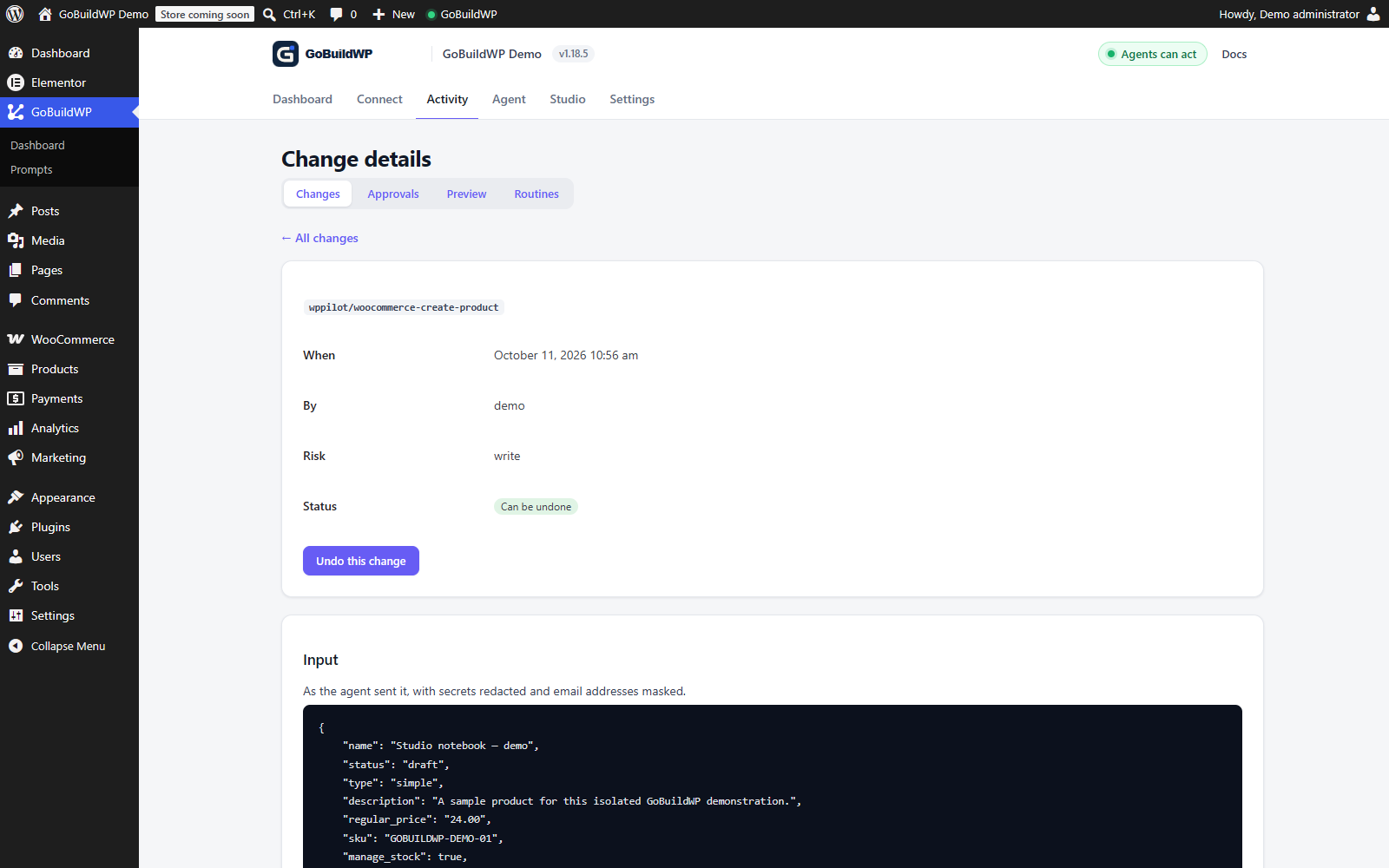
A real GoBuildWP ability created this WooCommerce draft product. The saved price of $24 and stock quantity of 12 were verified. WooCommerce 11.2.1; local test data and a test Pro entitlement. No checkout or payment was performed.
Actual product capture · local demoView the saved WooCommerce product ↗Task, side effect and recovery scope
The combined catalogue is 65 unique abilities: 13 Free, 50 additional Pro core operations and two Pro reports. Live availability depends on WooCommerce, licence state, capabilities and policy. Store settings reads do not imply arbitrary option writes; inspect the exact supported shipping, tax or gateway schema.
| Task | Edition and effects | Recovery boundary |
|---|---|---|
| One product’s basic fields | Free; price/stock changes affect the live catalogue | Supported changed-field before-image; review later sales and stock changes before restoration |
| Full product and variations | Pro; taxonomy and stock can be shared live state | Inspect the exact entry; stock-managed full-product edits can lack usable recovery |
| Order status | Pro; transition can run email, stock, refund and fulfilment hooks | Status-only restoration; hooks can run again and external effects remain |
| Refunds and customer/order edits | Pro; money, personal data and downstream integrations | No full object or external-event reversal; gateway refund is separately opt-in |
Source evidence: Free change-log.php status snapshot and restore-order-status; Pro commerce operations and product writer. A synthetic three-product dry-run, mixed result, readback and restore fixture remains unexecuted. Use disposable products/orders and approved sandbox destinations, then verify the storefront and downstream systems separately.
Money and customer data
Which WooCommerce calls stop for a confirmation, and why
Some store writes cannot be taken back by restoring a database row: a refund the payment provider has accepted, an order email the customer has already read, a low-stock mail WooCommerce has sent. Those calls carry an explicit confirmation. Every refund needs one, and sending it through the gateway is a separate opt-in. Moving an order to any status except pending needs one, because WooCommerce fires its own emails and stock changes, and so does editing an order that is completed, refunded or already partly refunded. By default the agent supplies that confirmation itself; set Confirmation mode to "A person approves" to have a person approve each of these calls.
Customer data is personal data, and WooCommerce's own MCP documentation warns about exposing it. Customer lists never return password or token fields, gateway settings refuse and never return anything that looks like a key or secret, and an access token can be limited to catalog abilities so a catalog agent cannot read an order at all.
What the ledger can undo in a store
- Prices and stock. The free product editor keeps a before-image of the name, description, prices and stock it changed and restores them through WooCommerce. Pro recovery depends on the exact writer and retained ledger before-image; stock-managed product edits are not universally recoverable.
- Orders and customers. General order/customer edits are recorded without full object recovery. Eligible order-status entries can have status-only recovery; current Pro marks refunded, cancelled and failed transitions irreversible. Restoring an eligible status can run hooks again and does not reverse notes, refunds, stock, emails, fulfilment or gateway events.
- Stock-managed product edits. Current Pro individual product and variation edits that omit manage_stock, stock_quantity and stock_status can restore other fields while keeping live stock. Supplying those fields on a stock-managed item prevents that restore, and separate bulk writers have their own limits. Inspect the exact entry and retained before-image.
- Tax and shipping. Tax rates and zone changes are logged as irreversible; shipping-method settings alone can be restored.
- Emails and payments. No rollback recalls a sent email or a refund the provider has accepted.
Other WooCommerce MCP servers
Native WooCommerce MCP, REST-key servers and GoBuildWP
WooCommerce now ships its own MCP integration in core, labelled a developer preview. Several open-source servers instead call the WooCommerce REST API with consumer keys, and one Marketplace extension sells scoped keys. They differ on scope, on how they authenticate, and on what is left to inspect or undo after a write.
| WooCommerce MCP (core) | techspawn server | wppoland server | W7S Marketplace extension | GoBuildWP Free and Pro | |
|---|---|---|---|---|---|
| Auth | Application Passwords, not REST keys, per the docs; the April 2026 blog post mentions a REST key. | WooCommerce REST consumer key and secret, plus a WordPress username and password for WordPress methods. | WooCommerce REST keys with Read permission. | Scoped API keys; read-only keys block writes; one-click revocation. | OAuth 2.1 with PKCE, an Application Password, or an expiring access token scoped to chosen abilities. |
| Scope | Products (query, create, update, delete) and orders (query, update status, add note): 7 abilities. | Products, variations, orders, notes, refunds, customers, coupons, shipping, taxes, gateways, reports, settings and system status. | Read-only, 5 tools. | Orders, products, customers, coupons, refunds, tax, shipping, payments, webhooks, reports and analytics. | 65 abilities. Free: 13 reads of catalog, orders, customers and settings, plus a basic product edit. Pro adds 52: catalog writes, refunds, coupons, reviews, shipping zones, tax rates, gateway settings and sales reports. |
| HPOS | Not documented. | Not documented. | Not documented. | Not documented. | The setup check reports whether HPOS is the order store; orders go through WooCommerce's order APIs. |
| PII controls | The docs warn that order and customer data can reach the AI provider and recommend a least-privilege user. | Not documented. | Not documented beyond read-only keys. | Optional action logging with PII masking; tool packs can be switched off. | Customer lists omit passwords and tokens; gateway secrets are refused and never returned; tokens can exclude order and customer abilities. |
| Refund confirmation | No refund ability in the documented set. | Refund methods listed; no confirmation documented. | No writes. | Not documented. | Explicit confirmation on every refund; the gateway refund is a separate opt-in. |
| Change log and undo | Not documented. | Not documented. | Not applicable: read-only. | Optional action log; undo not documented. | Supported product before-images and supported order-status changes have recovery paths. Whole orders, customers, refunds, tax and shipping records are not universally restorable; hooks and external effects remain outside status recovery. |
| Status | Developer preview; WooCommerce's blog recommends staging, not production. | Repository last pushed 10 November 2025. | Not stated. | Version 1.4.0, tested with WooCommerce 11.1.0. | Reads and the basic product edit in GoBuildWP Free; the rest released in Pro 1.12.4. |
| Price | Free, part of WooCommerce. | No price listed; a GitHub repository. | No price listed; a GitHub repository. | $39 for one year. | Reads and single-product edits free; Pro from $39 a year. |
Where the other route is stronger. WooCommerce's integration is free, first-party and built into core, so it will follow WooCommerce's data model as it changes; once it leaves preview it is the obvious first choice if products and order status are all you need. W7S documents PII masking in its action log and covers Subscriptions, Bookings and Memberships when they are active. techspawn's server reaches store settings and system status through the REST API.
Competitor cells come from the vendors' own pages, seen 29 September 2026; “not documented” means the source is silent, not that the feature is missing: WooCommerce MCP docs, WooCommerce MCP blog post, techspawn/woocommerce-mcp-server, wppoland/woocommerce-mcp, W7S MCP for WooCommerce.
Complete module
All 65 WooCommerce abilities, Free and Pro
The woocommerce module plus the two sales reports in woo-reports. 13 ship in the free plugin: the catalog, order and customer reads and a basic product editor. The other 52 load with a Pro licence.
Reads · 27
| Ability | What it does | Read / Write / Destructive | Edition |
|---|---|---|---|
woocommerce-check-setup | Check WooCommerce Setup | Read | Free |
woocommerce-get-coupon | Get Coupon | Read | Pro |
woocommerce-get-customer | Get Customer | Read | Free |
woocommerce-get-order | Get Order | Read | Free |
woocommerce-get-product | Get Product | Read | Free |
woocommerce-get-product-variation | Get Product Variation | Read | Free |
woocommerce-get-store-settings | Get WooCommerce Store Settings | Read | Free |
woocommerce-list-coupons | List Coupons | Read | Pro |
woocommerce-list-customers | List Customers | Read | Free |
woocommerce-list-orders | List Orders | Read | Free |
woocommerce-list-payment-gateways | List Payment Gateways | Read | Pro |
woocommerce-list-product-attribute-terms | List Product Attribute Terms | Read | Pro |
woocommerce-list-product-attributes | List Product Attributes | Read | Pro |
woocommerce-list-product-categories | List Product Categories | Read | Free |
woocommerce-list-product-shipping-classes | List Product Shipping Classes | Read | Pro |
woocommerce-list-product-statuses | List Product Statuses | Read | Pro |
woocommerce-list-product-tags | List Product Tags | Read | Free |
woocommerce-list-product-types | List Product Types | Read | Pro |
woocommerce-list-product-variations | List Product Variations | Read | Free |
woocommerce-list-products | List Products | Read | Free |
woocommerce-list-refunds | List Refunds | Read | Pro |
woocommerce-list-reviews | List Product Reviews | Read | Pro |
woocommerce-list-shipping-zones | List Shipping Zones | Read | Pro |
woocommerce-list-tax-rates | List Tax Rates | Read | Pro |
woocommerce-product-sales | WooCommerce Product Sales | Read | Pro |
woocommerce-sales-report | WooCommerce Sales Report | Read | Pro |
woocommerce-sales-summary | Sales Summary | Read | Pro |
Writes · 28
| Ability | What it does | Read / Write / Destructive | Edition |
|---|---|---|---|
woocommerce-add-order-note | Add Order Note | Write | Pro |
woocommerce-bulk-update-prices | Bulk Update Prices | Write | Pro |
woocommerce-bulk-update-stock | Bulk Update Stock | Write | Pro |
woocommerce-create-coupon | Create Coupon | Write | Pro |
woocommerce-create-customer | Create Customer | Write | Pro |
woocommerce-create-order | Create Order | Write | Pro |
woocommerce-create-product | Create Product | Write | Pro |
woocommerce-create-product-attribute | Create Product Attribute | Write | Pro |
woocommerce-create-product-attribute-term | Create Product Attribute Term | Write | Pro |
woocommerce-create-product-category | Create Product Category | Write | Pro |
woocommerce-create-product-shipping-class | Create Product Shipping Class | Write | Pro |
woocommerce-create-product-tag | Create Product Tag | Write | Pro |
woocommerce-create-product-variation | Create Product Variation | Write | Pro |
woocommerce-edit-product | Edit Product | Write | Free |
woocommerce-edit-product-attribute | Edit Product Attribute | Write | Pro |
woocommerce-edit-product-attribute-term | Edit Product Attribute Term | Write | Pro |
woocommerce-edit-product-category | Edit Product Category | Write | Pro |
woocommerce-edit-product-shipping-class | Edit Product Shipping Class | Write | Pro |
woocommerce-edit-product-tag | Edit Product Tag | Write | Pro |
woocommerce-edit-product-variation | Edit Product Variation | Write | Pro |
woocommerce-manage-shipping-zone | Manage Shipping Zone | Write | Pro |
woocommerce-manage-tax-rate | Manage Tax Rate | Write | Pro |
woocommerce-moderate-review | Moderate Product Review | Write | Pro |
woocommerce-update-coupon | Update Coupon | Write | Pro |
woocommerce-update-customer | Update Customer | Write | Pro |
woocommerce-update-gateway-settings | Update Payment Gateway Settings | Write | Pro |
woocommerce-update-order | Update Order | Write | Pro |
woocommerce-update-order-status | Update Order Status | Write | Pro |
Destructive effects; inspect confirmation policy · 10
| Ability | What it does | Read / Write / Destructive | Edition |
|---|---|---|---|
woocommerce-create-refund | Create Refund | Destructive | Pro |
woocommerce-delete-coupon | Delete Coupon | Destructive | Pro |
woocommerce-delete-product | Delete Product | Destructive | Pro |
woocommerce-delete-product-attribute | Delete Product Attribute | Destructive | Pro |
woocommerce-delete-product-attribute-term | Delete Product Attribute Term | Destructive | Pro |
woocommerce-delete-product-category | Delete Product Category | Destructive | Pro |
woocommerce-delete-product-shipping-class | Delete Product Shipping Class | Destructive | Pro |
woocommerce-delete-product-tag | Delete Product Tag | Destructive | Pro |
woocommerce-delete-product-variation | Delete Product Variation | Destructive | Pro |
woocommerce-delete-review | Delete Product Review | Destructive | Pro |
Names drop the wppilot/ prefix. The 13 marked Free ship in the free plugin; the other 52 need a GoBuildWP Pro licence. Supported writes are recorded in the change ledger with a redacted before and after, and reversible ones can be rolled back.
Worked example
Raise one category's prices by 5%, then take one back
The calls an agent makes on a staging copy for "put Outerwear up 5%, rounded to .99". Nothing is written until the dry run has been read and the call confirmed, and each product lands in the ledger on its own. A category of more than a hundred items is paged with a cursor and run the same way.
Representative sequence written from the ability reference, not a recorded run. Category ids, prices and change ids come from your store.
wppilot/woocommerce-check-setupConfirms WooCommerce 9.0 or newer, the store currency and whether HPOS is the order store before a write is planned.
wppilot/woocommerce-list-product-categoriesFinds the Outerwear category and its id.
wppilot/woocommerce-bulk-update-pricesRuns with dry_run: true. Every product and variation in the category comes back with its price before and after, and nothing is written.
wppilot/woocommerce-bulk-update-pricesRuns again with the same input and confirm: true. Each item reports updated, unchanged or failed, and the result lists one change id per product.
wppilot/list-changesShows those entries in the ledger, credited to the agent's credential; the bulk call's own entry points at them.
wppilot/rollback-changeUndoes the one product that should not have moved, after confirmation, and checks the restored price against its before-image. The rest keep the new price.
Checks before writes
Ten WooCommerce abilities behind most store sessions
Each one applies WooCommerce's own rules before it writes: variation attributes, order ownership, stock that lives on variations, secrets that never leave the gateway settings.
- Reads
- 27
- Writes
- 28
- Destructive effects
- 10
woocommerce-check-setupFreeReports the WooCommerce version against the 9.0 minimum, whether HPOS is the order store, Block Checkout, and detected extensions.
woocommerce-create-productProCreates simple and variable products; for variable products, stock fields are rejected because stock lives on variations.
woocommerce-create-product-variationProRequires every variation-enabled attribute to map to an option the parent actually offers.
woocommerce-list-customersFreeBounded customer lists without password or token data.
woocommerce-bulk-update-pricesProSets, raises or lowers prices on up to a hundred products or variations, with a dry run of every before and after and one ledger entry per product.
woocommerce-update-orderProEdits addresses, line items, coupons and fees through WooCommerce's order CRUD, never payment, and refuses a line item that belongs to another order.
woocommerce-update-gateway-settingsProEnables, disables or retitles a payment gateway; keys and secrets are never written or returned.
woocommerce-create-refundProA confirmed refund; sending it through the payment gateway is a separate opt-in.
woocommerce-sales-reportProSales for calendar dates in the store's timezone, overall and per day, week or month, with refunds counted on their refund date. Every result names whether it came from stored orders or WooCommerce Analytics.
woocommerce-product-salesProBest sellers by net sales or units for a date range, refunded units netted out and variations counted under their parent.
Store work
Store jobs to delegate, from catalog to reports
Create products in dependency order
Inspect attributes and terms, create the parent, add only valid variations, then read the saved product back.
Example prompt: Create the linen shirt as a variable product in S, M and L from this spec sheet. Draft only.
Audit the catalog without touching it
Find products missing images, prices or categories in Read Only, before anyone writes.
Example prompt: List published products with no featured image or no category, grouped by product type.
Answer store questions from real data
Report sales for a period from the orders themselves rather than exporting spreadsheets, in the store's own timezone and with refunds on the day they were issued.
Example prompt: How did September go, week by week, and which ten products sold most?
Run order admin with a trail
Update an order status with a private note, recorded in the change ledger. Completed sends the customer an email, so the call needs explicit confirmation.
Example prompt: Mark order 5530 as completed and add a private note that it shipped by courier.
Prepare a sale in one reviewed batch
Dry-run a percentage change across a category, read the before and after table, then apply it with confirmation.
Example prompt: Take 15% off every product in Outerwear, rounded to .99. Show me the dry run first.
Before a live store
Store requirements, payment caveats and first steps
Requirements
- WordPress
- 6.9 or newer, PHP 8.0 or newer.
- WooCommerce
- 9.0 or newer. HPOS state is reported by the setup check.
- Payments
- Test refunds and gateways in sandbox mode; a WordPress response is not provider confirmation. Gateway credentials stay in WooCommerce and are entered by the merchant.
- GoBuildWP
- The free plugin for 13 read and basic editing abilities; a Pro licence for the other 52.
- Current versions
- GoBuildWP Free 1.18.6 and Pro 1.12.4.
Limits
- A refund can move money and trigger emails. Keep it behind confirmation and human approval, and verify the payment provider separately.
- Separate catalog work from order and customer operations. Start read-only and request the minimum fields.
- Grouped and external product types are not created by this module yet; simple and variable are.
- A database rollback cannot recall an email or reverse an action a provider already accepted.
- General order/customer objects, tax rates and shipping zones lack full ledger recovery. Pro individual edits that leave stock fields out can preserve live stock during supported undo; stock writes and bulk writers have different limits. Eligible order-status entries restore only status, while refunded, cancelled and failed transitions are marked irreversible in current Pro. Status recovery does not recall mail or reverse stock, notes, refunds, fulfilment or gateway effects.
First run
Install GoBuildWP Free
WordPress 6.9+ and PHP 8.0+; the site becomes its own MCP endpoint.
Connect a client
OAuth 2.1 in the browser, or an Application Password where the client cannot sign in.
Start on a staging copy
Connect a Read Only credential and ask for the setup check and a catalog audit. Both run on the free plugin.
Add Pro, then dry-run
With a Pro licence active, run any price or stock change as a dry run and read the before-and-after table.
Setup guide · OAuth 2.1 · Application Passwords · Client guides
Product descriptions, written from the product's own data
Writing a WooCommerce product description with an AI client
GoBuildWP does not write product copy itself. Your AI client drafts the text, and the WooCommerce abilities supply the facts and store the result. Start with woocommerce-get-product: it returns the product's current name and description, its attributes and their options, categories, tags, images with their alt text and the rendered price, all in the free plugin. Ask the client to draft from the returned product facts and supplied sources. Review every size, material, variant and other claim before saving; a read does not prevent the model from inventing care instructions, certifications or health claims.
Ask for the draft in the chat first and read it before anything is saved. Then woocommerce-edit-product sends only the description field, so the price, stock and everything else stay as they were. The description accepts the same HTML the product editor does. On a published product the new text is live as soon as the call returns, so review the draft before the write, not after. WordPress strips single backslashes from a description when it saves, so a literal backslash needs to be doubled.
GoBuildWP Free covers this whole loop: its basic product editor changes name and description, keeps a before-image of only the fields it changed, and rollback-change writes them back through WooCommerce after you confirm. GoBuildWP Pro's fuller editor also writes the short description (the excerpt shown beside the add-to-cart button on most themes) and can keep a product in draft while copy is reviewed. On a product that manages its stock, a Pro description edit is undone with today's stock level kept, as long as the call did not also send a stock field.
Rewriting descriptions for a whole category
There is no bulk description ability. woocommerce-list-products filters by category, tag, status or stock and pages through up to 200 products per call, and each rewrite is its own woocommerce-edit-product call with its own change-log entry. That is slower than one bulk write, and it is deliberate: a rewrite that reads badly on four products can be rolled back on those four without touching the rest. For a large catalogue, agree a sample of five or six products first, check them on the storefront, and only then let the agent work through the category in batches you review.
Keep descriptions and search snippets apart. The product description is page content; the title and meta description search engines may show come from your SEO plugin, and the WordPress AI SEO automation page covers those writes. Neither one guarantees how a product ranks or what a search engine displays.
- "Read product 812 and draft a 120-word description from its attributes only. Do not save anything yet."
- "Save the approved description to product 812, change nothing else, and give me the change id."
- "List the published products in the Linen category, read each one, and tell me which descriptions are under 40 words. Read only."
FAQ
WooCommerce MCP server questions
Builder MCP guides: Elementor, Bricks, Breakdance, Divi, Oxygen, Beaver Builder, WPBakery, Flatsome, Etch, Mosaic.
What is a WooCommerce MCP server?
A server that exposes typed store operations, such as listing orders or editing a product, for an AI client like Claude or ChatGPT to discover and call. GoBuildWP's runs inside your WordPress install: the free plugin is the server. With WooCommerce 9.0 or newer active it registers the store reads and a basic product editor itself, and the rest of the WooCommerce module loads with a valid Pro licence.
Is my store data secure?
It stays on your server until your AI client asks for it; whatever the client reads is then processed by that AI provider, so review its data handling first. Customer lists omit passwords and tokens, supported gateway readers mask recognized secret fields. Pro can write permitted gateway settings with secret-field restrictions; inspect the installed schema and redacted output before sharing it, and an access token can be limited to catalog abilities so a catalog agent never sees an order. Start on a Read Only profile.
Can it write prices and order statuses?
Yes. The free plugin changes one product's regular and sale price and stock. With Pro, prices change on up to a hundred products per call after a dry run. An order status changes with an optional private note; every status except pending fires WooCommerce's own side effects, such as customer emails, restocking or a full refund record, so those calls need confirmation.
Does it handle large catalogues?
Product lists are paginated and compact by default, and bulk price and stock calls take up to a hundred items each, selected by id, SKU, category or tag, with a cursor for the rest. The sales report reads up to 5,000 stored orders per call and uses WooCommerce Analytics beyond that, naming which source it used.
Does WooCommerce have native MCP?
Yes. WooCommerce documents an MCP integration built on the Abilities API and the MCP Adapter, labelled developer preview. On 29 September 2026 its documented abilities covered products and orders. GoBuildWP is a separate plugin; compare the two on a staging copy of your store.
Which AI tools work with it?
Any MCP client that can reach the site. Claude Desktop, Claude Code, ChatGPT, Cursor, Codex and VS Code are among the 27 clients GoBuildWP's Connect screen generates a configuration for; ChatGPT signs in with OAuth and needs the store on public HTTPS.
Can an AI agent issue refunds automatically?
Refunds are marked destructive and need an explicit confirmation on every call, and refunding through the gateway is a separate opt-in. By default the agent can supply that confirmation itself, so for human approval set Confirmation mode to "A person approves" or hold refunds in Pro's approval queue, and verify the payment provider separately.
Can it report sales for a period?
Yes, read-only. The sales report takes calendar dates in the store's timezone and returns orders, items sold, gross and net sales, discounts and refunds, overall and per day, week or month, optionally narrowed to products or categories; a second report ranks best sellers. They are not accounting, tax or payout reports.
Run your first WooCommerce dry run on staging.
Install the free plugin to audit the catalog and edit single products, add Pro, and ask for a price change as a dry run. Nothing is written until you have read the table and confirmed.