ChatGPT WordPress MCP
Connect ChatGPT to WordPress. OAuth only, read-only first.
To connect ChatGPT to WordPress over MCP, you add a custom MCP plugin that talks to GoBuildWP's endpoint on your own site. You sign in with OAuth, so ChatGPT never holds a WordPress password, and the site decides what every call may do.
Checked against OpenAI's guidance on 8 October 2026, GoBuildWP Free 1.18.6
Name            Your site name
MCP server URL  https://your-site.com/wp-json/mcp/wppilot-oauth
Authentication OAuth- Surface
- ChatGPT on the web
- Reaches your site from
- OpenAI's cloud, over public HTTPS
Use the complete URL your Connect screen generates; your-site.com is a placeholder.
Easiest: GoBuildWP Cloud
One link for every site you run
GoBuildWP Cloud is an optional hosted account at app.gobuildwp.com. Each site connects to it once from wp-admin, and ChatGPT connects to it once, so every site you allow shows up in the same conversation. Calls still end on each site, under that site's safety profile.
Create a GoBuildWP Cloud account
Sign up at app.gobuildwp.com. Cloud is free for up to 3 sites and included with every GoBuildWP Pro licence.
Connect your sites from wp-admin
On each site, with GoBuildWP Free 1.17 or newer, open GoBuildWP, then Connect, then GoBuildWP Cloud. Sign in and choose Read Only or Production Safe for that site.
Add the Cloud link to ChatGPT once
Open ChatGPT Plugins, select the plus button, then Add custom MCP server. Paste the Cloud MCP link, select OAuth, create and install the plugin, and sign in to Cloud. Pick the sites ChatGPT may reach, then select the plugin with @ in a new chat.
Name            GoBuildWP Cloud
MCP server URL  https://app.gobuildwp.com/mcp
Authentication  OAuth
Directory listing planned. A Cloud sites panel, site selection and approval forms are planned for GoBuildWP for ChatGPT. No availability date is confirmed. The custom MCP setup below is the current documented route; verify any future listing and its supported features before using it.
Self-hosted path
Connect one site directly, with no account
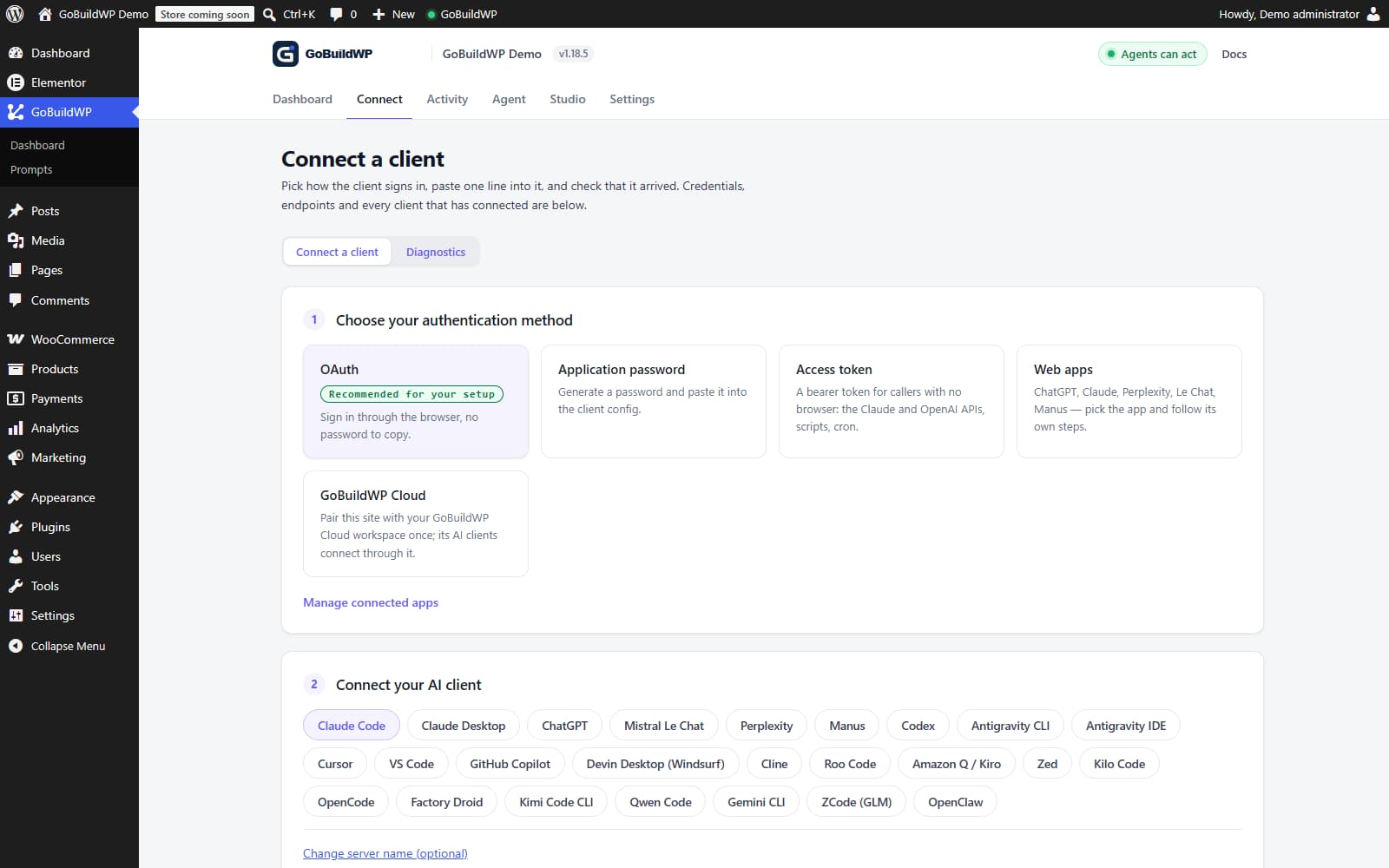
Without Cloud, ChatGPT calls your site's own GoBuildWP MCP endpoint from OpenAI's infrastructure, with no relay, and WordPress decides what the signed-in user and the active safety profile allow. Create one custom MCP plugin per site.
- Self-hosted WordPress 6.9+ on PHP 8.0+, with GoBuildWP Free active
- A public HTTPS WordPress endpoint for this direct setup guide
- ChatGPT on the web, on an account that permits custom MCP plugins
- A dedicated authorised user: manage_options on single-site or superadmin on multisite; restrict the connection to Read Only first
- GoBuildWP on Read Only for the first connection
Setup
The direct path: ChatGPT WordPress MCP in six steps
Add a custom MCP server from ChatGPT Plugins, configure OAuth and install the resulting plugin. In a new chat, type @ and select it. This direct route uses public HTTPS. OpenAI also documents Secure MCP Tunnel for private endpoints; that separate setup has not been tested with GoBuildWP here. Account, workspace and site permissions still apply.
Prepare the WordPress identity
Create a dedicated WordPress user for this connection instead of reusing your own administrator. Keep GoBuildWP on Read Only and confirm the site answers on a trusted public HTTPS certificate.
Generate the ChatGPT route in GoBuildWP
Open GoBuildWP, then Connect, choose ChatGPT and select OAuth 2.1. Copy the complete MCP server URL your site generates, not an example-domain URL from an article.
Open custom MCP setup in ChatGPT
On ChatGPT web, open Plugins, select the plus button, then Add custom MCP server. If that option is unavailable, check your account's controls and your workspace administrator's policy for custom plugins.
Create and install the custom plugin
Give the connection a recognizable site name, paste the complete GoBuildWP MCP URL and select OAuth. Review the trust warning, select I understand and want to continue, then Create as a plugin. Install the resulting plugin and complete the WordPress authorization.
Authorize in WordPress
ChatGPT opens the WordPress sign-in. Sign in as the dedicated user and approve the connection. It inherits that user's capabilities and stays subject to GoBuildWP policy on every call.
Select the plugin in a chat and test read-only
Start a new chat, type @ and select the installed GoBuildWP plugin, then paste the first task. Creating the connection alone does not select it for your conversation.
First task: prove one read
Use the gobuildwp-your-site-com MCP server in ChatGPT. Do not change anything.

1. Report the active GoBuildWP safety profile.
2. List the abilities this connection can see.
3. Call wppilot/get-site-settings and report the site URL and locale.
4. Call wppilot/list-content for the five newest pages,
   then wppilot/get-content on one of them.
5. Name every ability you called and each WordPress ID you read.
A good answer names the safety profile, the abilities it called and WordPress IDs you can check in wp-admin, and states that it changed nothing. Test a reversible draft on staging before any publish.
Troubleshooting
Common ChatGPT connection errors
Keep reachability, sign-in, discovery and permissions separate. Do not fix an endpoint problem by widening WordPress authority.
| Symptom | What to check |
|---|---|
| The app cannot reach the server | For this direct URL setup, use a reachable public HTTPS domain. A localhost or private-network URL cannot be reached directly from ChatGPT. OpenAI documents Secure MCP Tunnel separately; that route has not been tested with GoBuildWP here. |
| Custom MCP setup is missing | Use ChatGPT on the web and check the Plugins page. On a managed workspace, ask an administrator whether custom MCP plugins are allowed. |
| Authorization loops back to sign-in | Regenerate the route on the current Connect screen, make sure the site answers on one canonical HTTPS URL, and read the exact OAuth error. On staging, temporarily disable conflicting redirect or security rules. |
| The plugin exists but ChatGPT ignores it | Confirm the plugin is installed. Open a new chat, type @ and select it before sending the task. |
| A tool is missing | Check the safety profile, ability switches, user capabilities, plugin dependencies and Pro licence. Refresh the connection in ChatGPT Plugins, then select it in a new chat. |
After the first read
A first staging session in ChatGPT, step by step
Once ChatGPT has returned one page you can find in wp-admin, the next useful conversation is still mostly reading. Ask it to run wppilot/audit-content on the staging site and summarise missing meta descriptions and broken internal links, then pick one finding and read that page with wppilot/get-content. Nothing changes during this pass, and it tells you whether ChatGPT reads the tool output carefully or paraphrases it loosely, which matters before you let it write.
Only then switch the staging site to Production Safe and ask for one reversible edit: a new draft with wppilot/create-post, or a corrected excerpt on an existing draft with wppilot/update-post. Ask ChatGPT to quote the post ID and the edit URL it got back, open that URL yourself, and look the change up with wppilot/list-changes. If anything looks wrong, inspect the entry's recovery support before requesting wppilot/rollback-change, then check the affected page again.
This guide stops at a working connection and one reviewed draft. Building a whole site from ChatGPT is a longer job with its own planning, editions and review stages; the AI website build briefs cover it brief by brief, and each one runs through this same connection.
- Read: "Run wppilot/audit-content on published pages and list missing descriptions or broken internal links, with page IDs and the specific finding."
- Draft: "Create a draft post titled Test from ChatGPT with one paragraph. Do not publish it. Return the ID and edit link."
- Check: "Call wppilot/list-changes and show me the entry for that draft, including whether it can be rolled back."
Removing ChatGPT's access cleanly
Deleting the app in ChatGPT stops ChatGPT offering it, but the authorization it was given lives on your site. Revoke it on the WordPress side as well, from Connected Apps, so the site no longer honours its tokens regardless of what ChatGPT kept. An access token from that sign-in lasts an hour and its refresh token fourteen days, so a forgotten authorization does not live forever, but revoking is immediate and leaves a clear record.
If the connection went through GoBuildWP Cloud instead, revoke ChatGPT in your Cloud account, or narrow the sites it may reach there. The sites themselves stay connected to Cloud for your other apps, and you can disconnect any one of them from either side.
FAQ
ChatGPT and WordPress questions
The setup path is source-reviewed. A working build does not prove an account gate, host firewall or OAuth redirect will pass on your site.
Can ChatGPT connect to a self-hosted WordPress site?
On ChatGPT web, open Plugins, select the plus button, then Add custom MCP server. If that option is unavailable, check your account's controls and your workspace administrator's policy for custom plugins. The WordPress site must be reachable over public HTTPS.
Can ChatGPT publish or edit WordPress through this connection?
A custom MCP plugin can expose read and write tools. GoBuildWP enforces the connected user's WordPress capabilities, safety profile, enabled abilities and confirmation requirements. Account and workspace controls also apply. Begin with one read, then test a reversible draft on staging before publishing.
Can ChatGPT connect to a localhost WordPress site?
Not through a direct localhost URL. This guide uses a reachable public HTTPS endpoint. OpenAI also documents Secure MCP Tunnel for private endpoints, but that separate route has not been tested with GoBuildWP here.
Do I paste an Application Password into ChatGPT?
No. GoBuildWP's ChatGPT route is OAuth only, because the custom-app form has no static Authorization-header field. Keep passwords and tokens out of prompts and screenshots.
Does ChatGPT get administrator access?
Connection management requires manage_options on a single site or superadmin on multisite; an ordinary Editor is insufficient. Use a dedicated authorized identity and scope its credential and profile. Each call additionally checks user capabilities, enabled abilities, rate limits and required confirmation.
Is there a ChatGPT WordPress plugin, and how is this different?
Many WordPress plugins call OpenAI's API from wp-admin to generate text. Over MCP, ChatGPT calls your site through GoBuildWP under the connected user's WordPress permissions and site policy. A GoBuildWP directory listing with a Cloud sites panel and approval forms is planned; no availability date is confirmed. The current documented route adds the Cloud link or a site's link as a custom MCP plugin.
Should I connect through GoBuildWP Cloud or directly?
Use Cloud when ChatGPT should reach more than one site, or when you would rather add one link than one app per site. Connect directly when you want nothing between ChatGPT and the site and no account. Either way the site's safety profile, confirmations and change ledger decide what runs.
Is GoBuildWP an OpenAI-maintained connector?
No. GoBuildWP is a self-hosted WordPress plugin, and the custom app points ChatGPT at your own site's MCP endpoint. OpenAI has not reviewed that private endpoint, so the custom-app trust warning is expected.
Sources
What this guide is based on
- OpenAI custom MCP plugin setup: create the connection, configure authentication, install it and select it in a chat.
- OpenAI MCP and connectors guidance: remote-server reachability, approvals and third-party MCP risk.
- GoBuildWP's shipped ChatGPT connection steps: the menu path, OAuth route and per-chat enablement.
- WordPress MCP Adapter introduction: the Abilities-to-MCP architecture the plugin builds on.
GoBuildWP is not affiliated with or endorsed by OpenAI. ChatGPT is a trademark of OpenAI. WordPress is a registered trademark of the WordPress Foundation.
Start with one read-only ChatGPT conversation.
Install GoBuildWP Free on a public HTTPS staging site, connect a dedicated WordPress user, and verify one real page read before you consider writes.