WordPress MCP undo and rollback
WordPress MCP undo for what an AI agent changed, with each restore checked.
An agent that writes to a live site needs a way back that does not depend on the agent. GoBuildWP keeps a before-image of each write it can reverse, lets a person undo one change, a batch or a whole agent session from wp-admin, and checks the result against that image before calling the undo a success.
Undo the heading changes you made this afternoon.
wppilot/list-changesRead12 changes by agent "site-editor" since 14:00, 11 undoable. Batch 3f2a: alt text on 9 images.wppilot/rollback-changeVerifiedChange #418 restored. Post 212 matches its before-image.wppilot/rollback-changeDid not matchChange #417: the restore ran but did not match its before-image. Still differs: post_excerpt.
Review in wp-admin
Find the session. Inspect the change.
Filter by agent, ability or date to find the relevant record. Review what happened and whether recovery is available before choosing an undo action. The limits below explain which changes can be restored.
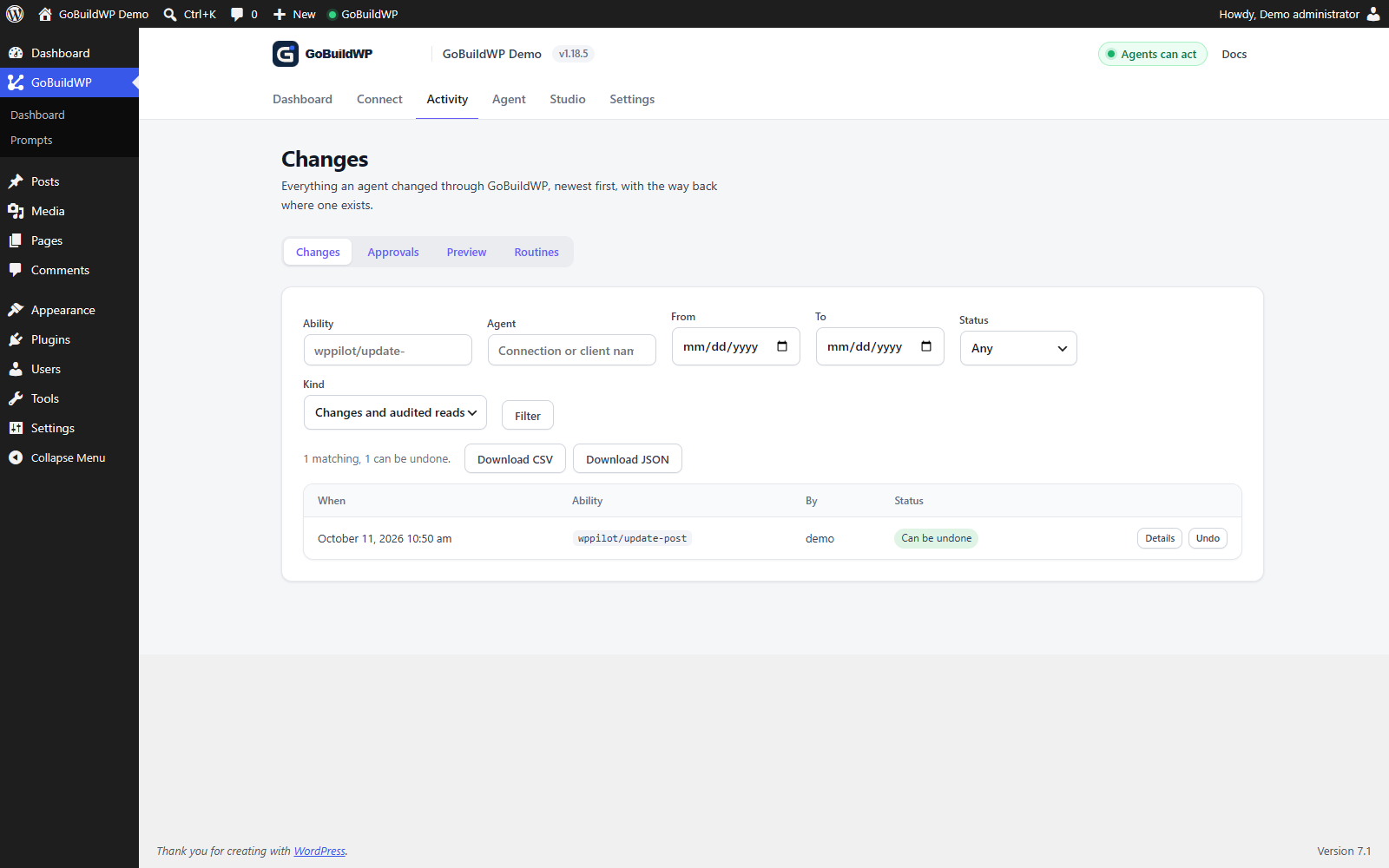
How one change is undone
Every supported write lands in the change record with the ability that ran, the WordPress user, the agent credential behind it, its redacted input and, where the object can be restored, a before-image of exactly the fields it touched.
Undo is wppilot/rollback-change. Native state restores write the retained before-image back and compare the covered fields after reading them again; meta comparison ignores key order. Registered restore strategies verify their own declared recovery state. Only a verified result marks the entry rolled back. A mismatch returns a failed undo with available differing fields; public rendering and external effects need separate checks.
The same call is destructive in its own right, so it needs explicit confirmation, and on a site set to “A person approves” the model's own confirm is not enough.
- Undo ability
wppilot/rollback-change- Where a person undoes
- GoBuildWP, then Changes, in wp-admin
- Largest screen undo
- 200 changes, newest first
- Whole session
wppilot/undo-session- History default
- Table storage: 10,000 changes or 90 days
From the GoBuildWP Free 1.18.6 change log and ability reference.
Batches and sessions
Undo a batch, or everything one agent session did
Most agent mistakes are not one bad write. They are forty writes that followed one bad instruction, and undoing them one by one is where people give up.
- Filter the Changes screen by ability, agent, date range, status and kind
- Undo one change, one bulk batch, or every undoable change the filter shows
- Bulk writes record one entry per item under a shared batch
- A search and replace run is one batch with one entry per post
- In Pro, applied content fixes share one group with one entry per fixed item
- Undo or redo a whole agent session, conflicts checked first
- A report lists any change that did not come back
Bulk abilities such as wppilot/update-image-alt and wppilot/search-replace-apply write one undoable entry per item and group them, so the whole run can be undone at once, or one image or post can be put back while the rest stay.
A session is filed on the server, not taken from the client: one MCP connection, one wp wppilot mcp serve process, or one credential and client until 30 idle minutes pass. Inspect wppilot/list-sessions with the session_id first: the plan lists conflicts, unchecked targets, not_reversible and not_redoable entries. Missing after-state or an unreadable target can leave a check unperformed. Detected conflicts refuse the run. Undo proceeds newest first and stops on a failed restore; unsupported entries refuse it unless allow_partial is true. Redo requires retained redo data and performs its own checks.
CSV and JSON exports through wppilot/export-changes exclude rollback snapshots. Authenticated change-detail and diff reads can return redacted retained evidence to the connected client and its provider. Output masking is best effort; review content and retention rather than assuming all before-image information stays on the site.
Before the write
Preview first, so there is less to undo
An undo is the second line. The first is seeing the change before it runs.
A diff, not a promise
wppilot/preview-abilityprojects supported post, media, settings and delete writes without changing the target. It needs a supported projector and readable before-state; excluded or recomputed values and plugin side effects can remain outside the diff. Review its warnings and the stored proposal in wp-admin before applying it.Applied only if the reviewed fields did not move
wppilot/apply-previewrefuses when a projected field or read value changed after the preview; unrelated target changes do not block it. Mandatory preview defaults off and covers only supported projectors. Built-in Chat is exempt and uses its own approval path; all other applicable server gates still apply.Reviewed where you chat
In clients that render MCP Apps, the preview arrives as a card with the diff and an Apply button. Other clients show the same preview as text.
MCP Apps cards
Honest limits
What cannot be undone, and why
A write that cannot be undone is recorded as such, with the reason, instead of being quietly left out. In Pro every write declares whether it can be undone, and a build check refuses a new ability that does not.
| Kind of change | Why the ledger cannot reverse it |
|---|---|
| Email, payments and webhooks | Once a customer email is delivered, a gateway has taken a refund or a webhook has fired, putting the database row back does not recall it. The change record still shows what ran. |
| Deletes WordPress has no trash for | wppilot/delete-term, wppilot/delete-menu and wppilot/delete-comment remove the row for good, which is why each asks for explicit confirmation. Trashing a post or comment instead stays reversible. |
| Plugin and theme code | wppilot/update-plugin and wppilot/install-plugin replace or add files and do not keep the previous version, so they are recorded as not reversible through the ledger. Pro's wppilot/safe-update retains supported previous files, probes selected pages and attempts file recovery when those probes fail. Restore can fail and does not reverse database migrations or external effects; retained update files have a 7-day recovery window. It does not update WordPress core. |
| Plugins that store data in their own tables | Where a plugin keeps its data outside WordPress's posts, meta and options, a before-image is not always possible. Pro names these per ability: All in One SEO rows written in bulk, WooCommerce orders and customers, Tutor LMS quiz questions and WS Form edits are examples. WS Form's only restore would recreate a form's fields under new ids, so its edits are recorded but not undoable. |
| Very large or very old changes | Native snapshots are capped at 512 KB per target; a bulk call has a 1 MB before-image budget. Oversize or later items can lack complete recovery data. Table-storage retention defaults to 10,000 records or 90 days, with larger snapshots pruned after 30 days; retention is filterable and fallback storage has smaller limits. Inspect the actual entry. |
Other plugins' abilities are recorded as not reversible unless a ledger map says how to restore them; Rank Math and SEOPress settings were the first to get one. The day-to-day steps are in the change ledger guide.
Other servers
How other WordPress MCP servers handle undo
Undo is not unique to GoBuildWP. Flex MCP and wpmcp roll back whole sessions too, and Cowboy MCP's whole-database checkpoints do something GoBuildWP does not. Each row is what the vendor's own page said on 29 September 2026.
| Server | One change | Batch or session | Checks the result | Source |
|---|---|---|---|---|
| GoBuildWP | Before-image per supported write; undo from wp-admin or over MCP | One batch, up to 200 changes a filter shows, or supported reversible session entries with retained before-images and redo, refused with the conflict named if something else changed a target since | Restored state compared with the before-image; differing fields named | Ledger guide |
| Flex MCP | One-click undo of a logged change, and redo to re-apply one | Session rollback: a whole AI conversation's changes, in order | Flex 3.6.0 documents rendered-HTML verification and expected_hash checks; matched runtime test unperformed | Flex MCP on wordpress.org |
| Respira | Snapshot before page and element writes, restorable for 90 days | Snapshot sessions, so a group of changes rolls back together | Writes are read back and render-verified after they run | Respira plugin page |
| Royal MCP Pro | Undo tokens on destructive writes, kept up to 168 hours (Pro) | Not documented | Not documented | Royal MCP Pro page |
| EMCP | rollback-change per operation; entries can be reversible, informational or unavailable | EMCP 3.18.1 documents session undo newest first, stopping at the first change it cannot undo | Operation-specific recovery; missing recovery data cannot be bypassed by force | EMCP transactions docs |
| wpmcp | Snapshot before every write; a rollback-operation tool and a Restore button in wp-admin | A rollback-session tool | Verifies each write and rolls it back by itself when verification fails, for example block markup that does not parse | wpmcp README on GitHub |
| Cowboy MCP | Per-change undo journal with before-state snapshots, kept seven days by default | Batch undo of plugin and theme changes; database checkpoints roll back every site table | Conflict detection before an undo | Cowboy MCP on wordpress.org |
Two rows need context. wpmcp's README calls it an early MVP; it needs WordPress 6.9 and PHP 8.1, signs in with Application Passwords and is not on wordpress.org. Cowboy MCP is free with no paid tier, needs public HTTPS for its OAuth sign-in, and prunes its audit log after 30 days, so its undo history and its audit history end at different times.
“Not documented” means the page did not say, not that the product cannot. We have read these pages, not run a restore on each server. Test undo on staging with the exact write you plan to run, whichever server you choose. For the wider picture, see WordPress MCP servers compared.
FAQ
WordPress MCP undo questions
Setting up the connection first? Start with what a WordPress MCP server is, then the security checklist.
Can I undo what an AI agent changed in WordPress?
Yes, for supported reversible entries with retained recovery data. Open GoBuildWP, then Changes, in wp-admin, filter to the agent and time, and inspect recovery status before undoing one change or a supported batch. The agent can call wppilot/rollback-change with explicit confirmation. Recovery support for one operation does not establish it for another.
What does a verified restore mean?
The operation's restore strategy must report verified before the entry is marked rolled back. Native state restores read back the fields covered by the retained snapshot. A safe-update restore checks the retained version and active state; it does not reverse database migrations or certify every file, page or external effect. A failed comparison reports failure and any differing fields the strategy supplies. Check the native editor or public page separately.
Is GoBuildWP the only WordPress MCP server with undo?
No. Flex MCP undoes single changes and whole AI conversations and has redo; Respira snapshots page and element writes for 90 days; Royal MCP Pro returns undo tokens on destructive writes; EMCP has a rollback-change tool; wpmcp snapshots before every write and can roll back a session; Cowboy MCP keeps a seven-day undo journal plus database checkpoints. What GoBuildWP documents is a comparison of the restored object with its before-image after the undo runs, a conflict check before a session is undone, and a stated reason for every write it cannot undo.
Can I undo a whole AI session at once?
Yes, for supported recorded changes with retained recovery data. A session is one MCP connection, one wp wppilot mcp serve process, or one credential and client until 30 idle minutes pass. Inspect wppilot/list-sessions with session_id first: it reports conflicts, unchecked targets and entries that cannot be undone or redone. Detected conflicts refuse the run; unsupported entries require allow_partial to proceed. Undo runs newest first and stops at the first failed restore. Redo needs its own retained image and checks. The Changes screen also exposes session controls.
What if someone edited the page after the agent did?
A detected session conflict refuses the run before any change. The checks compare retained after-state with the current target and the session's change chain. They cannot establish that no edit occurred when the necessary state is missing or unreadable; list-sessions reports those entries as unchecked. Inspect the plan, conflicts and current state first. A single rollback-change does not perform the session-wide conflict preflight.
Is rollback a backup?
No. It restores the fields GoBuildWP recorded for its own writes. It knows nothing about edits made outside the agent, and a manual edit between the write and the undo can leave a state nobody predicted. Keep a real backup before large batches.
Does undo need GoBuildWP Pro?
No. The change record, the Changes screen, wppilot/rollback-change and session undo and redo are in GoBuildWP Free 1.18.6, including undo for the free Elementor edits, one post's SEO title, description and robots in seven SEO plugins, and the basic WooCommerce product editor. Pro 1.12.4 extends undo to builder documents, WPForms, Contact Form 7 and Forminator forms, the rest of each SEO plugin's post fields, custom-field values, full product edits, FunnelKit funnel steps, content fixes and safe plugin updates, and its writes that go through the change log are undone with a session too.
Test undo for the exact workflow.
On staging, inspect the before-image and recovery support for one selected change, execute an approved bounded edit, then verify restored storage and the native editor or public page. One successful restore does not establish coverage for another operation.